 Lexpad
Import from Anki or QuizletMove your Anki or Quizlet words
into a vocabulary notebook
Import an Anki deck (.apkg) as it is, an Excel workbook (.xlsx) or a CSV or TSV file, or paste a Quizlet set’s export text, from Settings, Import & export in Lexpad. You see the first cards before a list is added, and Undo takes an import back. Words and meanings come across in a minute; review history, pictures and sounds do not.
By Reza Pirighadim, who makes Lexpad. Checked against the app on 21 October 2026.
- Reads
- Anki
.apkg, Excel.xlsx, CSV, TSV, TXT, pasted text - Before adding
- Check the first cards; Undo after
- Not carried
- Review history, pictures, sounds
- Plan
- Free on every plan
What Lexpad can read
- An Anki deck (
.apkgor.colpkg), including the ones current Anki (2.1.50 and later) makes with its default settings. Lexpad picks the word, meaning, example and pronunciation by the names of the note’s fields, and never takes a sound or picture field as a meaning. A cloze note becomes the word in its first gap, with the whole sentence as the example and the Back Extra field, when it has text, as the meaning. A note with a word but only a picture or a sound on the back keeps the word, without a meaning, for Fill with AI. The deck is read on Lexpad’s server, so it needs a connection. - When a deck’s front side is in the language of your meanings, such as a German speaker’s Chinese deck with hundert on the front and 百 on the back, Lexpad turns the cards round to match your notebook. It can tell when the two languages use different writing systems.
- An Excel workbook (
.xlsx, as Excel, Google Sheets and Numbers save one), read on your device. Every visible sheet is read; when more than one sheet holds words, each word gets its sheet’s name as its topic. An older.xlsfile or a LibreOffice.odsfile is not read: Lexpad asks you to save it as.xlsxor as a CSV file. - A text file (
.csv,.tsvor.txt) with the word in the first column and its meaning in the second, separated by tabs, commas, semicolons or a vertical bar. A third column becomes the example. A list with one word a line works too; those words arrive without meanings. - A CSV saved by Excel in an older encoding, as Excel on Windows and Mac often does: Windows-1252 for Western European languages, Windows-1256 for Arabic and Persian, Mac Roman, Shift-JIS for Japanese and a few more. Lexpad tries each and takes one only when the text reads as real words. When it cannot tell, as with a Chinese file saved in Big5, it asks you to save the file as CSV UTF-8.
- Google Translate’s saved phrases, as Google Sheets keeps them and as a CSV, TSV or
.xlsxfile of them: the two columns that name the languages are set aside, and each phrase becomes a word with its translation. - A pasted list. Settings, Import & export, Paste a list takes the same text without a file, such as the box of text Quizlet’s Export gives you.
- When the text has tabs, the tab is what divides the word from its meaning, so a comma inside a meaning stays in the meaning.
- A first row that names the columns says which column is which, in any order: the word, a translation in your meanings’ language, a definition, an example, the part of speech and the pronunciation. A sheet headed english, type, vietnamese, pronounce, explain, example comes in the right way round. A column that only numbers the rows, a title line above the table and lines starting with
##are set aside. HTML tags,[sound:…]references and codes such as from Anki’s text export are removed from every cell. - Words already in the notebook are skipped and counted. The words go into the notebook you have open.
- Workbooks, text files and pasted lists are read on your device, so they work offline. Importing is free on every plan.
Lexpad also reads its own export file, which restores boxes, stars and notes, and the Kindle files described in Kindle words to flashcards, including My Clippings.txt in the older “Highlight Loc.” wording. A picture, a zip that is not an Anki deck or a workbook, or a file too large to import is refused at once with a message that says what to do.
The Anki deck, the check before adding, Undo and Paste a list are on the web app since 17 October 2026, in Lexpad for Mac (0.3.10) and Lexpad for Windows (0.3.11).
New on 21 October 2026, on the web app: Excel workbooks, CSVs in older encodings, Google Translate’s saved phrases, header rows that place their columns, and the older Kindle clippings. The Android app has them from 1.0.71; Lexpad for Mac and Windows and the iPhone app later. The Anki changes of that day (field names in current decks, cloze notes, decks turned round, and a message instead of being signed out when a deck is too large) happen on Lexpad’s server, so they apply wherever you import a deck.
On Android: up to 1.0.70, the app’s file picker does not offer an Anki deck (.apkg) or a Kindle’s vocab.db; from 1.0.71 you can choose them. With an older app, import the file on app.lexpad.app (in your phone’s browser works too); the words sync to the app.
Step 1 from Anki: export the deck
Use Anki on a computer. The steps below follow the Anki manual (Exporting, read 13 October 2026).
- In Anki, open the File menu and choose Export.
- Choose Anki Deck Package (.apkg) and the deck you want.
- Export, and keep the file where you can find it. Then go to step 4.
Prefer plain text? Choose Notes in Plain Text instead. Anki writes one note per line, with a tab between the fields. Newer versions put settings lines at the top that start with #, such as #separator:tab (Anki manual, file headers). Lexpad reads them as settings, not words, and leaves out the deck, note type and tags columns they name. The HTML and sound references Anki keeps by default are removed.
Step 1 from Quizlet: copy a set as text
Quizlet lets the person who made a set export it, from the website only. A set you copied from someone else cannot be exported (Quizlet Help Center, read 12 October 2026).
- On the Quizlet website, open your set, choose the more menu (…) and then Export.
- Keep Tab between term and definition and New line between rows.
- Choose Copy text. You will paste it in step 4; no file is needed.
Chose a semicolon between cards instead of New line? That works too since 17 October 2026: with a tab or a comma between term and definition, each card comes in on its own, whether you paste the text or import it as a file. Since 21 October this also works when a definition holds a semicolon of its own. A semicolon inside an ordinary file’s meaning, such as to leave; to give up, is never split.
If your set has the definition on the left and the word on the right, Lexpad turns the columns round when the two languages use different writing systems; otherwise use Swap word and meaning in step 4.
Step 2: commas in your meanings
Commas in a meaning are fine. Lexpad picks one separator for the whole text: when it has tabs, it splits each line at the tab, so vast⇥very big, huge comes in as vast with the meaning very big, huge. In a comma-separated file, put quotation marks around a meaning that holds a comma, as spreadsheets do when they save CSV.
Is the word already in the first column? Skip to step 4. For a messy export (definitions over several lines, odd separators), the free Quizlet and Anki export fixer tidies it in your browser: paste the text, check the preview and download a clean CSV.
Step 3: tidy it in a spreadsheet (if needed)
- Open the text file in Google Sheets, Microsoft Excel or LibreOffice Calc. If it asks, choose Tab as the separator.
- Delete any rows at the top that start with
#. - Make sure column A holds the word and column B its meaning. Column C, if you keep it, becomes the example; delete any others. Or keep your own columns and give them a header row, such as Word, Meaning, Example.
- Save it as an Excel workbook (
.xlsx) or as CSV. In Excel, choose CSV UTF-8 if it offers several kinds of CSV.
Step 4: bring it into Lexpad
In Lexpad
- Open the notebook the words belong to.
- Open Settings, then Import & export. Choose Import words and pick the file, or Paste a list and paste the text.
- For a text file or a pasted list, check the first cards as they will read. Lexpad says how many words are already in your notebook and how many lines it left out. Then tap Add 120 words (the count follows your file).
- An Anki deck is added as soon as the server has read it. Either way, Undo appears for twelve seconds and removes exactly the words that import added.
Every imported word starts in box 1. It joins your practice with the new words of each day, at up to 15 a day unless you change New words per day, so a deck of 2,000 words does not land on you in one morning.
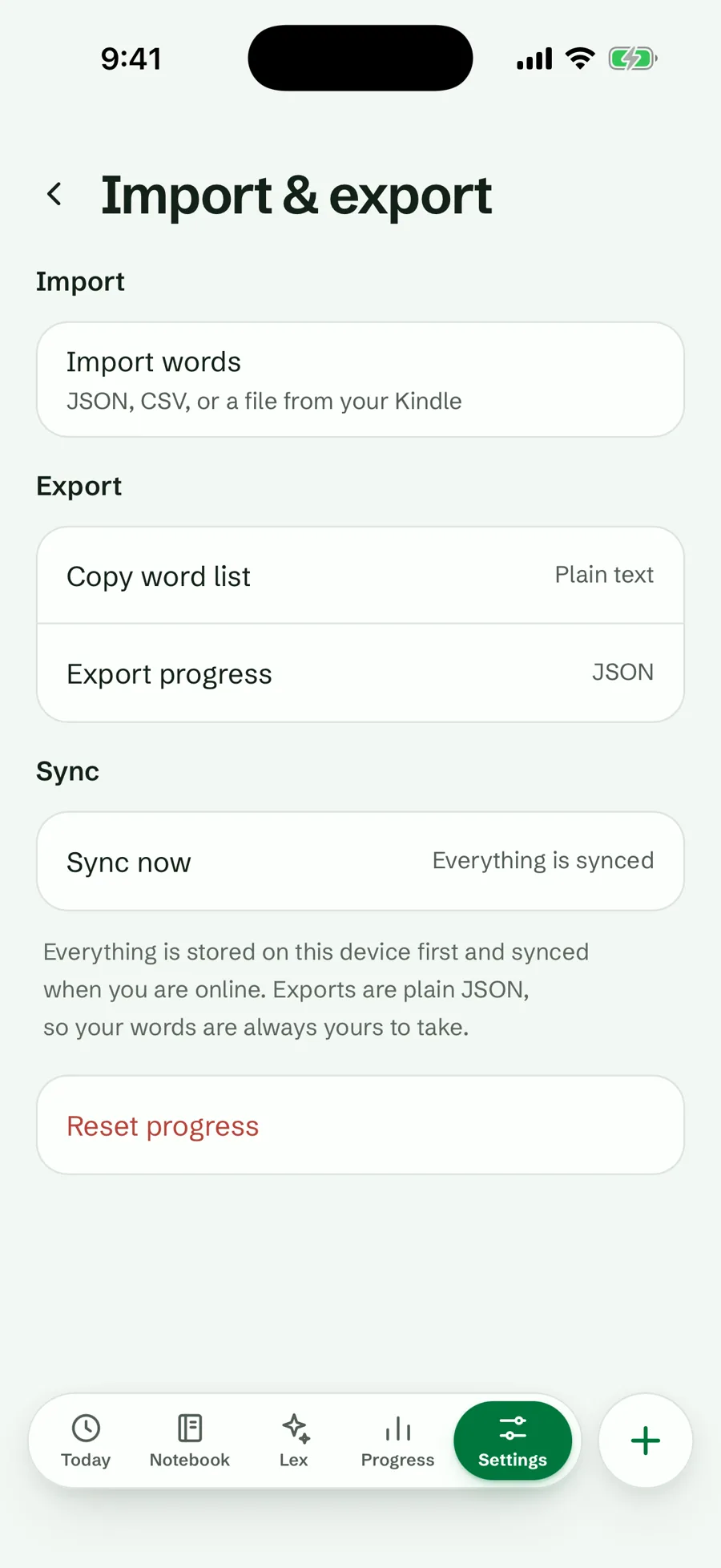
After the import
- Words that came without a meaning: right after the import, and above the notebook’s words, Fill 120 words with AI (the count follows your import) writes their meanings, examples and pronunciation in one tap. Only empty words are filled. If the day’s AI cards run out, the rest wait for tomorrow. On the web app since 17 October 2026, in the Android app and in Lexpad for Mac and Windows; the iPhone app with its next build.
- Open a word and choose Improve with AI to fill in what the file did not have: examples, pronunciation and level. It never changes the meaning you brought.
- To see only the imported words that have not been practised yet, filter the notebook by Not started.
- Your review history does not come across, so words you knew well in Anki or Quizlet will move up quickly: each right answer moves a word one box.
What can go wrong
The import says what went wrong in plain words. These are its messages, and what to do.
| What Lexpad says | What to do |
|---|---|
| “That file could not be read.” | Use an Anki deck (.apkg), a Lexpad export, or a CSV or text file with the word and its meaning on each line. |
| “That Anki file could not be read.” | In Anki, export the deck again as Anki Deck Package (.apkg). |
| “Lexpad found no cards with a word on them in that Anki deck.” | Its cards are pictures or sounds only. Export the deck as text instead. |
| “Lexpad could not read this spreadsheet.” | An .xls or .ods file: save it as an Excel workbook (.xlsx) or as CSV. |
| “Lexpad could not tell which alphabet this file was saved in.” | In Excel choose Save As, then CSV UTF-8, and import it again. |
| “That file is too large to import at once.” | Split the list into smaller files and import them one by one. |
| “That file is read on the server, so it needs a connection.” | An Anki deck or a Kindle vocab.db: connect and try again. Text files and workbooks are read on your device. |
| “Every word in that file is already in your notebook.” | Nothing to add: words already there are skipped, never doubled. |
| The words and meanings are the wrong way round | Before adding, choose Swap word and meaning. |
| “3 words could not be filled. Add their meanings yourself.” | After Fill with AI: entries such as a grammar note or a placeholder get no card. They stay without a meaning for you to fill in. |
Imported the wrong file? Choose Undo on the message right after the import; it removes exactly the words that import added. Importing is free and does not use your AI allowance; only filling words with AI does, one card per word. What uses the allowance.
What does not come across
- Review history, due dates and ease from Anki; progress from Quizlet.
- Images, sounds and formatting. Lexpad uses the device’s own voice for pronunciation.
- Tags and extra fields. From a text file, the third column becomes the example and later columns are left out; everything in the second column becomes one meaning.
- From a cloze note, only its first gap becomes a word; the sentence comes along as its example.
Comparing the tools before you move? Read Lexpad vs Anki, Lexpad vs Quizlet or Anki vs Quizlet.
Good to know
Questions
Can Lexpad import an Anki .apkg file?
Yes, on the web app since 17 October 2026 and in Lexpad for Mac and Windows. Choose the file in Settings, Import & export, Import words. The deck is read on Lexpad’s server, so it needs a connection. Words and meanings come across, and cloze notes come in as the word in their gap; review history, pictures and sounds do not. In the Android app, an .apkg file can be chosen from 1.0.71; with an older app, use the web app in your phone’s browser.
Can I import an Excel file?
Yes, an .xlsx workbook, on the web app since 21 October 2026 (the Android app with 1.0.71, the desktop and iPhone apps later). Every visible sheet is read, and a header row says which column is which. An older .xls or an .ods file: save it as .xlsx or as a CSV file first.
Will my Anki review history come across?
No. Every word starts in box 1, and words you know move up one box with each right answer.
Can I import a Quizlet set I copied from someone else?
Quizlet only lets the person who made a set export it. You can type or paste the words into a set of your own first.
What if the import looks wrong?
For a text file or a pasted list, nothing is added until you tap Add: check that the word is in the first column, or use Swap word and meaning. If an import is already in, Undo removes exactly the words it added, for twelve seconds after it finishes.
Is importing free?
Yes, on every plan. Text files and pasted lists are read on your device and work offline; an Anki deck is read on Lexpad’s server and needs a connection.
Lexpad
Your next word is worth keeping.
Lexpad is free to start, on the web and on Android. Bring the words you meet.