 Lexpad
Free printable templateFree vocabulary
notebook template
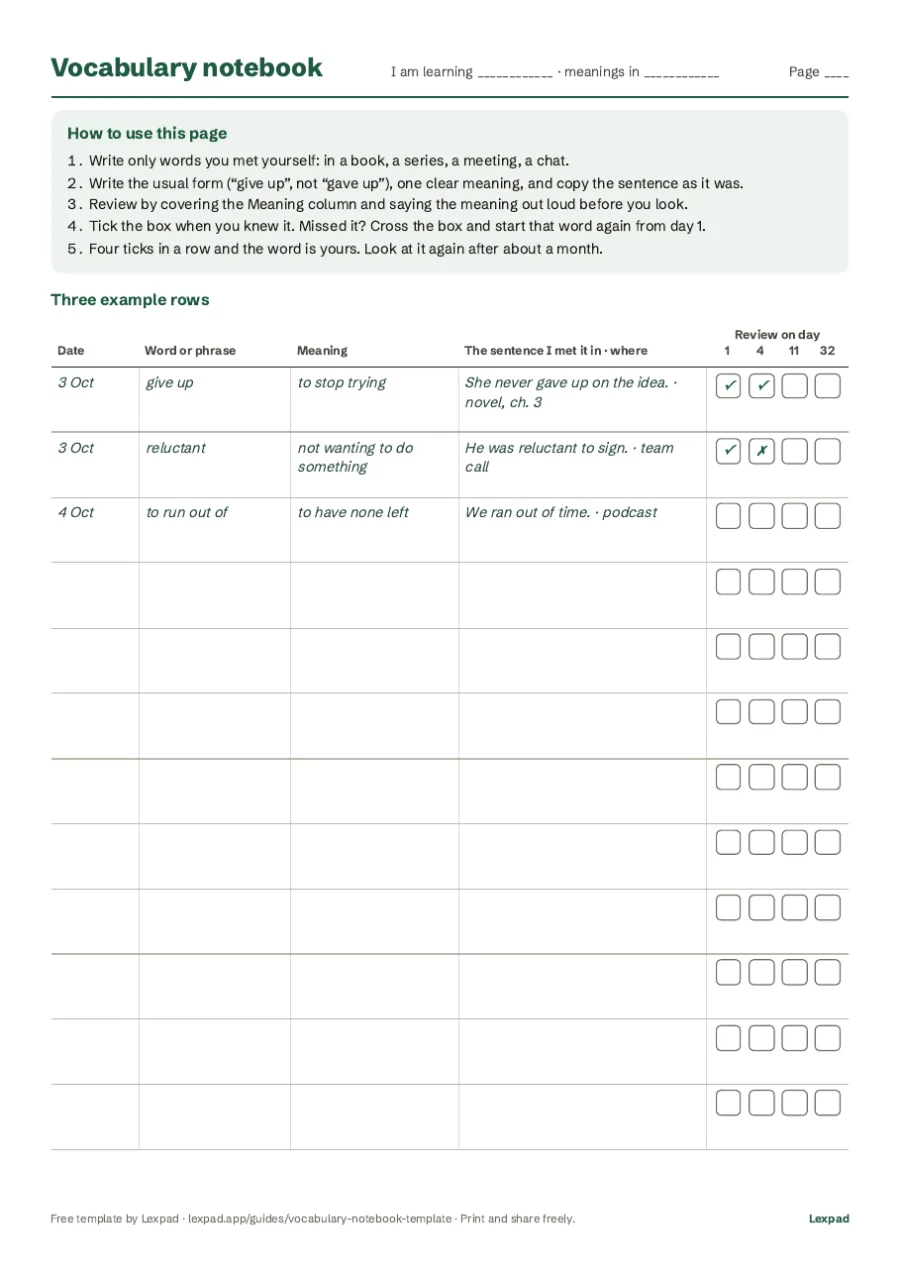
This free vocabulary notebook template is a two-page PDF, in A4 or US Letter. Each line has room for the date, the word, its meaning and the sentence you met it in, plus four review boxes for days 1, 4, 11 and 32 after you write it. Page 1 explains the method with three filled rows; print page 2 as often as you need. It works for any language.
By Reza Pirighadim, who makes Lexpad. Checked against the app on 20 October 2026.
- Format
- PDF, 2 pages
- Paper
- A4 or US Letter
- Review boxes
- Days 1, 4, 11, 32
- Price
- Free to print and copy
Download the template
Two pages, black and green on white, readable when printed in grey. Free to print and copy for yourself, your class or your students.
- A4 PDF (most countries)
- US Letter PDF (United States, Canada, Mexico)
In other languages: Vokabelheft-Vorlage (Deutsch), kelime defteri şablonu (Türkçe), plantilla de cuaderno de vocabulario (Español), modelo de caderno de vocabulário (Português), modèle de carnet de vocabulaire (Français).
What goes in each column
Five columns, the same ones a good vocabulary notebook needs anywhere:
| Column | What to write | Why |
|---|---|---|
| Date | The day you wrote the word | Your review days count from it. |
| Word or phrase | Its usual form: “give up”, not “gave up” | It is what you will look for and practise. |
| Meaning | One clear meaning, in your language or a simple definition | One meaning you will read beats five you will not. |
| The sentence I met it in · where | The sentence as it was, and a few words on where | It keeps the meaning the word had for you, and a memory of the moment. |
| Review on day 1, 4, 11, 32 | A tick if you knew it, a cross if not | Gaps that grow: 1, 3, 7 and 21 days apart. |
How to use it
- Write a word the day you meet it, with its date. Only words you met yourself and want to keep.
- Next day, cover the Meaning column with a sheet of paper and say each meaning before you look. Knew it: tick the day 1 box. Did not: cross it.
- Do the same on day 4, day 11 and day 32. Example: a word written on 3 October comes back on 4 October, 7 October, 14 October and 4 November.
- A crossed box means the word starts again: write the date of the miss beside it and count 1, 4, 11 and 32 days from there.
- Four ticks in a row: the word is yours. Look at it again after a month or two, so it stays.
Why these days? Testing yourself beats rereading, and reviews spread over days beat reviews crammed together. The gaps (1, 3, 7 and 21 days) are the waits of the Leitner system, the simplest spaced-repetition schedule. The vocabulary notebook guide explains the research, and the Leitner system shows the same rule with cards in boxes.
- Write itDay 0
- Review 1Day 1
- Review 2Day 4
- Review 3Day 11
- Review 4Day 32
Printing and using it on a tablet
- Print page 1 once, then page 2 as many times as you need. Double-sided printing and a ring binder make a notebook that grows.
- For a small A5 notebook, print two pages per sheet and fold or cut it.
- On a tablet, open the PDF in a note app that lets you write on PDFs, such as GoodNotes or Notability, and duplicate page 2.
- Teachers: print a class set. The template is free to copy for your students.
The same template as a spreadsheet
Prefer typing? Make the same columns in Google Sheets, Excel or LibreOffice: Word in column A, Meaning in B, Sentence in C, then Where, Date and Next review. Sort by Next review each day to see what is due.
A sheet in that order also moves into an app in one step. Save it as CSV: Lexpad and Anki both read the word from the first column, the meaning from the second, and Lexpad keeps the third column as the example. How to import a CSV.
When paper gets heavy: the digital version
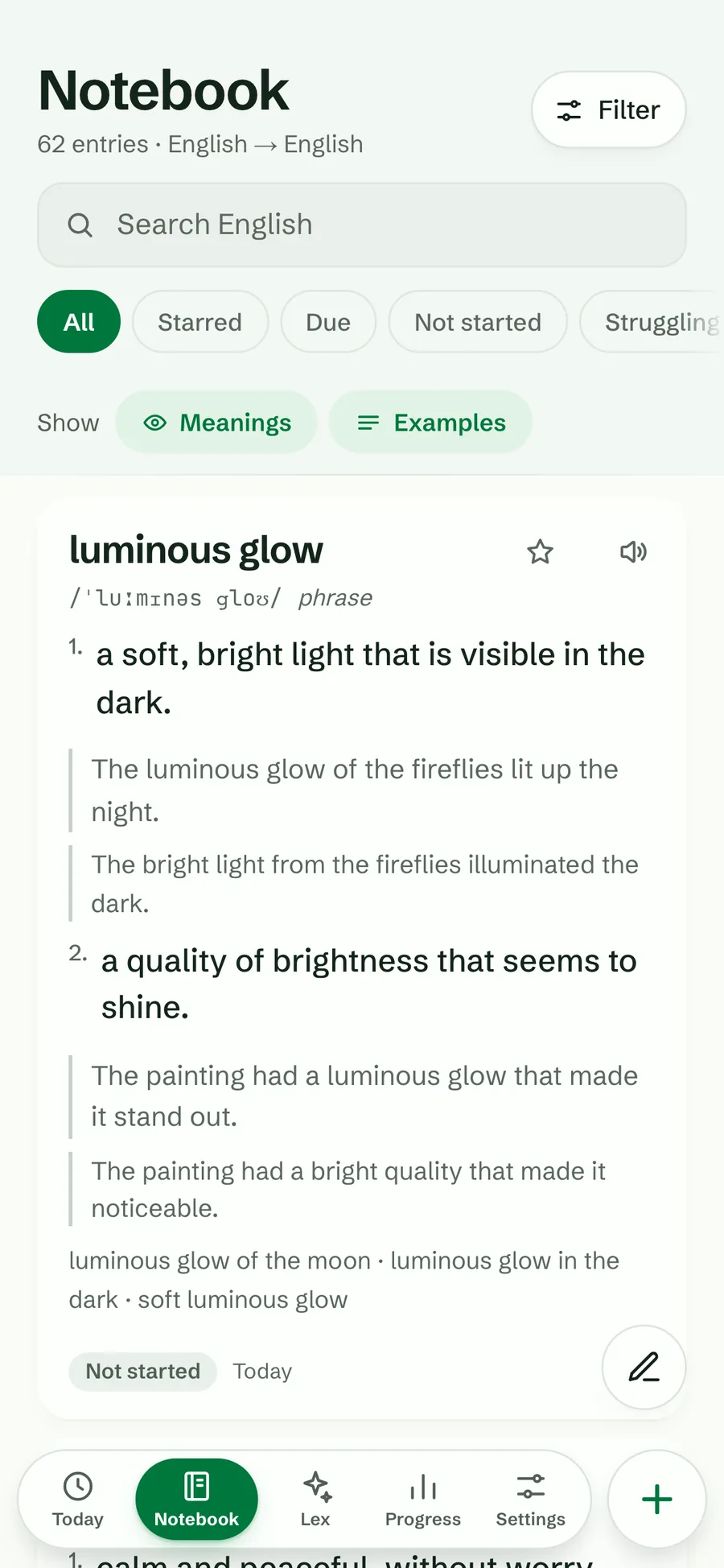
Paper is great for writing; the reviews are the work. After a few hundred words, finding the words due today takes longer than reviewing them. That is the point where an app helps: it keeps the same columns, works out the review days for you, and can test you in different ways.
Lexpad, our own app, is built around the same idea: you add the words you meet, Fill with AI writes the meaning, examples and pronunciation (you can change anything), and five Leitner boxes bring each word back on the same kind of schedule as this template. It is free to start in a browser, on Android, Mac and Windows. Digital vocabulary notebook compares it with a notes app, a spreadsheet and flashcard apps.
Good to know
Questions
Is the vocabulary notebook template free?
Yes. Download the PDF, print it as often as you like and copy it for a class. No sign-up.
Can I use it for any language?
Yes. The columns work for any pair of languages. The example rows are an English learner’s words, and the template also exists in German, Turkish, Spanish, Portuguese and French.
Why review on days 1, 4, 11 and 32?
Those are gaps of 1, 3, 7 and 21 days, the waits of the Leitner system. Each review comes a little later than the last, which is how spaced repetition keeps a word with few reviews.
Is there a vocabulary journal template?
This is one. A vocabulary journal and a vocabulary notebook are the same thing: a place to write the words you meet and come back to them.
Can I use the template in GoodNotes or on an iPad?
Yes. Open the PDF in any note app that lets you write on PDFs and duplicate page 2 when you need more lines.
Is there a digital version?
A spreadsheet with the same columns works, and saved as CSV it imports into Lexpad or Anki. Lexpad itself keeps the same entries and works out the review days for you.
Lexpad
Ready for the digital version?
Lexpad keeps the same columns and works out the review days for you. Free to start, on the web and on Android.