Download · Mac · FreeLexpad for Mac.

Add a word from any app on your Mac: select it, press ⌘⇧L, and it goes into your notebook with the sentence you met it in. The whole Lexpad app comes too, in its own window, with practice that works offline.

Updated . Checked against the app on 22 October 2026.

Lexpad for Mac

Version 0.3.14 · 14.8 MB · Free

Download for Mac

Direct link: lexpad-desktop-mac.dmg

Needs
macOS 11 Big Sur or later, Apple silicon or Intel
File
.dmg disk image, one download for Apple silicon and Intel, signed and notarized by Apple
Released
22 October 2026

SHA-256 4a02253cc96756ff296df4333649298fdf6261f5181319f4d6e9e1501b76ea6d

Version
0.3.14
Size
14.8 MB
Needs
macOS 11 or later
Price
Free

Need it for another system? Windows · Android · All platforms

Install on a Mac

  1. Open lexpad-desktop-mac.dmg from your Downloads folder and drag Lexpad onto the Applications folder.
  2. Open Lexpad from Applications. If macOS asks whether you want to open an app downloaded from the internet, choose Open.
  3. Lexpad opens, and its icon appears in the menu bar at the top of the screen.

Updating from 0.3.6 or older

  1. Choose Quit in Lexpad’s panel, then drag the new Lexpad onto Applications and replace the old one.
  2. Open Lexpad. 0.3.7 is the first release signed with Lexpad’s Developer ID, so macOS asks once more for the Accessibility permission, even if the switch for Lexpad still looks on.
  3. Open System Settings, Privacy & Security, Accessibility. Select Lexpad and remove it with −, then add it again with + from Applications and switch it on.
  4. Reopen Lexpad. The card notices within a few seconds that it is allowed. Later updates keep the permission.

Signed and notarized by Apple. Since 0.3.7 Lexpad for Mac is signed with Lexpad’s Apple Developer ID and notarized: Apple checked it for malicious software before it was published, and macOS checks the signature when it opens. You no longer need Privacy & Security, Open Anyway or Control-click to open it.

There is no Mac App Store version, and none is planned: that store does not allow apps to read the selection in other apps, which is what Lexpad does.

First steps after installing

  1. Click the Lexpad icon in the menu bar and choose Connect to Lexpad⁠. Your browser opens Lexpad and asks “Connect the Lexpad desktop app?”. Sign in there if you need to, and choose Allow. No password is typed into the app.
  2. Allow Accessibility when Lexpad asks. macOS lets an app read another app’s selection only with this permission: System Settings, Privacy & Security, Accessibility, then switch Lexpad on. Without it you can still type a word.
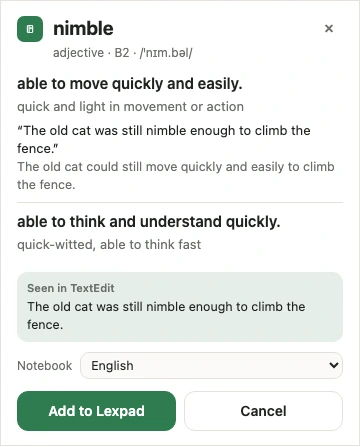
  3. Select a word in any app, such as Mail, Pages, a PDF or a chat, and press ⌘ ⇧ L. A card shows its meanings. Press Enter to add it with its sentence, Esc to close.
  4. Or right-click a selection and choose Services, Add to Lexpad.
  5. Choose Open Lexpad in the panel, or click the Dock icon, for the whole app in its own window: Today, practice (offline too), the notebook, Lex, Progress and Settings. Settings, This computer holds the shortcut, the notebook new words go to, notifications and start-up.
The Lexpad desktop card for nimble: adjective, B2, two meanings with an example, Seen in TextEdit with the sentence, a notebook picker and Add to Lexpad
The card, for a word selected in TextEdit
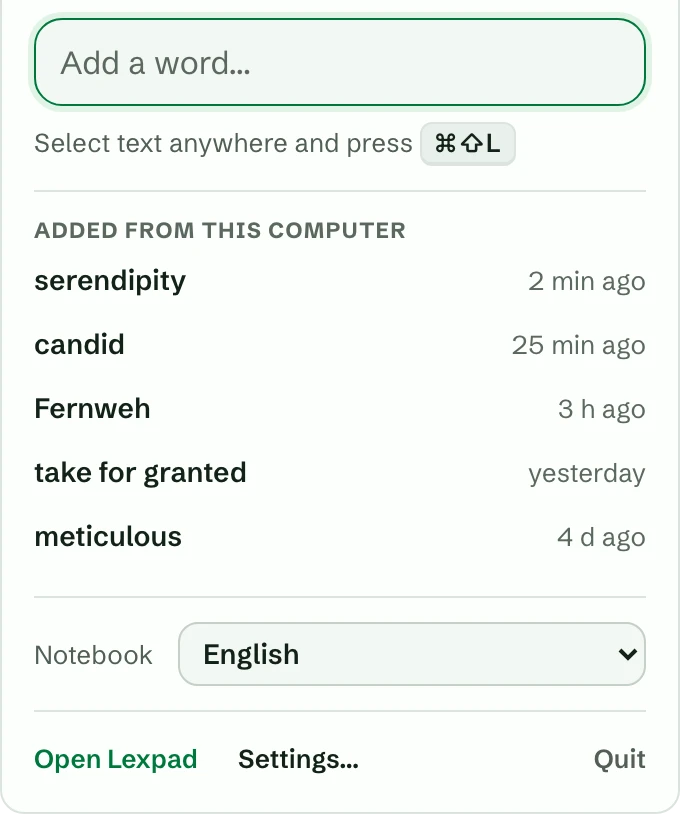
The Lexpad panel on a Mac: an Add a word box, the shortcut ⌘⇧L, five words added from this computer, the Notebook picker and Open Lexpad, Settings and Quit
The menu-bar panel, with sample words

Requirements

System

macOS 11 Big Sur or later, Apple silicon or Intel. One download for both.

Account

A free Lexpad account. You sign in once, from your browser.

Connection

Needed to sign in, look up and add words. Practice in the window works offline and catches up later.

Check the file

SHA-256 of lexpad-desktop-mac.dmg 4a02253cc96756ff296df4333649298fdf6261f5181319f4d6e9e1501b76ea6d

Optional. In Terminal, run this and compare the result with the SHA-256 above:

shasum -a 256 ~/Downloads/lexpad-desktop-mac.dmg

Every installer’s checksum is also in lexpad-desktop.sha256.

The desktop app’s code is public: read exactly what it does with the text you select and with the Accessibility permission. (Source available; the Lexpad name and logo are ours.)

Updates and removing Lexpad

  • There are no automatic updates yet. Download the new version from this page and drag it onto Applications again, replacing the old one. Your words live in your account, so nothing is lost.
  • Updating from 0.3.6 or older, macOS asks once more for the Accessibility permission, because 0.3.7 is the first release signed with Lexpad’s Developer ID. The switch may look on while macOS no longer applies it, and Lexpad says so: follow Updating from 0.3.6 or older above. Later updates keep the permission.
  • To remove Lexpad: choose Quit in its panel, then move Lexpad from Applications to the Bin. To end its sign-in too, sign out “Desktop app” in Lexpad’s Settings, Account, Signed-in devices.

What 0.3.14 does

  • Adds a word from any app with ⌘ ⇧ L: part of speech, level, pronunciation and up to three meanings, with your sentence kept as its first example and a private note such as “Seen in Microsoft Word” (the app’s name, never a window title).
  • A menu bar panel: an Add a word box, the last five words added on this computer, and the notebook new words go to.
  • The whole Lexpad app in its own window, bundled in the download, so practice works offline.
  • Your daily reminder and messages from Lexpad as notifications on this computer.
  • New in 0.3.14: the window has the web app of 22 October: the new first-run introduction (three short stories, up to three reasons, your plan in minutes a day, then your first word and its card), a Today that grows with your notebook, an add sheet whose one button is always the next step and which says exactly how many AI cards are left and when they come back, a session summary that leads with its numbers, Settings, Plan with a Free and Pro table, a preview of Lex on Free built from your own words, one row of controls in practice, sign-in that says what is wrong under each field, the daily reminder as a switch, and “Step 2 of 5” instead of box numbers.
  • New in 0.3.13: a message from Lexpad can carry a button, to a screen in the app, a short form you answer in the window, or a web page that opens in your browser; a click on its notification opens that page or form. Notes about your plan that are meant to pop up (a declined card, a refund, the end of Pro from the team) now do so on this computer too, whether or not product news is on.
  • New in 0.3.12: the window has the web app of 21 October: importing reads Excel workbooks (.xlsx), CSVs Excel saved in an older encoding, Google Translate’s saved phrases, older and non-English Kindle clippings and big Anki decks; a practice card keeps every answer on screen in a short window.
  • New in 0.3.11: the window has the web app of 20 October: Lex proposes changes to your notebook as cards you tap to apply, and a word you add from Lex gets its whole card (Lex is part of Pro); an honest wait for an AI card, with its outline taking shape; the question before your words go to the AI names no single provider and links to the privacy policy, and asks once more.
  • New in 0.3.10: the window has the web app of 18 October: Fill with AI for every word without a meaning (each meaning it writes is marked and has Report), Anki decks, Quizlet sets with semicolons, a check before an import is added, Undo and Paste a list. The notebook’s filter is cleared when you restart the app.
  • New in 0.3.7: the Mac app is signed with Lexpad’s Apple Developer ID and notarized by Apple, so it opens without Open Anyway (coming from 0.3.6 or older, allow Accessibility once more). The window has the web app of 13 October: Settings → Account → Sign-in methods, and “Apple ID (email hidden)” for Hide My Email.
  • New in 0.3.6: Report beside everything the AI wrote (cards, Improve with AI, sentence checks, Lex answers), and a Report link on the shortcut card’s AI-written meaning that opens the same form in Lexpad’s window. On a Mac the Accessibility permission carries over.
  • New in 0.3.5: the window has the web app of 13 October: Settings → Invite friends (you both get Pro days when a friend you invite starts learning), a steadier sign-in when the app starts, and Anki and Quizlet files whose meanings hold commas import as one card each.
  • New in 0.3.4: in practice, after a wrong answer the card waits with a Next button; choose the behaviour in Settings → Practice → After an answer. On a Mac the Accessibility permission you gave 0.3.3 carries over to this update.
  • New in 0.3.3: the window has the web app of 12 October: Send feedback in Settings, Did you mean when you add a word, Persian notebooks on the same plans as every other language, a smoother notebook, the Games page, celebrations and the new first screen. On a Mac the Accessibility permission now survives updates; on Windows the desktop shortcut shows the Lexpad icon.
  • Since 0.3.0: How words come back for each notebook, the Smart schedule, games and drills, the next 30 days, streak freeze and the first-days screens, the Pro trial, saving a word when the AI is out, and Add to my notebook.

Everything it does is on the desktop app page; every change is in what’s new.

Good to know

Questions

Do I still need Open Anyway in Privacy & Security?

No. That was for the builds before 0.3.7, which Apple had not notarized. If macOS still says it cannot check Lexpad, you have an older download: delete it and get the current one from this page.

macOS says Lexpad is damaged and cannot be opened.

The download was probably cut short. Delete it, download it again, and check its SHA-256 against this page before opening it.

I press ⌘⇧L and nothing happens.

Check Settings, This computer, Accessibility in Lexpad’s window. If it says not allowed, or you have just updated from 0.3.6 or older, remove Lexpad with − in System Settings, Privacy & Security, Accessibility, add it again, then reopen Lexpad. If another app uses the same shortcut, change Lexpad’s in This computer.

Where is Lexpad after it opens?

In the menu bar at the top of the screen. It has no Dock icon while it waits; while its window is open, it has one.

Does it work on an Intel Mac?

Yes. One download runs on Apple silicon and Intel Macs with macOS 11 Big Sur or later.

Has Apple checked Lexpad for Mac?

Yes. Since 0.3.7 it is notarized: Apple scanned it for malicious software before it was published, and macOS checks its signature when it opens. Download it only from lexpad.app, and check the SHA-256 if you like. The app reads only the text you select, only when you press the shortcut, and never password fields. See privacy and permissions.

Is it free?

Yes. The desktop app is free. Its meanings use the same AI allowance as the rest of Lexpad, which Pro raises. Learning, practice and your notebook are free.

Do I need an account?

Yes, a free Lexpad account. You sign in once, from your browser; your notebook is the same on the web, on Android and on every computer.

Lexpad

Keep the word where you meet it.

Lexpad is free on the web, on Android and on your computer. Bring the words you meet.