Adding words

Ten ways in.
One notebook.

Lexpad is built around the words you meet yourself, so getting them in has to be quick wherever you meet them. Nothing is ever added for you without your choice.

Checked against the app on 3 October 2026.

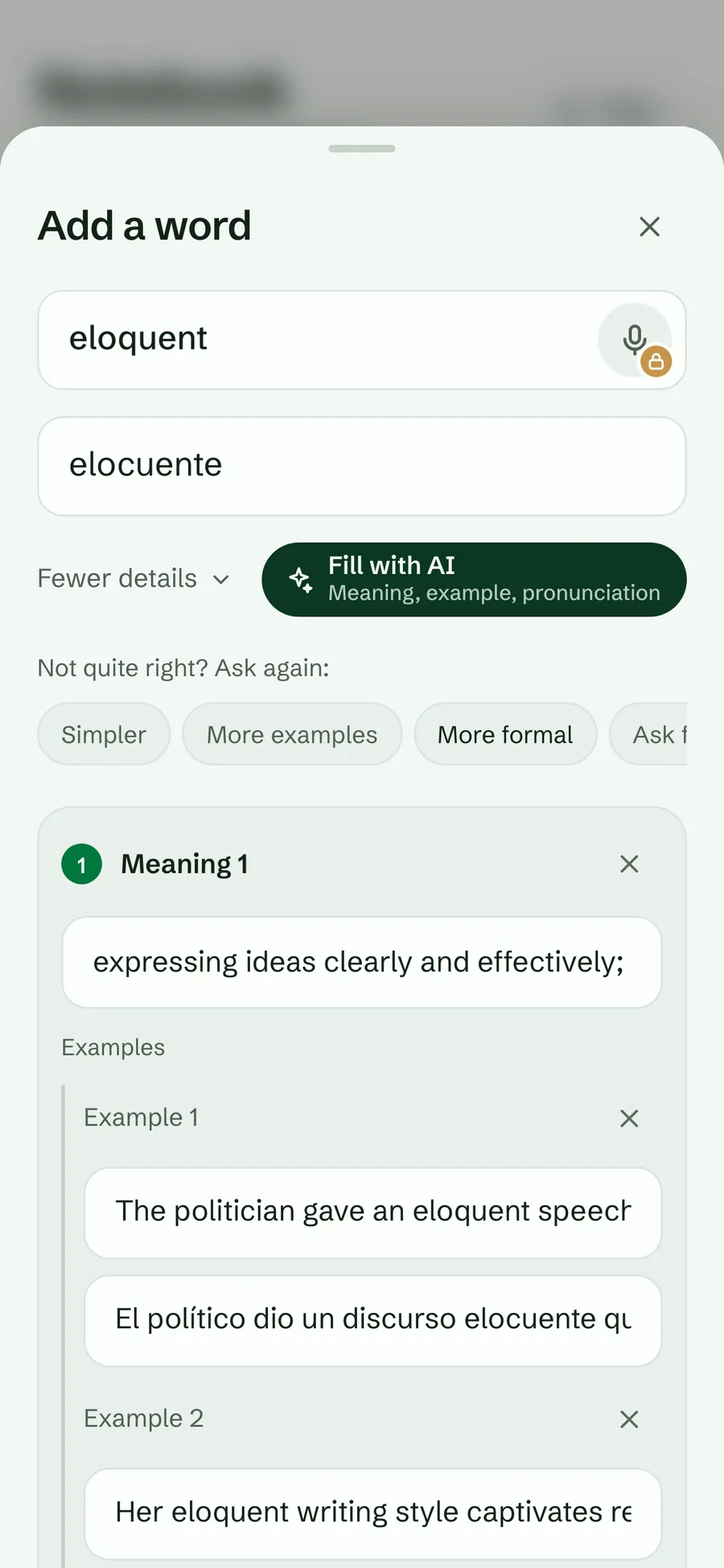
The Add a word sheet with an AI-written card for eloquent
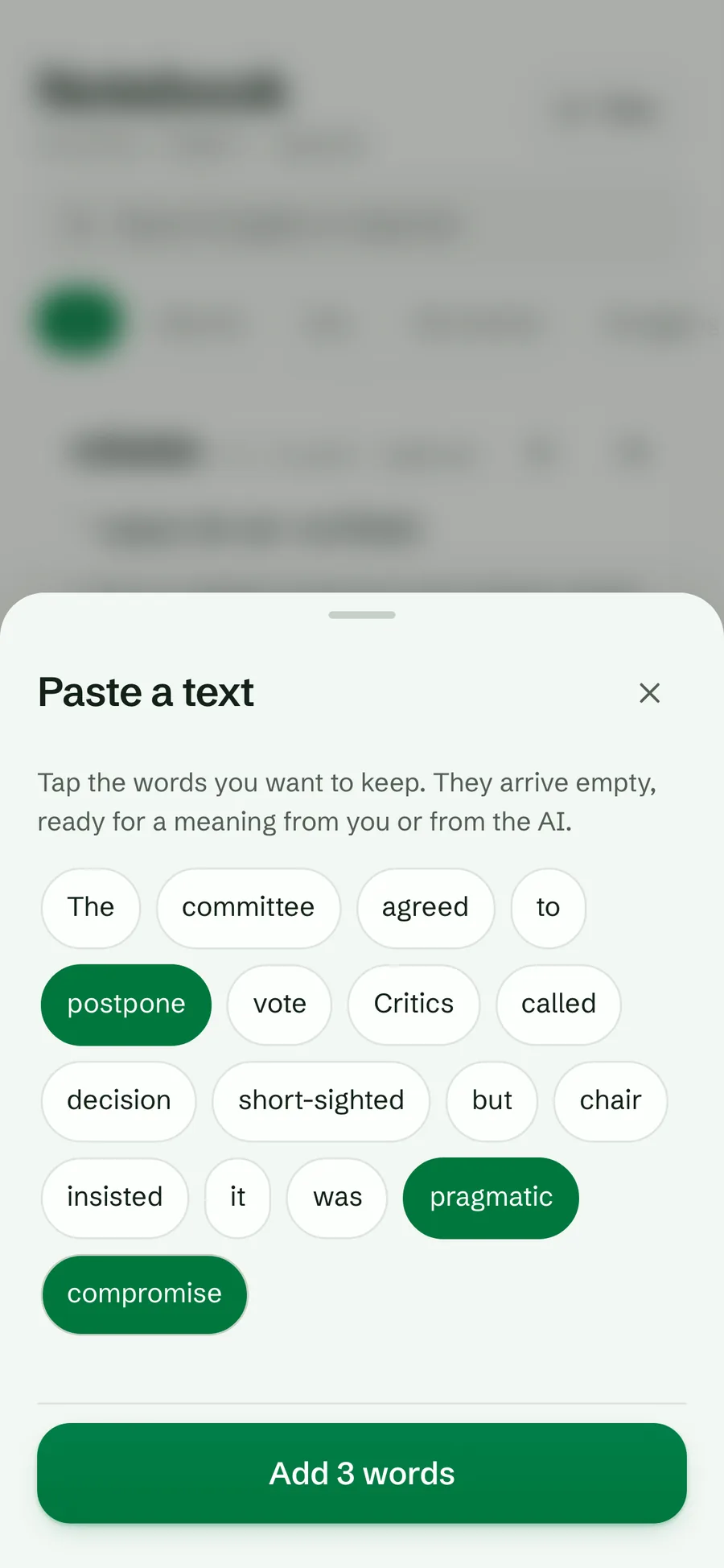
The Paste a text sheet with three words picked
Ways in
Ten, from typing to Kindle
Free
Typing, paste, extension, Kindle, files, links
Pro
Voice, Words worth keeping, more AI cards
Persian
Pro ways free in Persian notebooks

Type it

Tap the round + beside the tab bar on any screen. Write the word and its meaning, each in its own language’s direction and font. “More details” opens everything a card can hold: several meanings with short definitions and up to five examples each, topic, CEFR level (A1 to C2), pronunciation, part of speech, a hard-to-spell mark, collocations, expressions, related words, a usage note and a private memo. “Add another” keeps the sheet open for a run of words.

Plan
Free
Where
web, Android
Connection
not needed

Try it in Lexpad

  1. Tap the round + beside the tab bar.
  2. Type eloquent in the word field and your meaning underneath.
  3. Tap More details to add an example, a level or a note, or skip it.
  4. Tap Add another to keep going, or add and close.

You see the word at the top of your notebook, marked Not started, ready for today’s session.

Let AI fill it in

“Fill with AI” writes the whole card from the word alone: every common meaning, a definition in the language you are learning, example sentences with translations, pronunciation, part of speech, level, collocations, expressions and related words. If you misspelled the word, it suggests the usual form. Not quite right? Ask again with Simpler, More examples, More formal, or your own request.

To do many at once, paste a list on the AI screen, preview every card, untick any you do not want, and add the rest.

Plan
Free with a daily allowance; Pro writes many more cards each day. A notebook with Persian on either side gets it free.
Where
web, Android
Connection
needed
The Add a word sheet after Fill with AI: the word eloquent with its Spanish meaning, a definition, examples with translations and the Refine chips Simpler, More examples and More formal
Fill with AI, then refine

Try it in Lexpad

  1. Open + and type a word, for example eloquent.
  2. Tap Fill with AI⁠. In a moment the sheet shows meanings, examples with translations and pronunciation.
  3. Under “Not quite right? Ask again”, tap Simpler⁠, More examples or More formal⁠, or type your own request, such as “British spelling”.
  4. Remove a meaning you do not need with its ×, then add the word.

The card arrives complete, and every field stays editable on the word’s page.

Say it

Tap the microphone in the word field and say the word. Lexpad listens in the language of the notebook the word is going to and puts what it heard in the field for you to check. It never saves on its own.

Plan
Pro. A notebook with Persian on either side gets it free.
Where
the Android app, and web browsers with speech recognition such as Chrome, Edge and Safari. Firefox does not support it.
Connection
depends on the device’s speech recogniser

Voice input launched free on 23 September 2026 and moved to Pro later the same day. It is still free in any notebook with Persian on either side.

Paste a text and pick

Paste an article, a chat or a page. Lexpad lists every distinct word in reading order; words already in your notebook are counted, not offered again. Nothing is pre-selected: you tap the words that are new to you. Each one keeps the sentence you found it in as its first example.

Chinese, Japanese, Thai, Lao, Khmer and Burmese text, written without spaces, is split into words for you.

Plan
Free
Where
web, Android
Connection
not needed

Try it in Lexpad

  1. On the Notebook, choose Paste a text⁠.
  2. Paste a paragraph you are reading.
  3. Tap the words you want to keep; they turn green.
  4. Tap Add 3 words (the count follows your picks).

Each word arrives with its sentence from your text as its first example; add a meaning yourself or let AI fill it.

The Paste a text sheet listing every word of a pasted paragraph, with postpone, pragmatic and compromise picked and an Add 3 words button
Paste a text and tap the new words

Find the words worth keeping

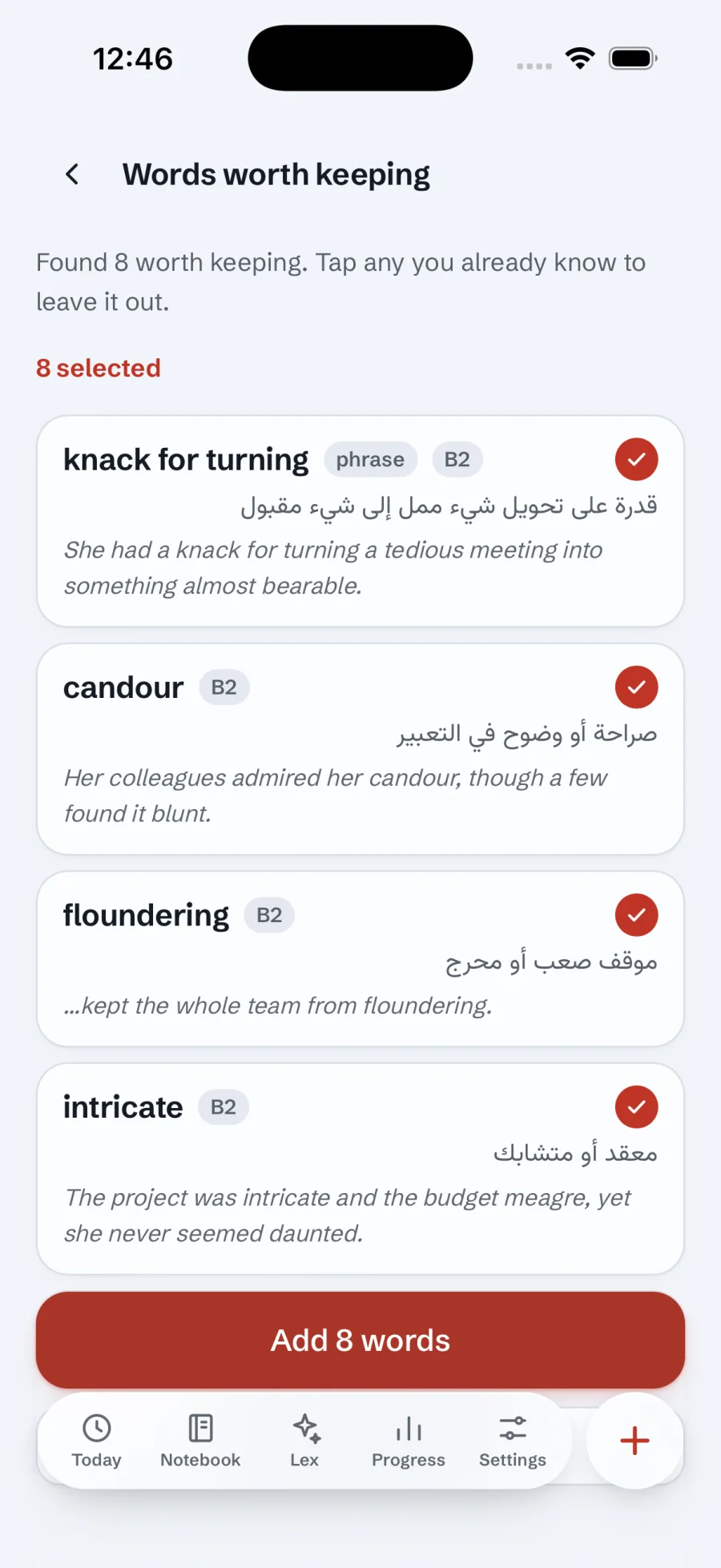
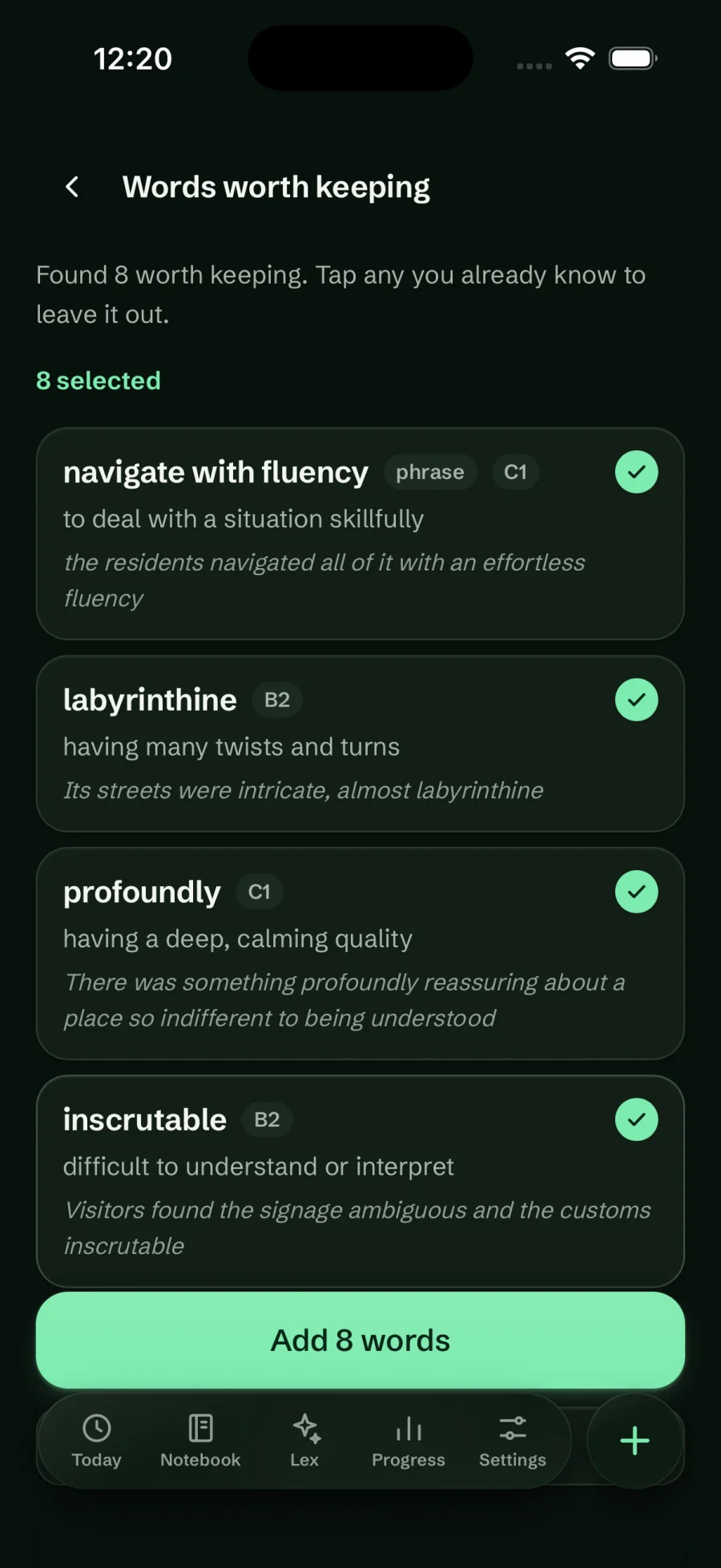
Paste something you have read and let AI mark what is worth a card. It puts fixed expressions, idioms, phrasal verbs and collocations first, then ordinary words used in an unusual sense, then rare words, and leaves out names, numbers and basic words. Each find arrives in the form you would learn it (“gave up” becomes “give up”), with a short meaning, a CEFR level and the sentence it came from.

Everything starts kept; strike out what you already know and add the rest. This is the opposite of Paste a text, where nothing starts selected.

Plan
Pro. A notebook with Persian on either side gets it free.
Where
web, Android
Connection
needed

Try it in Lexpad

  1. On Today, open Find the words worth keeping⁠.
  2. Paste a few paragraphs from an article or a book.
  3. Read the list: each find shows its meaning, level and sentence. Tap any you already know to leave it out.
  4. Tap Add 8 words (the count follows what you kept).
Words worth keeping in the Coral light theme: knack for turning, candour, floundering and intricate, each with a meaning and its sentence
Coral, light
Words worth keeping in the Forest dark theme: navigate with fluency, labyrinthine, profoundly and inscrutable, all selected
Forest, dark

From any web page

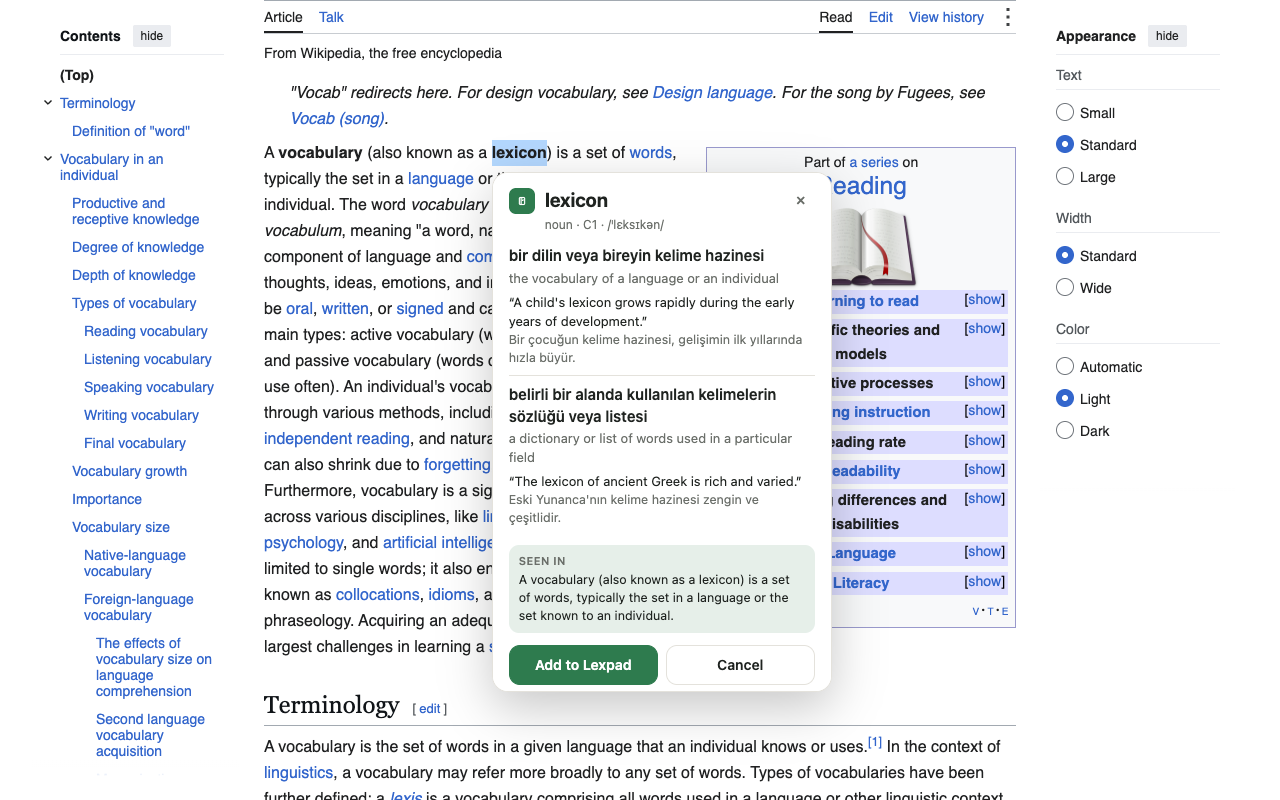
With the browser extension, select a word on any page and add it without leaving the page. It arrives with its meaning, the sentence you read it in as its first example, and a private note saying where you saw it.

Plan
Free (the meaning uses the same AI allowance)
Where
Chrome and Firefox on a computer
Connection
needed
Lexpad’s Firefox extension explaining lexicon on Wikipedia, with meanings, examples, the original sentence and an Add to Lexpad button

From your Kindle, a file or a friend

Three more ways to bring words you already have.

Free

From your Kindle

Import My Clippings.txt for your highlights of up to four words, or vocab.db for every word you looked up while reading. The book’s title becomes the topic. The words arrive without meanings or sentences; “Improve with AI” or “Fill with AI” completes them. Free. vocab.db is read on the server and needs a connection; clippings are read on your device.

Free

From a file

Settings, Import words takes a Lexpad export (which also restores boxes, stars, notes and order), the older Lexpad notebook file, or a two-column CSV or TSV of word and meaning. That covers Quizlet and Anki exported as plain text; Anki’s own .apkg package is not read. Words already in the notebook are skipped and counted.

Free or Pro

From a shared link

Open a notebook someone shared with you and take a copy. The words become a new notebook of your own, with no link back to theirs, and without their notes or progress. Free for your first notebook and for any Persian notebook; otherwise a second notebook is part of Pro.

Rules that apply to every way

  • A word you already have moves to the top instead of failing, and keeps any new meaning you gave it.
  • Words go to the right notebook. Lexpad reads the writing system: if one notebook fits, the word goes there; if several do, you choose; if none does, it offers to make one. It never guesses between two languages that share a script.
  • Accents that change a word are kept. “año” and “ano” are two words, while search ignores accents so “cafe” finds “café”.
  • You choose every word. Lexpad never adds starter words, word lists or words of the day.

Good to know

Questions

Does Lexpad ever add words on its own?

No. Every word comes from you. Words worth keeping and the AI screen suggest cards from text you paste, and you choose what to keep; Lexpad never adds starter words, word lists or words of the day.

Can I bring my Anki or Quizlet words?

Yes, as a two-column CSV or TSV of word and meaning, which both can export. Anki’s .apkg package is not read. Then use Improve with AI to complete the cards.

What happens with a word I already have?

It moves to the top of the notebook and keeps any new meaning you gave it, instead of being added twice.

Can ChatGPT or Claude add words for me?

Yes, the ones you ask for. Connect Lexpad and say “Save meticulous to my Lexpad”; the assistant writes the card and saves it.

Lexpad

Your next word is worth keeping.

Lexpad is free to start, on the web and on Android. Bring the words you meet.