 Lexpad
Method · English with YouTube
How to learn English
with YouTube
YouTube has English for every level and every interest, free, with subtitles you can switch on. Watching alone teaches less than it feels like, though. This page is a daily routine for English learners: what to watch, how to set up the player, what to keep from each video and when to come back to it.
By Reza Pirighadim, who makes Lexpad. Checked against the app on 25 October 2026.
Pick videos at your level
The right video is one you can follow without stopping every few seconds. Try a two-minute test: if you get the story and meet only a handful of unknown words, it fits. Lost by the end of the first minute? Choose something easier. Nothing new at all? Choose something harder.
- Channels made for learners speak slowly and explain as they go. They suit A2 and B1 (what the CEFR levels mean for words).
- Videos for native speakers on a topic you know, such as cooking, games or your own job, are easier than their speed suggests, because the picture and what you already know fill the gaps.
- Stay with one or two creators for a few weeks. Their voices get easier every day, and their favourite expressions return without any effort from you.
- Add accents one at a time. Get comfortable with one, then add the ones you will hear at work or on your travels.
Why “mostly understand” matters: you can work out new words from the scene, and those are the ones that stick (comprehensible input).
Set up YouTube for learning
Everything below is a YouTube setting, from YouTube Help, read 25 October 2026.
- Turn on English subtitles. Click the CC button at the bottom right of the player, or press C; Settings, then Subtitles/CC, lets you pick English (Manage caption settings).
- Notice which subtitles you have. Subtitles marked “auto-generated” come from speech recognition, and YouTube warns that their quality can vary (Use automatic captioning). With one clear speaker they are usually fine; with music or crosstalk, trust your ears.
- Slow the speaker down. Open the gear-shaped Settings menu and choose the speed (Speed up or slow down videos), or press < and > to change it one step at a time (Keyboard shortcuts). A little slower keeps the rhythm of the voice and gives you time to read.
- Open the transcript. Under a captioned video, Show transcript in the description lists every line; a click on one jumps there (View video transcripts).
- Go back without the mouse. J rewinds 10 seconds, the left arrow 5, and K pauses and plays.
A 20-minute routine
- Minutes 0 to 5, the story. Watch without pausing. You want the gist and the sound of the speaker.
- Minutes 5 to 12, again with English subtitles. Pause on the lines you nearly understood. That is the English you are ready for.
- Minutes 12 to 15, three to five phrases. Keep each with its whole line and the minute. Phrases you could use yourself this week come first.
- Minutes 15 to 18, shadow two lines. Play a line, pause, and say it aloud at the same speed, copying the stress and the rhythm. Three times each.
- Minutes 18 to 20, yesterday’s phrases. Look at each line with the phrase covered, say it, then check.
Short and daily beats long and weekly. On a busy day, do only the last step: it keeps what you already have.
What YouTube trains, and what it leaves to you
- Listening: its strength. Hours of real voices at real speed, on topics you chose.
- Vocabulary: you meet a lot, but one meeting rarely keeps a word. The phrases you save and review are the ones that stay. Much of spoken English is phrasal verbs, worth keeping whole (how to learn phrasal verbs).
- Speaking: only if you open your mouth. Shadowing, and retelling a video in your own words afterwards, turn what you heard into what you can say.
- Writing and grammar: videos give examples, not practice. Write two sentences with each new phrase, and ask a teacher or a tutor to check them now and then.
So YouTube can carry most of your listening. Add a little speaking and writing, and one place where the phrases are kept.
Keep the phrases
How you keep them matters less than what you keep. For each phrase: the phrase, the whole line it was in, the video and the minute, and a short meaning.
- Paper or a notes app works if you also plan the reviews; the free notebook template has the review boxes.
- A flashcard app such as Anki: put the line on the card, not only the phrase.
- A subtitle file of your own video (.srt or .vtt) goes into Text to flashcards, which keeps each line with the words you pick.
| Keep | Why | Example |
|---|---|---|
| The phrase | Words that belong together are easier to reuse than one word alone. | run out of |
| The whole line | It shows how the phrase is used and what goes around it. | “We ran out of time before the last question.” |
| The video and the minute | You can play the line again and hear the stress and rhythm. | A talk about planning, 7:40 |
| A short meaning | For this line only, in simple English or your own language. | to have none left |
Keeping them with Lexpad
Made by the author of this page
Click the phrase in the subtitle
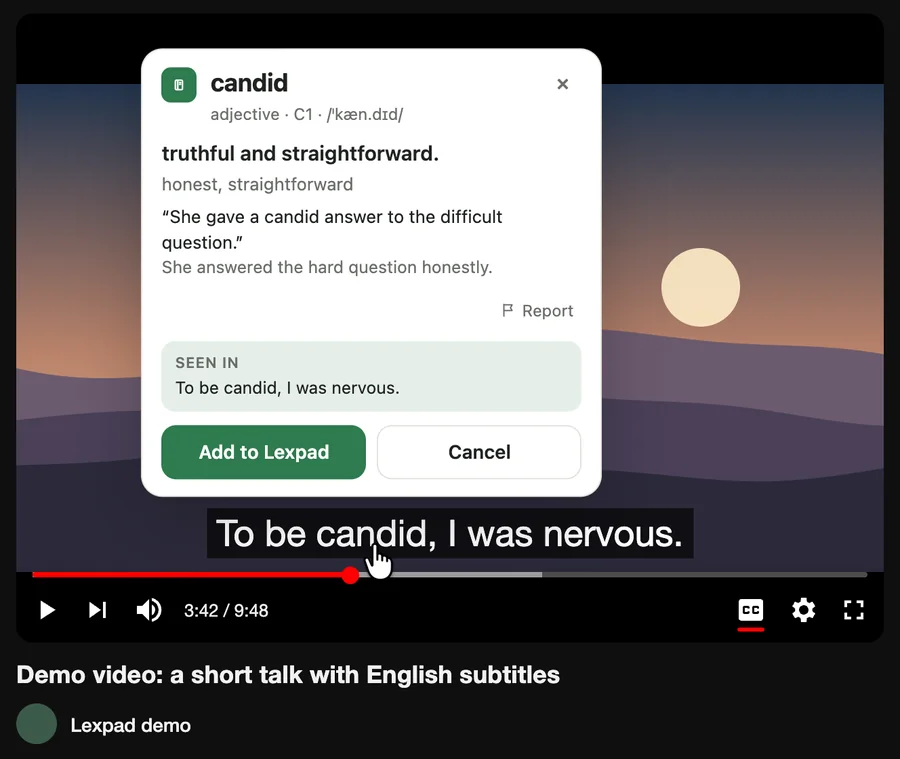
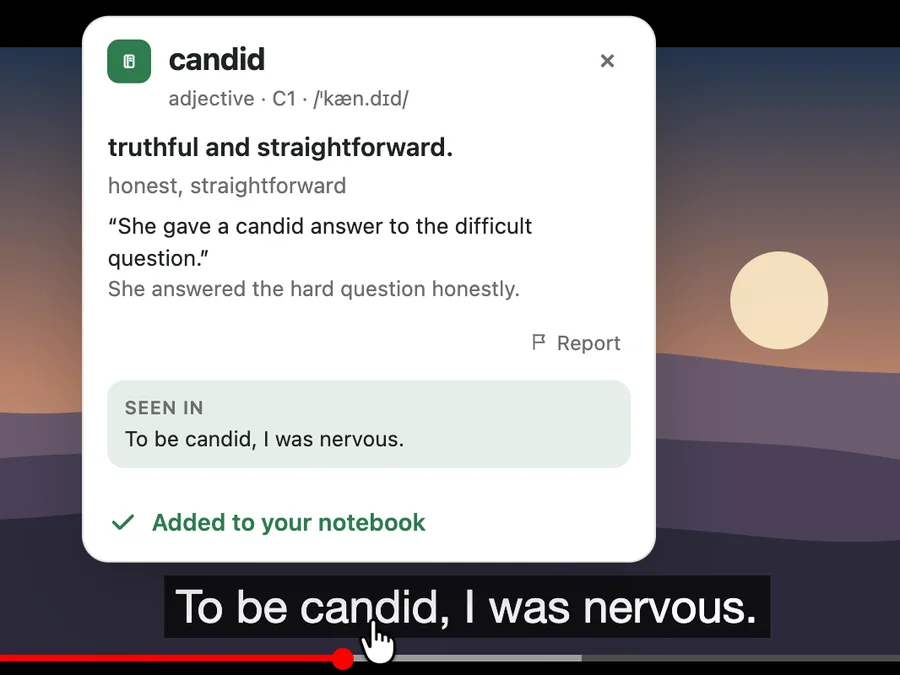
- With Lexpad’s free browser extension, rest your pointer on a YouTube subtitle and the video waits. Click a word, or drag across up to four for a phrase such as “run out of”, and a card with its meaning, written by AI, opens on the video.
- Press Add: the line becomes the phrase’s example, and a private note keeps the video’s title with a link that starts two seconds before the moment, so one click plays the line again.
- An English notebook can give English definitions, or the card can be in your own language, from 81 languages in any pair.
- Free: unlimited words in one notebook, and 25 AI cards a day (400 a month). How it works on YouTube.
Free account, no card. Apps: Mac · Windows · Android · iPhone
Free account, no card. macOS 11 or later · All downloads

Free account, no card. Or the direct installer
Free account, no card. Or the APK file
Free account, no card. Lexpad works in Safari on iPhone and iPad.
Free account, no card. Lexpad works in Safari on iPhone and iPad.
 Add to Chrome
Free account, no card. Apps: Mac · Windows · Android · iPhone
 Add to Edge
Free account, no card. Apps: Mac · Windows · Android · iPhone
 Add to Firefox
Free account, no card. Apps: Mac · Windows · Android · iPhone
Review them so they stay
A phrase you met once is usually gone within a week. Bring it back from memory at growing gaps: the same day, then after a day, three days, a week and three weeks. Each time, look at the line with the phrase missing, or at its meaning, and say the phrase before you check (active recall).
In Lexpad those gaps are the five boxes. A phrase you miss goes back to box 1. Reviews take a few minutes a day, on the web, in the Android app or on Mac and Windows; add new phrases only as fast as your reviews can carry them (how many new words a day).
- Box 1Today
- Box 21 day
- Box 33 days
- Box 47 days
- Box 5 · mastered21 days, then longer
English for work
Need English for your job? Pick videos from your field: talks, product demos, interviews with people who do your work. Their phrases are the ones you will hear in meetings. For the meetings themselves, live captions let you read what you only half heard: Learn English at work covers e-mails, documents and calls, and Google Meet captions shows how Lexpad keeps a word from a call.
Good to know
Questions
Is YouTube enough to learn English?
For listening, it can take you a long way. Most learners also need some speaking and writing practice, and a way to keep and review the phrases they meet.
English subtitles or subtitles in my language?
English, once you follow most of a video: you read the words you hear, so you can catch them. For a video well above your level, watch once in your own language for the story, then again in English.
Are auto-generated captions good enough?
They come from speech recognition, so they work best with one clear speaker and little noise. When a line looks wrong, check it against the sound or a dictionary before you keep the phrase.
How many videos a day?
One video you work through beats five you only watch. Twenty minutes with one video, plus a few minutes of review, is a good daily base; watch more for fun on top.
Can I save words from YouTube for free?
Yes. Lexpad’s browser extension is free, and the free plan keeps unlimited words in one notebook; each AI meaning uses the allowance (25 AI cards a day (400 a month) on Free). A paper notebook works too.
Lexpad
Keep the words you meet.
Save the words you meet with their sentence; AI writes the card and spaced repetition brings each one back. Free to start, on the web, Android, Mac and Windows.
Every new account gets Pro free for 7 days, no card needed.
Free account, no card. Apps: Mac · Windows · Android · iPhone
Free account, no card. macOS 11 or later · All downloads
Free account, no card. Or the direct installer
Free account, no card. Or the APK file
Free account, no card. Lexpad works in Safari on iPhone and iPad.
Free account, no card. Lexpad works in Safari on iPhone and iPad.
Free account, no card. Apps: Mac · Windows · Android · iPhone
Free account, no card. Apps: Mac · Windows · Android · iPhone
Free account, no card. Apps: Mac · Windows · Android · iPhone