
AI cards Free
Type the word. AI writes the card.
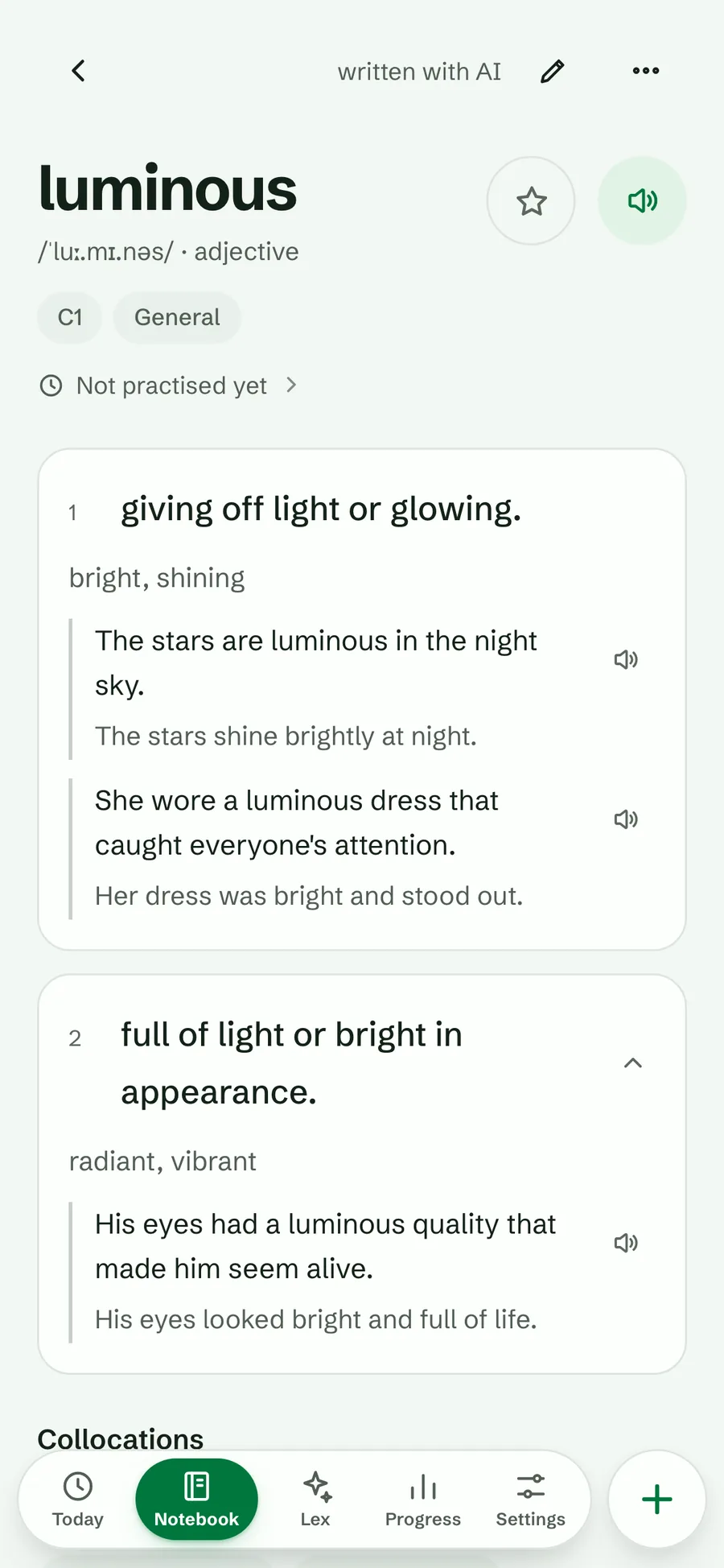
Type a word you met. AI writes the card: meanings, examples with translations, pronunciation and level.
Free every day. You can change anything it writes.

 Lexpad
Save the words you meet in what you read and watch. Lexpad writes the card and brings each word back just before you’d forget it.
Apps: Mac · Windows · Android · iPhone
macOS 11 or later · Other systems
Or the direct installer · Other systems
Or the APK file · Other systems
Works in Safari today · Add to Home Screen
Works in Safari today · Add to Home Screen
Apps: Mac · Windows · Android · iPhone
Free, no card needed. We never sell your data. Updated 22 October 2026: see what’s new
AI writes the card. You can change anything.


81 languages, in any pair. Right to left where it should be.
From the moment you meet it to the day it is yours: on the web, your phone, your computer and inside ChatGPT and Claude. Real Lexpad screens and real assistant conversations.
Chapters, captions and the full transcript: the film’s own page. Also on YouTube.
New words are everywhere. Lexpad helps you keep them. Type a word you met. AI writes the card: meanings, examples, pronunciation. You can change anything. On your Mac or PC, select a word in any app, and press one shortcut. A card opens right there, with meanings, examples and pronunciation. Press Enter, and it’s saved, with its sentence. The whole app is there too, even offline. And in Chrome, Edge or Firefox, the extension works the same way. Already chatting with ChatGPT or Claude? Just say, save that word, and it lands in your notebook. They can even quiz you on what’s due. It all goes into one notebook. Use it on the web, iPhone, Android, Mac and Windows, or right inside ChatGPT and Claude. Then Lexpad brings each word back, just before you’d forget it. Keep five simple boxes, or try the Smart schedule. It learns how fast you forget. See the next thirty days at a glance. Play games and drills with your own words. Lexpad cheers you on. And a streak freeze covers a day you miss. Again and again, until the word is yours. Want more? Lex, your tutor, quizzes you and turns your own words into a story. Eighty-one languages. Any pair. Right to left, too. (On a terrace, a woman says:) “And honestly, it was ephemeral.” Lexpad. Meet a word. Make it stay. Start free at lexpad.app.
How it works
You bring the words you meet. Lexpad does the rest of the work.
Type it, select it on a web page, or ask ChatGPT. AI writes the meanings, examples and pronunciation. You can change anything.
Open Today and answer the words that are due. Flashcards, recall, multiple choice, spelling and cloze.
Each word comes back just before you’d forget it, then less and less often. Box 5 means mastered.
Free where you meet words. Pro when you want a tutor. See every feature
AI cards Free
Type a word you met. AI writes the card: meanings, examples with translations, pronunciation and level.
Free every day. You can change anything it writes.
Browser extension and desktop app Free
Reading or watching on a computer? Select a word on any page, or click one in YouTube subtitles, and save it with the sentence you found it in.
The sentence becomes its first example, with a note of where you saw it. Chrome, Edge, Firefox, and any app on Mac or Windows.
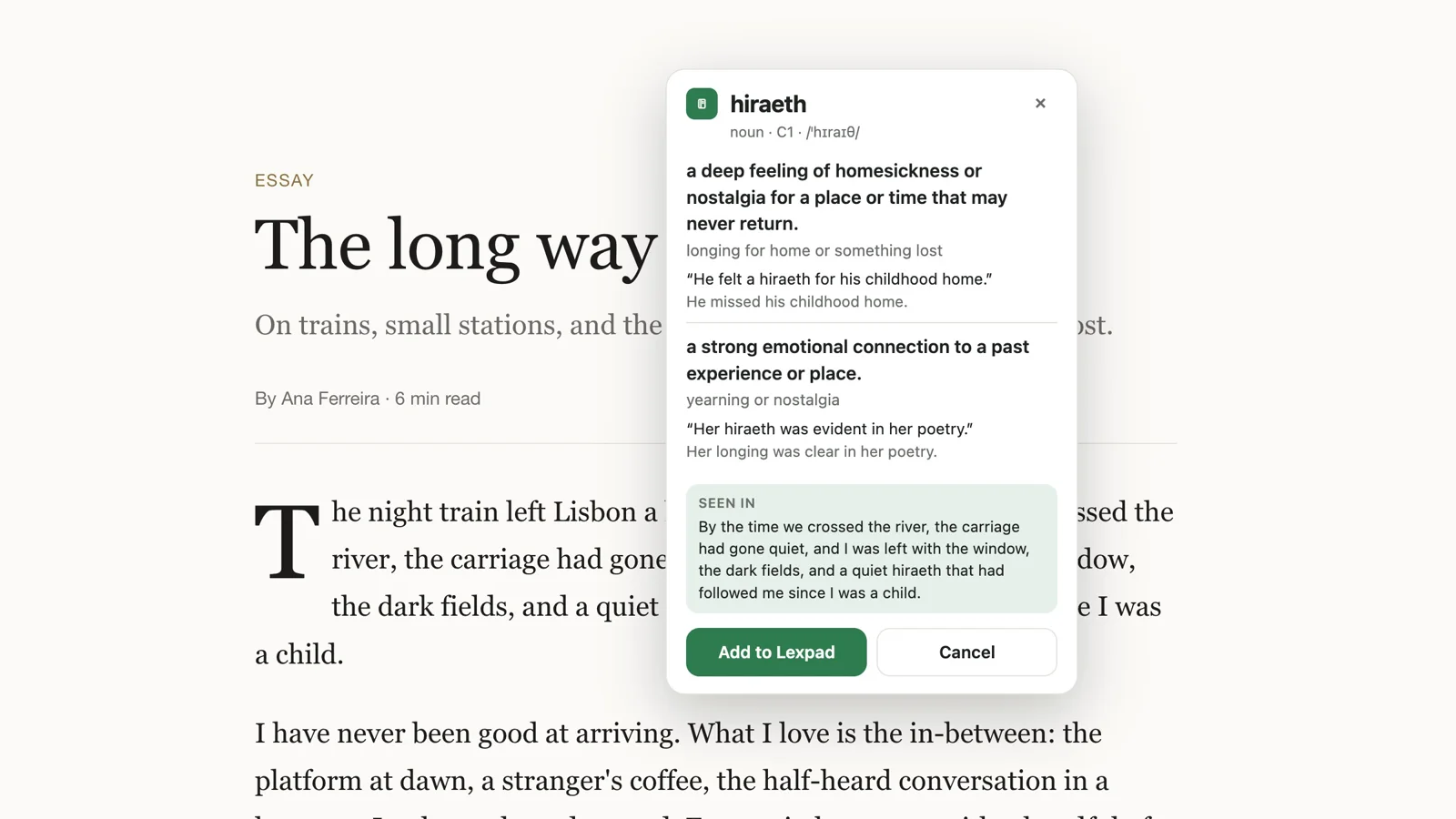
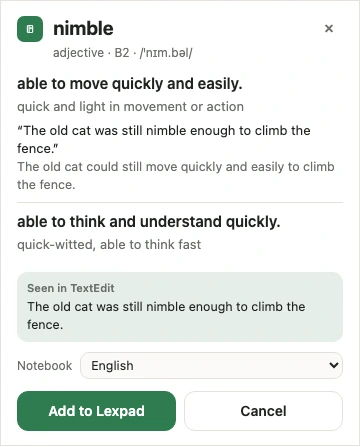
The shortcut: Command Shift L on a Mac, Control Shift L on Windows.
In any app on your computer: select a word, press the shortcut. Mac and Windows. The desktop app
ChatGPT and Claude Free
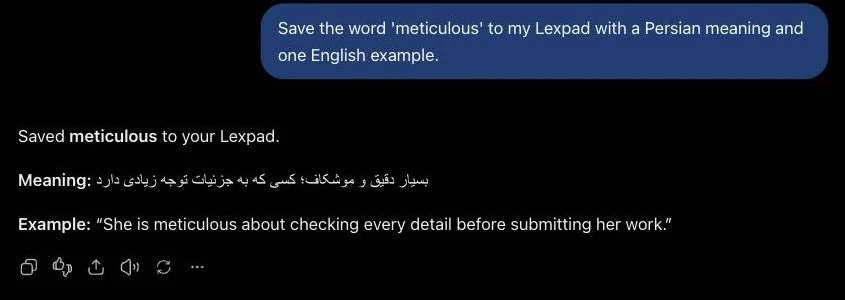
Ask ChatGPT or Claude to save a word to your notebook, or to quiz you on the words that are due.
Free on every plan. It can never see your e-mail address or pay for anything.
Practice Free
Lexpad picks what to practise today: due words first, then new ones.
Five boxes, six card types and five games, all free. Practice works offline.

Know it: the word moves up a box and waits longer. Miss it: back to box one. A mastered word waits weeks, then months. Read about the Leitner system, how Lexpad works and how to memorize vocabulary.
Mastered, then 45 90 180 365 days, as long as you know it.
Also: games and drills, the smart schedule (beta), your next 30 days and a streak freeze for a day you miss.
Home-screen widgets Free
Today’s reviews, one of your own words to flip and answer, quick add and your progress, right on your Android home screen.
Four widgets in the Android app from 1.0.69, on Google Play and as the APK, in light and dark. iPhone widgets are in testing.

Words worth keeping Pro
Paste what you read, and AI picks out the idioms, phrasal verbs and expressions worth learning.
Each comes in the form you learn it (“gave up” becomes “give up”), with a meaning, a level and its sentence. On Free, pick words from any text yourself.

Lex, your tutor Pro
Chat with a tutor that knows your newest words. It quizzes you, finds the ones you mix up and puts them in a story.
Ask Lex to add a word: nothing changes until you tap Add. Lex works with your own words and will not hand out lists of new words.

And more: 81 languages in any pair, right to left included; practice offline; Kindle highlights and lookups; Anki decks and Quizlet lists; a friend’s shared notebook; voice input with Pro. Every way to add words
The notebook, every practice style and sync are free. Pro adds Lex, Words worth keeping and many more AI cards each day. Every new account gets Pro free for 14 days, no card needed. When it ends, nothing you made is taken away.
Free
0 USD
forever
Pro monthly
4.99 USD
a month, cancel any time
Pro yearly
29.99 USD
Billed once a year, about 2.50 USD a month.
12 monthly payments = 59.88 USD. Paying yearly saves 29.89 USD.
Prices in USD. Web billing through Paddle; Android billing through Google Play. Compare plans and billing, or read the refund policy.
Pro starts from your free account: create it first, then choose Pro in Settings.
We never sell your data. Export your words any time. Pro comes with a 14-day money-back promise.
Lexpad is made by Reza Pirighadim. Write to hello@lexpad.app. The Mac and Windows app’s code is public on GitHub.
The same words and the same schedule on the web, your phone and your computer. Practice works offline, and syncs when you are back.

The same notebook and the same schedule in each. A tick means available today; Soon is not released yet.
 Chrome, Brave, OperaExtension 0.4.0Available
 Microsoft EdgeExtension 0.4.0Available
 FirefoxExtension 0.4.0Available
 KindleImport looked-up wordsAvailable
 App StoreiPhone and iPad app, coming soonSoon
Short answers about how Lexpad works, what it costs and where it runs.
Still wondering? Email us or see every feature.
Lexpad is an AI vocabulary notebook with spaced repetition. Add the words and phrases you meet, let AI complete their cards if you want, and practise them in short daily sessions.
A personal record of the words you meet in your own reading, listening and conversations, each with its meaning and the sentence you found it in, which you review at growing gaps until the words stay. It can be paper, a spreadsheet or an app. See how to make a vocabulary notebook, the free printable template and the digital vocabulary notebook guide.
No starter packs or words of the day. You bring the reading and the vocabulary. Add words yourself, or use Pro’s Words worth keeping to find expressions in your own text and remove anything you already know.
Lexpad uses five Leitner boxes with intervals of today, 1, 3, 7 and 21 days. A correct answer moves a word up one box. A wrong answer returns it to box one. Words in box five count as mastered: they come back after 21 days, then after 45, 90, 180 and 365 days as long as you know them.
Yes. Five Leitner boxes are the default. Each notebook can switch to the Smart schedule, built on FSRS-6 (Beta, free), and back again without losing a box.
Anki and Quizlet are flashcard apps for any subject, with shared decks and sets. Lexpad is a vocabulary notebook for the words you meet yourself: AI writes each card, and the schedule is visible at a glance. See Lexpad vs Anki and Lexpad vs Quizlet.
Lexpad supports 81 languages in any target and meaning-language pair: 6,561 pairs, because the same language can be on both sides for definitions (every language, with its native name and code). Arabic, Hebrew, Persian, Urdu and Pashto are written right to left, each piece of text in its own direction. The app’s screens are in English; this site is also in Türkçe, Español, Português, Deutsch, Français, 日本語 and فارسی.
Yes. Import Kindle highlights from My Clippings.txt or lookups from vocab.db. Import an Anki deck (.apkg) as it is (on the web app for now), a CSV or TSV that Anki or Quizlet exported, or paste a Quizlet set’s export text; you see the first cards before they are added. Lexpad also imports its own JSON exports and skips duplicate words. See Kindle to flashcards, Lexpad vs Anki and Anki vs Quizlet, or compare Anki alternatives and free Quizlet alternatives.
Yes, with Pro. It works in the Android app and in web browsers that support speech recognition, and listens in the destination notebook’s language. Review what was heard before adding it; it never saves automatically. Firefox does not support it.
Yes. Saved notebooks, practice sessions and progress work from your device, then sync when you reconnect. AI generation, billing, creating a notebook and opening a public shared notebook need an internet connection.
Yes. Connect Lexpad to ChatGPT, Claude or Claude Code as a custom MCP connector at https://api.lexpad.app/mcp and approve it on a Lexpad page. Then ask the assistant to save words, find the words due today or quiz you; answers count as practice. It is free on every plan, never sees your password, and you can disconnect it in Settings, Connected apps.
The iPhone and iPad app is coming to the App Store (Lexpad for iPhone). You can use the web app on an iPhone or iPad now. Android is on Google Play and as a direct APK download, and the Chrome, Edge and Firefox extensions are published.
Yes. Your first notebook, unlimited words, all practice types, both schedules, five games and drills, offline use, sync, export and AI cards every day are free. Optional Pro adds Lex for conversational vocabulary practice, Words worth keeping for discovering expressions in your own text, many more AI cards each day (the same cards, more of them), Say it and Use it in a sentence, voice input and more notebooks. Every new account gets Pro free for 14 days, no card needed. When it ends, nothing you made is taken away.
Lex is Lexpad’s AI vocabulary tutor for Pro users. It knows your recently saved words. Chat with it to practise recalling them, compare words that are easy to confuse, and get help using your vocabulary in sentences, stories and writing. Lex needs an internet connection.
It is a Pro feature in the web app that finds useful words, phrasal verbs and fixed expressions in text you paste. Suggestions start selected; cross out the ones you know. Each saved entry keeps its original sentence. Manual text selection is still available separately.
Your words stay in your notebook and the practice schedule keeps running. Pro continues until the end of the paid period, then the account returns to Free. See the pricing and refund pages for billing details.
Start free in your browser. Add the apps when you want them.
Apps: Mac · Windows · Android · iPhone
macOS 11 or later · Other systems
Or the direct installer · Other systems
Or the APK file · Other systems
Works in Safari today · Add to Home Screen
Works in Safari today · Add to Home Screen
Apps: Mac · Windows · Android · iPhone