 Lexpad
Vocabulary notebook guideVocabulary notebook:
how to make one that works
A vocabulary notebook is a personal record of the words you meet in your own reading, listening and conversations, each written with its meaning and the sentence you found it in, which you review until the words stay. To make one that works, write little for each word, test yourself instead of rereading, and review each word at growing gaps: one day after you write it, then on days 4, 11 and 32.
By Reza Pirighadim, who makes Lexpad. Checked against the app on 20 October 2026.
- Per word
- Word, meaning, your sentence
- Review
- Days 1, 4, 11, 32
- Rule
- Test yourself; a miss starts again
- Template
- Free PDF, A4 or Letter
What a vocabulary notebook is
It is a place for the words you meet yourself: not a list someone else chose, and not a dictionary. Its value comes from two things a list cannot give you. The words matter to you, because you met them. And you come back to them.
In a well-known article in the ELT Journal, Norbert and Diane Schmitt argue that a notebook should hold more than a translation and that its words should be reviewed again at growing intervals, not just written down once (Schmitt and Schmitt, 1995). That is the whole method in one line: write enough, then come back.
This guide in other languages: Deutsch · Türkçe · Español · Português · Français.
People call it many things: a vocabulary journal, a word notebook, a vocabulary log, a personal dictionary. They are the same idea. It can live on paper, in a notes app or spreadsheet, or in an app made for it; an AI vocabulary notebook is an app where you still choose the words and AI fills in each card for you.
How to make a vocabulary notebook, step by step
- Choose where it lives. A small paper notebook, a spreadsheet, or a vocabulary notebook app. Pick the one you will open every day; paper, digital or AI below compares them.
- Set up the columns. Date, word, meaning, the sentence you met it in, and room to mark each review. The free printable template (PDF, A4 or US Letter) has exactly these.
- Add words the day you meet them. Only words you want to use or understand again. A few a day you will review beat fifty you will not.
- Write a short entry. The word in its usual form, one clear meaning, the sentence as you found it, and where. That is enough.
- Review by testing yourself. Cover the meaning and recall it before you look. Do it one day after you wrote the word, then on days 4, 11 and 32.
- Start a missed word again. If you did not know it, it goes back to the start; if you knew it four times in a row, it is yours. Look at it again now and then.
What to write for each word
Keep the entry short enough that you will still write it on a busy day. These five fields are enough:
| Field | Why it helps | Tip |
|---|---|---|
| The word, in its usual form | It is what you will look for and practise. | Write the form you will use: “give up”, not “gave up”. |
| Its meaning | One clear meaning beats five you will not read. | Your own language, or a simple definition in the language itself once you are advanced. |
| The sentence you met it in | It keeps the meaning the word had for you, and it is a ready-made example. | Copy it as it was. Underline the word. |
| Where you met it | A book, a series or a meeting is a strong memory hook. | A few words: “Chapter 3”, “team call”. |
| Extras | Pronunciation, part of speech, words it goes with (collocations), a note. | Add them when they help, not because there is a column. |
Leave the rest out. A notebook that takes ten minutes per word is a notebook you stop keeping.
Vocabulary notebook examples
Here is what good entries look like, from five learners with different languages. Each is short, has one meaning, and keeps the sentence and the place it came from. The meaning can be a translation into your own language or, once you read easily, a simple definition in the language itself.
| Word | Meaning | The sentence it came in | Where |
|---|---|---|---|
| reluctant | reacio, poco dispuesto (a Spanish speaker learning English) | He was reluctant to sign the contract. | A work e-mail |
| to run out of | to have none left (an advanced learner, English to English) | We ran out of milk again. | At home |
| die Ausrede | an excuse (an English speaker learning German) | Das ist doch nur eine Ausrede. | A German series |
| la madrugada | the early hours of the morning, after midnight | Me desperté de madrugada. | A podcast |
| 諦める (あきらめる) | to give up | 最後まで諦めない。 (I won’t give up until the end.) | A manga |
Three layouts work well. Columns on a page, one line per word, as in the table above and the template: fastest to keep up. One word per card, meaning on the back: easiest to test yourself and to sort into boxes. A page per topic (work, travel, a book): nice to read, harder to review, so add a date to each word.
Why the sentence matters
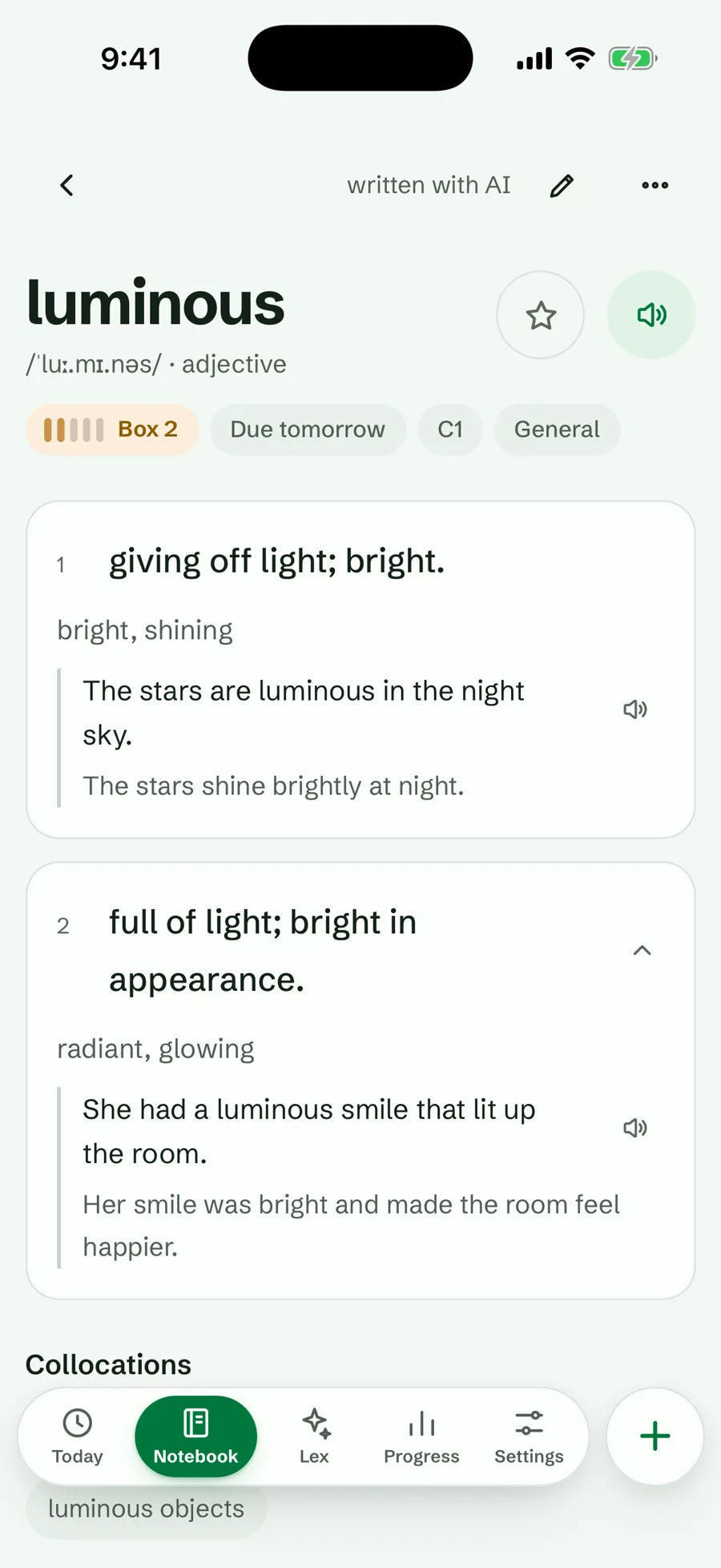
A word on its own is easy to forget and easy to misuse. The sentence shows how the word behaves: what comes before and after it, how formal it is, which of its meanings you met. When the word comes back for review, the sentence is the first thing that brings back the moment you saw it.
If you read on a screen, save the word and its sentence in one step. How to save new words while reading shows how, in a browser, on a phone or from an e-book.
Reviewing it: the part most notebooks skip
Most notebooks fail here. Rereading a page of words feels like work but does little. What works is testing yourself: cover the meaning and try to recall it. In a study of Swahili–English word pairs, students who kept testing themselves remembered far more a week later than students who kept studying the pairs again (Karpicke and Roediger, 2008, Science).
The second rule is spacing. Reviews spread over days beat the same reviews crammed into one sitting; a review of 317 experiments found this again and again (Cepeda et al., 2006). The simplest way to space reviews is the Leitner rule: a word you know waits longer before it comes back; a word you miss starts again. On paper, that gives these review days for a word you know each time:
- Write itDay 0
- Review 1Day 1
- Review 2Day 4
- Review 3Day 11
- Review 4Day 32
The gaps are 1, 3, 7 and 21 days, the same waits as Lexpad’s boxes; in Lexpad a mastered word then waits 45, 90, 180 and 365 days while you know it. Missed a word? Start it again from day 1, counted from the day you missed it. The Leitner system explained shows how to run the same rule with paper cards, and how to memorize vocabulary covers the method in full.
Paper, digital or AI?
All three work. Choose the one you will actually open every day.
| Paper notebook | Notes app or spreadsheet | AI vocabulary notebook app | |
|---|---|---|---|
| Adding a word | By hand, anywhere | Typing or pasting | Typing, or saving it straight from what you read |
| Meaning and examples | You write them | You write or paste them | AI writes a first version; you check it and change anything |
| The sentence you met it in | You copy it out | You paste it | Saved with the word when you save it from a web page or another app |
| Which words to review today | You work it out from the dates | You work it out, or build formulas | The app shows them |
| Testing yourself | Cover the meaning column | Hide a column | Flashcards, typing, multiple choice and more |
| Cost | A notebook and a pen | Usually free | Varies; Lexpad has a free plan |
Paper costs nothing, has no screen, and writing a word by hand makes you look at it closely. Its weak point is the review: you have to work out which words are due, and a page has no memory of the words you missed.
A notes app or a spreadsheet is quick to type into and easy to search, but it is still a list: it does not test you or tell you what to review. Digital vocabulary notebook compares the four digital ways in detail.
An AI vocabulary notebook app does the bookkeeping and most of the writing. You choose the word; AI drafts the meanings, examples with translations and pronunciation; the app knows which words are due today and asks each one in different ways. Check what the AI writes: it can be wrong, and a good app lets you change it.
Many people do both: a small paper notebook in a bag for the moment they meet a word, and an app for the reviews. Choosing an app? Which vocabulary app fits how you learn compares the four kinds.
A free vocabulary notebook template
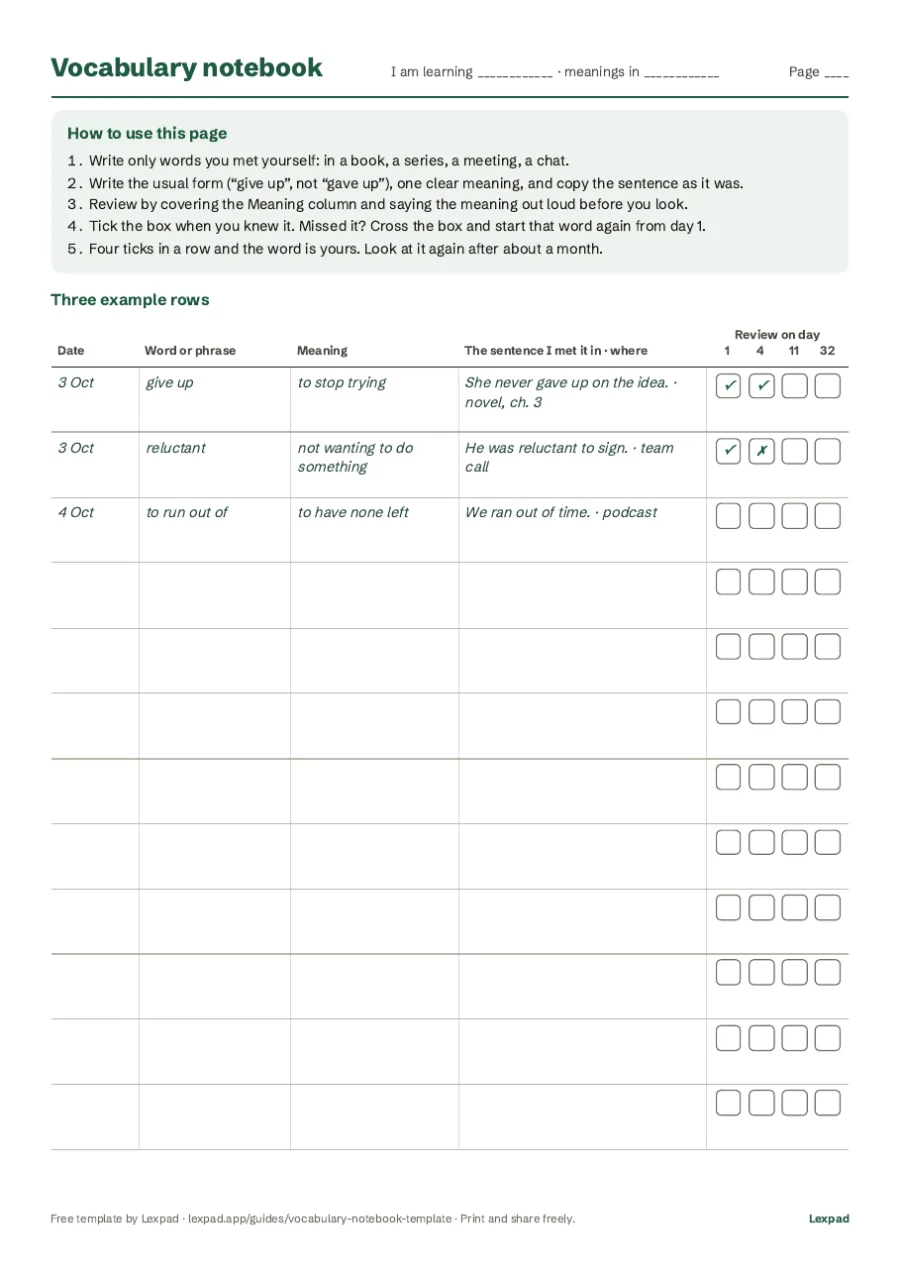
Prefer paper? Print our free template: two pages with the columns above and four review boxes per word for days 1, 4, 11 and 32. Page 1 explains the method with three filled rows; print page 2 as often as you need. Download the A4 PDF or the US Letter PDF, or read how to use the template.
Keeping one in Lexpad
Lexpad is our own app: an AI vocabulary notebook made for exactly this method. What it does for each of the steps above:
- Add the word. Type it with Add a word, or save it as you read: the browser extension and the desktop app keep the sentence too. You can also paste a text and pick words, or import your Kindle look-ups.
- Fill in the card. Fill with AI writes meanings, examples with translations, pronunciation and a level. You can change anything, and report anything the AI got wrong.
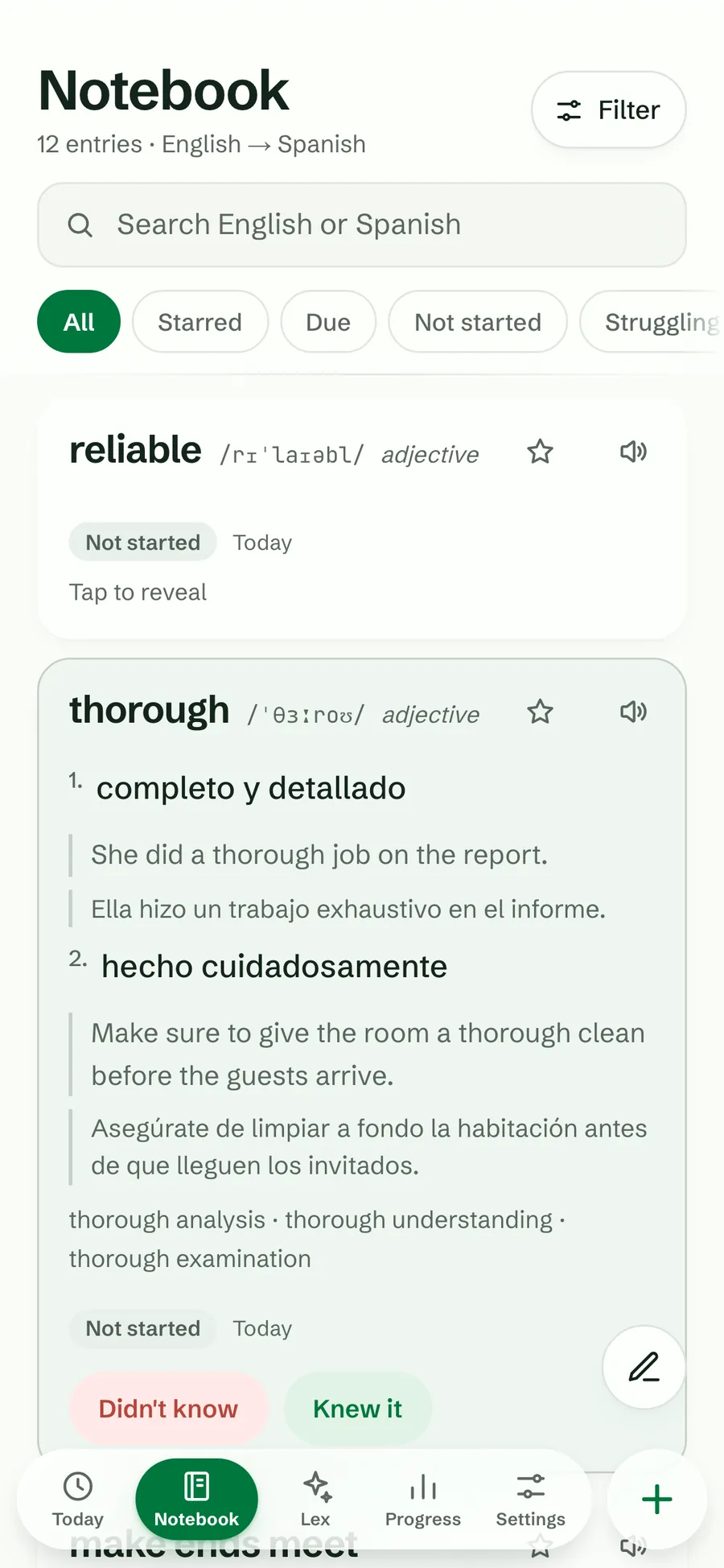
- Review. Today shows the words that are due, in five Leitner boxes. A right answer moves a word up; a miss sends it back to box 1.
- Test yourself in the notebook itself. Turn the Meanings switch off and the notebook becomes a quiz: each hidden meaning has a Show meaning button, and Knew it or Didn’t know moves the word’s box like a session.
The notebook, both schedules and the browser extension are on the free plan, with a daily allowance of AI cards. The notebook works offline, syncs between your devices and can be exported or shared by link: see vocabulary notebooks, offline and sync. Coming from a paper notebook or a spreadsheet? Type the words in, or save the sheet as CSV and import it.
Common mistakes
- Copying lists. Words from a “top 1,000” list have no story behind them. Keep the words you met.
- Writing too much. If every entry takes a page, the notebook stops after a week.
- Never testing. Reading the page is not reviewing it. Cover the meaning and recall it.
- Adding more than you can review. Fifty new words a day feels productive and turns into hundreds of reviews a day within a month. How many new words a day works it out.
- Translations forever. Once you read easily in the language, try simple definitions in the language itself. Lexpad can keep a notebook in one language, such as English–English, with learner’s definitions instead of translations.
Good to know
Questions
What is a vocabulary notebook?
A personal record of the words you meet in your own reading, listening and conversations, each with its meaning and the sentence you found it in, which you review at growing gaps until you know the words. It can be paper, a spreadsheet or an app.
What is an AI vocabulary notebook?
A vocabulary notebook app where you still choose the words, from your own reading, listening and conversations, and AI fills in each card: meanings, examples with translations, pronunciation and a level. You can change anything it writes. Spaced repetition then brings each word back before you forget it. Lexpad is one: Fill with AI writes the card, and anything the AI wrote can be reported.
How do I make a vocabulary notebook?
Pick paper, a spreadsheet or an app. Make columns for the date, the word, its meaning, the sentence you met it in and your reviews. Add words the day you meet them, keep each entry short, and test yourself on each word one day later, then on days 4, 11 and 32. A missed word starts again.
What should a vocabulary notebook look like?
One entry per word: the word in its usual form, its meaning, the sentence you met it in and where you met it. Add pronunciation or collocations only when they help. Leave space or a mark to record each review. The free template shows one layout.
Is a vocabulary journal the same as a vocabulary notebook?
Yes. Vocabulary journal, word notebook, vocabulary log and personal dictionary all name the same habit: writing down the words you meet and coming back to them.
Do vocabulary notebooks work?
They work when you review them. Writing a word down once does little; testing yourself on it again and again, with gaps that grow, is what research supports (Karpicke and Roediger, 2008; Cepeda et al., 2006).
How many new words should I add a day?
As many as you meet and want to keep, but review only as many as your days can carry. Lexpad brings in up to 15 new words a day by default; how many new words a day shows the reviews each one brings.
Is a paper or a digital vocabulary notebook better?
Neither is better in itself. Paper is simple and has no screen; an app keeps track of what is due and saves time adding words. The best notebook is the one you review every day. Digital vocabulary notebook compares the digital options.
Is there a free vocabulary notebook template?
Yes. Our free printable template is a two-page PDF in A4 or US Letter, with columns for the word, its meaning and your sentence, and review boxes for days 1, 4, 11 and 32.
Should I write a translation or a definition?
A translation is quicker at first. Once you read the language easily, simple definitions in the language itself help you think in it. You can switch at any time.
Should I organise words by topic or by date?
By date is easiest to keep up, because you never have to decide where a word goes. Add a topic as a label if it helps. Lexpad keeps both: a topic on each word, and the notebook can be ordered by Latest, by day or A to Z.
Lexpad
Your next word is worth keeping.
Lexpad is free to start, on the web and on Android. Bring the words you meet.