 Lexpad
ChatGPT and Claude vocabulary flashcards
Your assistant teaches.
Lexpad remembers.
A chat with ChatGPT or Claude is a good place to meet new words and a bad place to keep them: the conversation scrolls away and nothing brings the word back. Connect Lexpad and the assistant can save words to your notebook, tell you what is due and quiz you, and every answer counts toward your spaced-repetition schedule.
By Reza Pirighadim, who makes Lexpad. Checked against the app on 2 November 2026. How this guide is made.
- Works with
- ChatGPT and Claude
- Saves
- Words, meanings, examples
- Practice
- Answers count like a review
- Plan
- Free to connect
Can ChatGPT make flashcards?
Yes. Ask for cards on a topic, or on the words you did not know in a text you paste, and it writes them in the chat, front and back, as text. Claude does the same. The trouble starts a week later. Nothing in a chat brings a card back on the day you are about to forget it, and the conversation has scrolled on. There are three ways round that.
| Way | What you do | Cost | A week later |
|---|---|---|---|
| Ask, then copy | Ask for cards on a topic or on the words in a text you paste. They appear in the chat. | Free | The cards sit in the chat history. Nothing brings one back when you are about to forget it. |
| Ask for a file, then import | Ask for a CSV, one card per line, and import it into Anki or Lexpad. | Free, one more step | The app you imported into runs the schedule. Words from later chats need the same steps again. |
| Connect Lexpad | Say “save meticulous to my Lexpad”. The assistant writes the card into your notebook and can quiz you on what is due. | Free to connect; on Free, ChatGPT and Claude write 10 cards a day, and on Pro they are unlimited (up to 1,000 a day). | One notebook, one schedule. Each word comes back on its day, in the chat or in the app, and your answers count. |
Lexpad is listed in ChatGPT’s Plugins Directory and in Claude’s connector directory; the rest of this page is about that third way. If you already use Anki, the second way is a good one, and the same file imports into Lexpad if you move later.
The short answer
- Use the chat to understand words. Ask for meanings, examples in your own topic, the difference between two words, or whether a sentence you wrote sounds natural.
- Save the words you want to keep, in the same chat, to a notebook that has a schedule. A word left in a chat history is a word you will not see again.
- Review a few minutes a day, in the chat or in the app. Test yourself rather than rereading, with longer gaps for words you know.
The third step is the one a chat cannot do alone. What keeps words is testing yourself on them again and again, with growing gaps: how to memorize vocabulary sums up the research, and spaced repetition for vocabulary explains the schedules.
Connect once
Lexpad connects through MCP, the open standard assistants use to work with other apps. In Claude, open Lexpad’s page in the connector directory and choose Connect. In ChatGPT, open Lexpad in the Plugins Directory and add it, then type @Lexpad in a chat to call it by name. Either way you sign in on Lexpad’s own page and approve what the assistant may do; it never sees your password. Connecting is free.
The full steps are on Lexpad in ChatGPT and Claude. In the app, Settings has a Connect ChatGPT or Claude guide.
Flashcards in Claude that come back on time
Claude is good at making flashcards: ask for cards on a topic and it writes them, quizzes you in the chat, or builds a small flashcard app as an artifact you can click through. Those cards live in that conversation, and nothing brings them back next week. Lexpad is in Claude’s connector directory (since 4 October 2026), so Claude can save each card to a notebook that schedules it, and read back what is due. It works in claude.ai, Claude Desktop and the Claude apps.
- Open Lexpad’s page in Claude’s connector directory: claude.ai/directory/lexpad.
- Choose Connect.
- On the Lexpad page, sign in if asked and choose Allow. You are back in Claude, connected.
- Recommended: in Claude, open Customize, Connectors, Lexpad. Set both groups of tools to Always allow, then set Delete a word back to Needs approval, so Claude asks only before deleting.
Then try: Explain the difference between reluctant and hesitant, then save both to my Lexpad with an example about work.
Claude writes each card and saves it; the next day, ask Quiz me on what’s due in Lexpad
and your answers move the words through their steps.
- A prompt for a reading:
Here is an article I read, with the words I did not know in bold. Explain each one, and save the ones I choose to my Lexpad with the sentence from the article.
- A prompt for review:
Which of my Lexpad words am I struggling with? Quiz me on them, one at a time, and record my answers.
- Cards for Anki instead: Claude can also write cards as a CSV file, one card per line, that Anki imports. The schedule then lives in Anki. Lexpad imports the same file if you move later.
Lexpad gives Claude 20 tools: read your notebooks and words, add and edit the words you ask for, see what is due and record your answers, answer questions about Lexpad from its own pages, and send your feedback when you say yes. Connecting is free. On Free, ChatGPT and Claude write 10 cards a day. On Pro, chat cards are unlimited (up to 1,000 a day). Claude itself needs a plan that lets you add connectors. Claude Code connects with one command: claude mcp add --transport http lexpad https://api.lexpad.app/mcp. Every tool.
Prompts that work
Write the way you would talk. Each of these matches a tool Lexpad gives the assistant, named under it, so it does what it says. Your assistant chooses the tool; ChatGPT and Claude may ask you to approve a change first.
“Explain the difference between “affect” and “effect”, then save both to my Lexpad with one example each.”
The chat does the teaching; the two words you named are saved with the examples it wrote. A word you already have moves to the top instead of being added twice.
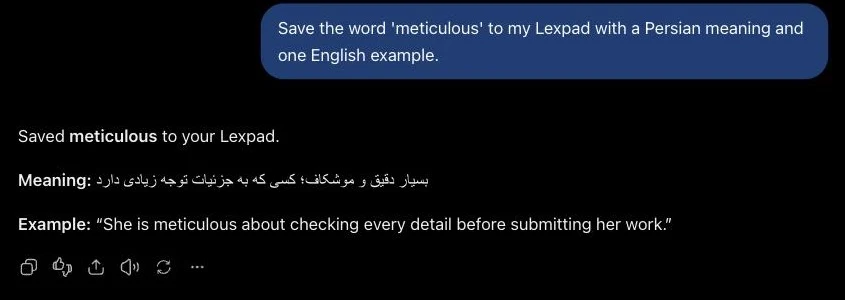
add_word“Save “meticulous” to my Lexpad with the sentence it was in, from the article above.”
Only the word you name is saved, with its sentence as an example. Lexpad’s tools tell assistants to save only the words you ask for.
add_word“Quiz me on my due words, one at a time.”
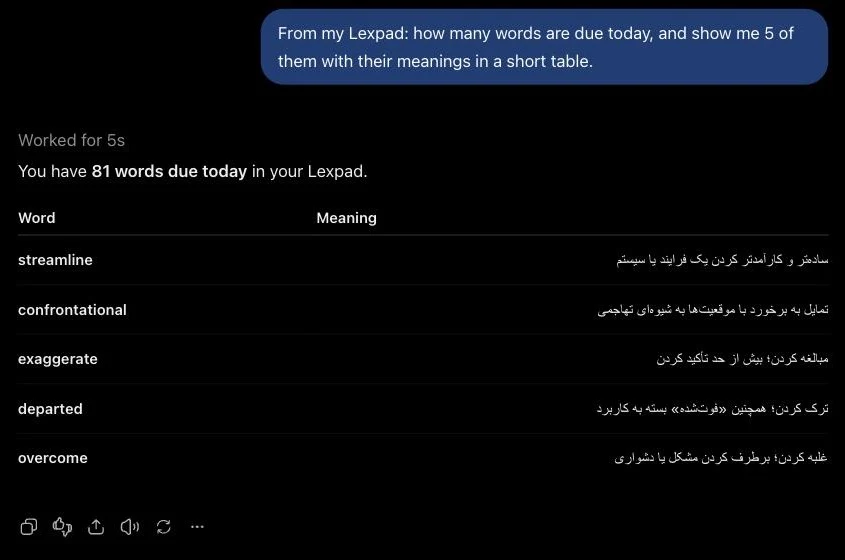
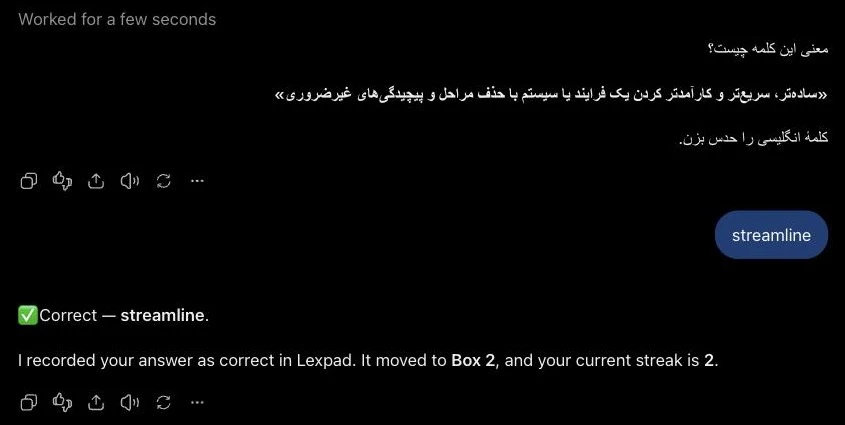
It reads today’s due words and asks. Each answer is recorded as practice: the word moves through its steps and your streak counts.
get_due_wordsrecord_answer“Which words am I struggling with? Give me a short multiple-choice quiz on them.”
It filters your notebook to struggling words; the assistant writes the questions, and your answers count for each word.
list_wordsrecord_answer“What did I add this week? Put them in a table with their meanings.”
Your most recent words, newest first, as a table you can read through.
get_recent_words“Make the “to push forward” meaning of propel the main one.”
Reorders the meanings. The first meaning is the one practice asks about.
reorder_meanings
Two habits help. Name the words you want saved, rather than “save the new words”, so nothing lands in your notebook by guesswork. And ask for an example from your own context (your work, a book, the article you pasted): the sentence is what brings the word back later. Every tool is listed on the assistants page.
Save words from the chat
Ask the assistant to save a word and it writes the card: a meaning in your language and an example. The word goes into your notebook like any other, marked as added by an assistant, and Lexpad brings it back on its schedule. Chat in any language you learn.
Practise in the chat
Ask what is due, or ask for a quiz. The assistant reads your due words from Lexpad and asks; when you answer, it records the answer. A right answer moves the word up a step, a miss sends it back, and the day counts for your streak, exactly as a session in the app would. You can switch between the chat and the app from one day to the next.
Other ways
- Just ask the chat. With no connection at all, ChatGPT or Claude will happily write flashcards or quiz you. It works for one sitting. Nothing brings the words back next week, and your answers are not kept anywhere.
- Quizlet’s app in ChatGPT. Type “@Quizlet” and what you need, and ChatGPT turns the conversation into a complete Quizlet flashcard set that you can flip through in the chat; open it in Quizlet to edit it, study it in Quizlet’s study modes and share it (Quizlet Help Center, checked 14 October 2026). It suits a set on one topic, such as a chapter or a test.
- Lexpad in ChatGPT and Claude. In ChatGPT’s Plugins Directory (type “@Lexpad”), in Claude’s connector directory, and in Claude Code. Instead of making a new set, it adds to the notebook you already keep, reads what is due and records your answers into the same schedule as the app. Free to connect. On Free, ChatGPT and Claude write 10 cards a day; on Pro, chat cards are unlimited (up to 1,000 a day).
- Lex, inside Lexpad. Lexpad’s own AI tutor (with Pro) chats about the words you saved most recently: it explains, compares, quizzes you and uses your words in stories. More about Lex.
Which to choose: a Quizlet set if you are studying one topic for one test; Lexpad if you collect words over months, from chats, web pages and books, and want one schedule for all of them. For words from web pages, see how to save words while you read. Comparing apps more widely? Which vocabulary app fits how you learn.
This page is about the words. For the whole method, from a daily routine to the prompts that get real corrections and what the chat gets wrong, read How to learn a language with ChatGPT or Claude.
What the assistant can and cannot do
- It can read your notebooks and words, add and edit the words you ask for, record practice answers, and delete a word only when you ask.
- It cannot see your e-mail address or password, delete your account or a notebook, or pay for anything.
- The assistant asks you before anything is removed. Disconnect it at any time in Settings, Connected apps.
Good to know
Questions
How do I turn words from a ChatGPT chat into flashcards?
Connect Lexpad once, then say “Save these words to my Lexpad”. The assistant writes each card (meanings, examples, pronunciation) and saves it to your notebook, where it comes back on a spaced-repetition schedule. You can also ask it to quiz you; your answers count as practice. On Free, ChatGPT and Claude write 10 cards a day; on Pro, chat cards are unlimited (up to 1,000 a day).
Can ChatGPT help me learn vocabulary?
Yes, for understanding: meanings, examples, differences between words, checking your sentences. On its own it does not bring words back later. Save the words to a notebook with a schedule, such as Lexpad, and review them a few minutes a day.
Do I need a paid ChatGPT or Claude plan?
Connecting Lexpad costs nothing, and its Free plan works in the chat. In ChatGPT, adding a plugin depends on your ChatGPT plan, region and workspace settings; in Claude, you need a plan that lets you add connectors.
Do my answers in the chat count?
Yes. When the assistant records an answer, the word moves through its steps and the day counts for your streak, as in a session in the app.
Can the assistant add words I did not ask for?
Lexpad’s tools tell assistants to save only the words you ask for, and you can be asked to approve each change.
Is this the same as Quizlet in ChatGPT?
No. Quizlet’s app turns a conversation into a new Quizlet set that you study in Quizlet. Lexpad’s connector adds to your existing notebook and records your answers into its schedule.
Does it work in my language?
Yes. Chat in any language; words go to the notebook whose language they are in.
Can Claude make flashcards?
Yes. Claude writes flashcards, quizzes you in the chat and can build a flashcard app as an artifact. To keep the cards and have them come back on a schedule, connect Lexpad from Claude’s connector directory: Claude then saves each card to your notebook and records your quiz answers as practice.
Lexpad
Keep the words you meet this week.
Lexpad is free to start, on the web and on Android. Bring the words you meet.