 Lexpad
Save words while reading online
Meet it on a page.
Keep it for good.
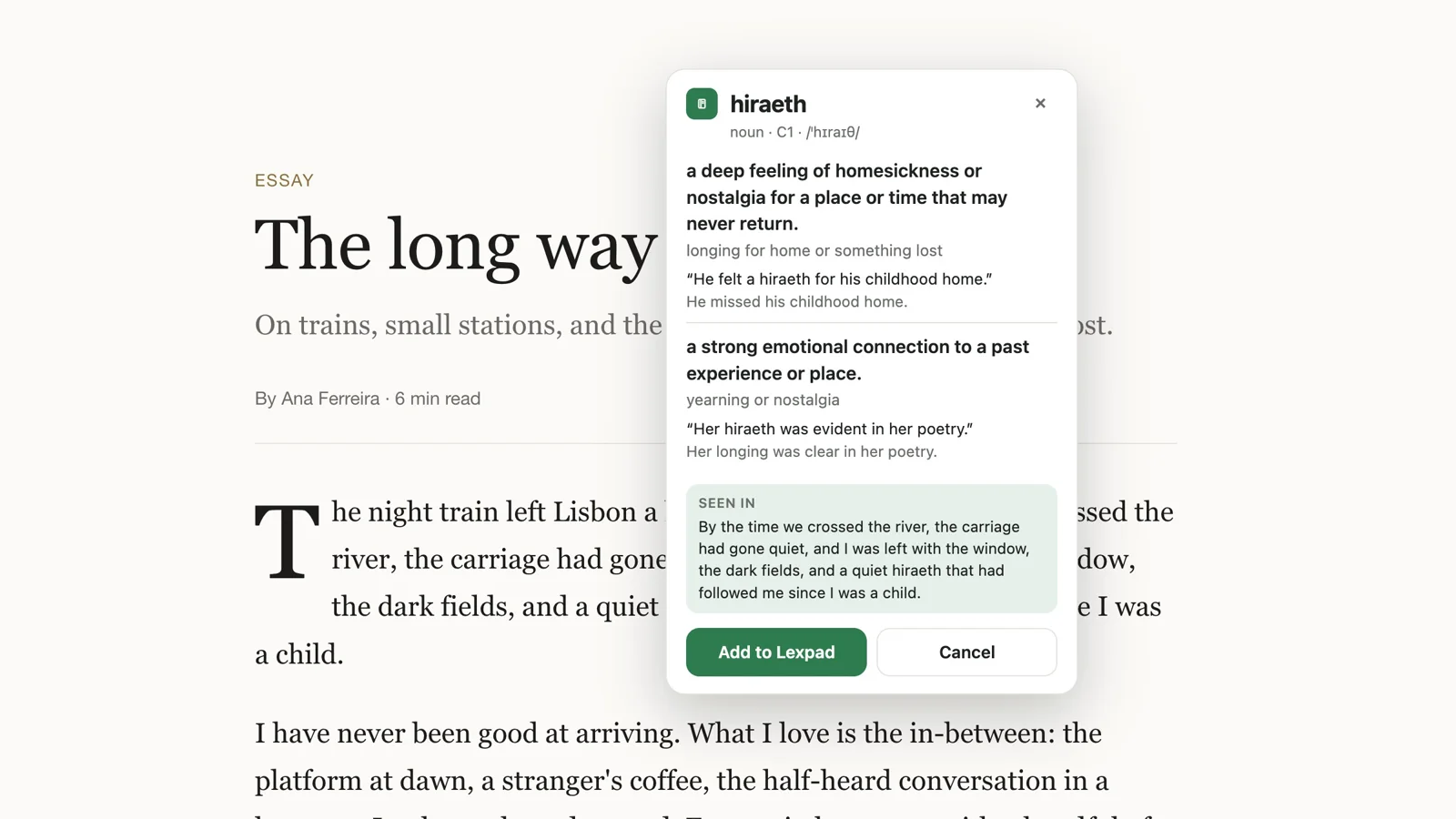
The easiest way to keep a new word you meet online is to save it the moment you see it, together with the sentence it was in. With the free Lexpad browser extension you select the word, read its meaning in a small card, and press Enter: the word, its meanings and the sentence go into your notebook, and spaced repetition brings it back.
By Reza Pirighadim, who makes Lexpad. Updated 22 October 2026: words from YouTube subtitles; what can go wrong, in the app’s own words. How this guide is made.
- Price
- Free
- Browsers
- Chrome, Edge, Firefox, Safari on a Mac; Brave, Opera and Vivaldi through the Chrome Web Store (how-to)
- Keeps
- Word, meanings, sentence, page
- Phone
- Paste the text instead
Why the sentence matters
A word on its own is hard to remember. The sentence you met it in carries the meaning that word had for you, and it is a ready-made example when the word comes back for review. That is why Lexpad keeps the sentence as the word’s first example and a private note of the page it came from. Reading a lot of text you mostly understand, known as comprehensible input, gives you many such sentences.
With the browser extension
On a computer
- Install Lexpad from the Chrome Web Store (also for Brave, Opera and Vivaldi: how-to), Microsoft Edge Add-ons, Firefox Add-ons or the Mac App Store (Safari).
- Click the Lexpad button in the toolbar and choose Connect to Lexpad. You allow it in a small sign-in window; no password is typed into the extension.
- Select a word or a short phrase on any page and press the small + button, or right-click and choose “Add to Lexpad”.
- Read the card, then press Enter to save it.
The full details, including privacy and permissions, are on the extension page.
While you watch YouTube
The same extension works in a video’s subtitles on youtube.com. Turn subtitles on, rest the pointer on a line and the video waits; click a word, or drag across a phrase, and the card opens on the video. The subtitle line becomes the example, and the note links back to that moment. Save words from YouTube subtitles. It works the same way from videos on TED and other sites: words from video subtitles.
On a phone, or for a whole article
Copy the text you read and paste it into Lexpad. Every distinct word appears in reading order; words already in your notebook are counted, not offered, and nothing is chosen for you. Pick the ones you want; they are saved as bare words, without the sentence, and AI or you add the meaning next. This works offline and is free.
On Pro, “Words worth keeping” reads the text you pasted and marks its idioms, phrasal verbs and collocations first, each in its learnable form with a short meaning and the sentence it came from; strike out what you already know. See adding words.
Reading a text with an AI assistant? You can make flashcards in ChatGPT or Claude without leaving the chat.
From books
- On a Kindle: every word you look up is kept in Vocabulary Builder. Import that file, or your highlights, and the words become cards. Kindle words to flashcards. To see them first, or take them to Anki or a spreadsheet, the free Kindle exporter opens
vocab.dband your highlights file in the browser. - A PDF or an e-book on a computer: with the desktop app, select the word in any app and press ⌘ ⇧ L on a Mac or Ctrl Shift L on Windows. The sentence comes along when the app shares it. Save words from PDFs and e-books.
- A paper book: type the word, and the sentence if you like, with Add a word. Write the card with AI writes the rest.
Want a reader that translates as you go instead? Readlang and LingQ alternatives compares six tools.
What can go wrong
- “Connect the extension to your Lexpad account to add words.” The extension is signed out, or was disconnected under Signed-in devices. Click its button and choose Connect to Lexpad.
- “You have no notebook for this language. Make one in Lexpad and try again.” The word is in a writing system none of your notebooks holds, for example Arabic when you have only an English notebook.
- “The meaning is not available right now. Add the word and fill it in later in Lexpad.” The AI could not write the card just then, for example when the day’s AI cards are used up. You can still add the word and fill its meaning later from the word’s page.
- “You seem to be offline. The word can still be added and filled in later.” The same, without a connection.
- “This word is already in your notebook.” Nothing is added twice.
- The + button does not appear. It is never offered inside text fields, and it can be switched off in the extension menu; the right-click “Add to Lexpad” is always there.
- A meaning looks wrong. Under the meanings, Report sends it to the Lexpad team (since version 0.3.1); edit the card in your notebook.
The extension saves 5 words a day on Free, 200 on Pro. What counts.
Then let them come back
A saved word starts on step 1 and is asked today. Answer it right and it waits longer each time: 1, 3, 7, then 21 days, and up to a year once it is mastered. Miss it and it comes back today. A few minutes a day is enough. How the Leitner system works.
Good to know
Questions
Is there an app to save the new words I come across?
Yes. On a computer, the free Lexpad extension, a Chrome extension for learning languages, saves a word from a web page with its sentence, and the desktop app for Mac and Windows saves a word you select in any other app with one shortcut. On a phone, paste the text into Lexpad and pick the words you want.
Does the extension read every page I visit?
No. It sends only the text you select and its sentence when you open the card, and the page title and address when you add the word.
Can I save words on my phone?
Yes: copy the text and paste it in Lexpad (Paste a text), then pick the words you want.
Can I save a phrase, not just a word?
Yes, up to seven words, such as a phrasal verb or an idiom.
How do I remember the words I save?
Test yourself on them a few minutes a day, with longer gaps for the words you know. Lexpad does this with five Leitner boxes. How to keep a vocabulary notebook explains the method.
Lexpad
Your words, back on the right day.
Lexpad is free to start, on the web and on Android. Bring the words you meet.