Readlang and LingQ alternativesReadlang and LingQ alternatives
for saving words while you read

Readlang and LingQ turn reading into vocabulary: click a word, see what it means, keep it for review. If their limits or prices do not suit you, the usual alternatives are Language Reactor (for video), Lute (free, on your own computer), Yomitan (a free pop-up dictionary that sends words to Anki) and Lexpad (our own app), which saves words from any page, app or e-book into one notebook but is not a reader.

By , who makes Lexpad. Checked against the app on 13 October 2026.

Checked
13 October 2026
Order
A to Z, not a ranking
Tools
Six, including Readlang and LingQ
Ours
Lexpad, marked as ours

What Readlang and LingQ do

Readlang works on the texts you already read: click a word or a phrase on a web page and it translates it, and every word you translate is saved for flashcards. The free plan has unlimited single-word translations and 10 phrase translations a day; Premium is $6 a month (readlang.com, 13 October 2026).

LingQ is a whole course built from content: lessons with text and audio, where each new word you click becomes a “LingQ” to review. The free account allows 20 LingQs and 5 imported lessons in total; Premium is $14.99 a month, or $10 a month yearly (LingQ blog, 4 Aug 2026).

People look for alternatives because of those limits and prices, because they read outside the app (e-books, PDFs, work documents), or because they want the saved words to keep coming back for months.

At a glance

Alphabetical, not a ranking. Prices in US dollars as each site showed them on the day.

Readlang, LingQ and four alternatives, A to Z, checked on 13 October 2026.
ToolWhere you readSaves wordsReviewPrice model
Language ReactorNetflix, YouTube, imported textsYesA saved-items list on its siteFree; in-app purchases
Lexpad (ours)Anywhere: browser, YouTube subtitles, any app on a computer, pasted text, KindleYes; from the browser and computer apps, with the sentenceLeitner boxes, or Smart (FSRS, Beta)Free plan; Pro optional
LingQLingQ lessons, imported pagesYes (20 on Free)LingQ reviewFree account; Premium $10–14.99/month
LuteTexts you add, on your computerYesStatus levels per wordFree (MIT)
ReadlangWeb pages and textsYesFlashcardsFree plan; Premium $6/month
YomitanAny web pageSends to AnkiIn AnkiFree (GPL-3.0)

Six options, A to Z

Readlang and LingQ are included so you can compare. Every fact links to the page we read it on.

Language Reactor

A browser extension for learning from video: two sets of subtitles, a pop-up dictionary and playback controls on Netflix and YouTube, and imported texts with machine translation and text-to-speech. Words and phrases you save go to a saved-items list on its site.

Platforms
Chrome on Windows and Mac computers.
Price
Free to install; the store listing says it offers in-app purchases. Its site did not show prices to our check.
Suits
Learners who watch series and videos in the language.
Keep in mind
Built around video and its own reader, not around saving words from any web page.

Checked on 13 October 2026: Chrome Web Store listing (version 5.1.8, updated 1 July 2026); saved items as described on its own forum.
Ours

Lexpad

A vocabulary notebook with spaced repetition, made by the author of this page (who makes Lexpad). It is not a reader: you read wherever you like, and save the word with its sentence into one notebook that brings it back.

Platforms
A browser extension for Chrome, Edge and Firefox; a desktop app for Mac and Windows that saves a word from any app with ⌘⇧L or Ctrl+Shift+L; the web app and Android, where you can paste a text and pick words.
Price
Free plan with unlimited words, the extension, the desktop app and both schedules; Pro is optional (prices).
Suits
Learners who read in many places (news, e-books, PDFs, chats) and want every word in one notebook.
Keep in mind
No library of texts or lessons, and it does not mark known words on a page. No iPhone app yet.

Our product. Facts from the extension and desktop pages.

LingQ

Lessons made from real content: you read and listen, click new words to make “LingQs”, and review them over time. An importer extension turns web pages into lessons.

Platforms
Web, iPhone and Android, and the LingQ Importer extension for Chrome, Safari, Firefox and Edge.
Price
Free account with 20 LingQs and 5 imported lessons in total; Premium is $14.99 a month, or $10 a month on the yearly plan.
Suits
Learners who want a full reading-and-listening course with their own content.
Keep in mind
The free account is a trial in practice: 20 saved words in total.

Checked on 13 October 2026: lingq.com, LingQ free vs Premium (4 Aug 2026).

Lute

Learning Using Texts: a free, open-source reader you run on your own computer. Read texts, click words to define them and set how well you know each one.

Platforms
Your own computer, in a browser at localhost, installed with Python 3.8 or later (pip) or Docker.
Price
Free, under the MIT licence.
Suits
Learners who like LingQ’s way of reading and are comfortable installing software.
Keep in mind
Setup needs a terminal; it runs on one computer unless you host it yourself.

Checked on 13 October 2026: GitHub, Lute manual, install.

Readlang

Read web pages and texts and click a word or phrase to translate it; every word you translate is saved for flashcard practice.

Platforms
Web, a Chrome extension (and a bookmarklet), with a guide for iPhone and Android.
Price
Free with unlimited single-word translations and 10 phrase translations a day; Premium $6 a month or $48 a year; Premium Plus $15 a month or $120 a year.
Suits
Learners who read on the web and want translations on click.
Keep in mind
Practising or exporting the words from one particular book is a Premium feature.

Checked on 13 October 2026: readlang.com.

Yomitan

A free pop-up dictionary extension: hover over a word and press a key to see definitions, frequencies and audio, then send the word to Anki with one key.

Platforms
Chrome, Firefox and Edge.
Price
Free and open source (GPL-3.0).
Suits
Learners of Japanese and other supported languages who already use Anki.
Keep in mind
You install dictionaries yourself, and reviews happen in Anki.

Checked on 13 October 2026: yomitan.wiki, GitHub.

Read anywhere, keep one notebook

Readers like Readlang, LingQ and Lute work best inside their own reading screen. If you read in many places, the other approach is to keep reading where you are and send each word to one notebook. This is how Lexpad works:

  • In a browser: select a word, read the card and press Enter. The word, its meanings and the sentence are saved, with a note of the page. The extension.
  • On YouTube: with subtitles on, click a word or drag across a phrase in the subtitle; the line is saved as its example, with a link to that moment. Words from YouTube subtitles.
  • In any app on a computer: a PDF, an e-book app, an e-mail. Select the word and press ⌘ ⇧ L or Ctrl Shift L. The desktop app.
  • On a phone or for a whole article: paste the text into Lexpad and pick the words you want; they are saved without the sentence, ready for a meaning.
  • On a Kindle: import the words you looked up. Kindle words to flashcards.

What it does not do, honestly: Lexpad has no library of lessons, does not translate whole pages, and does not colour the words you know on a page.

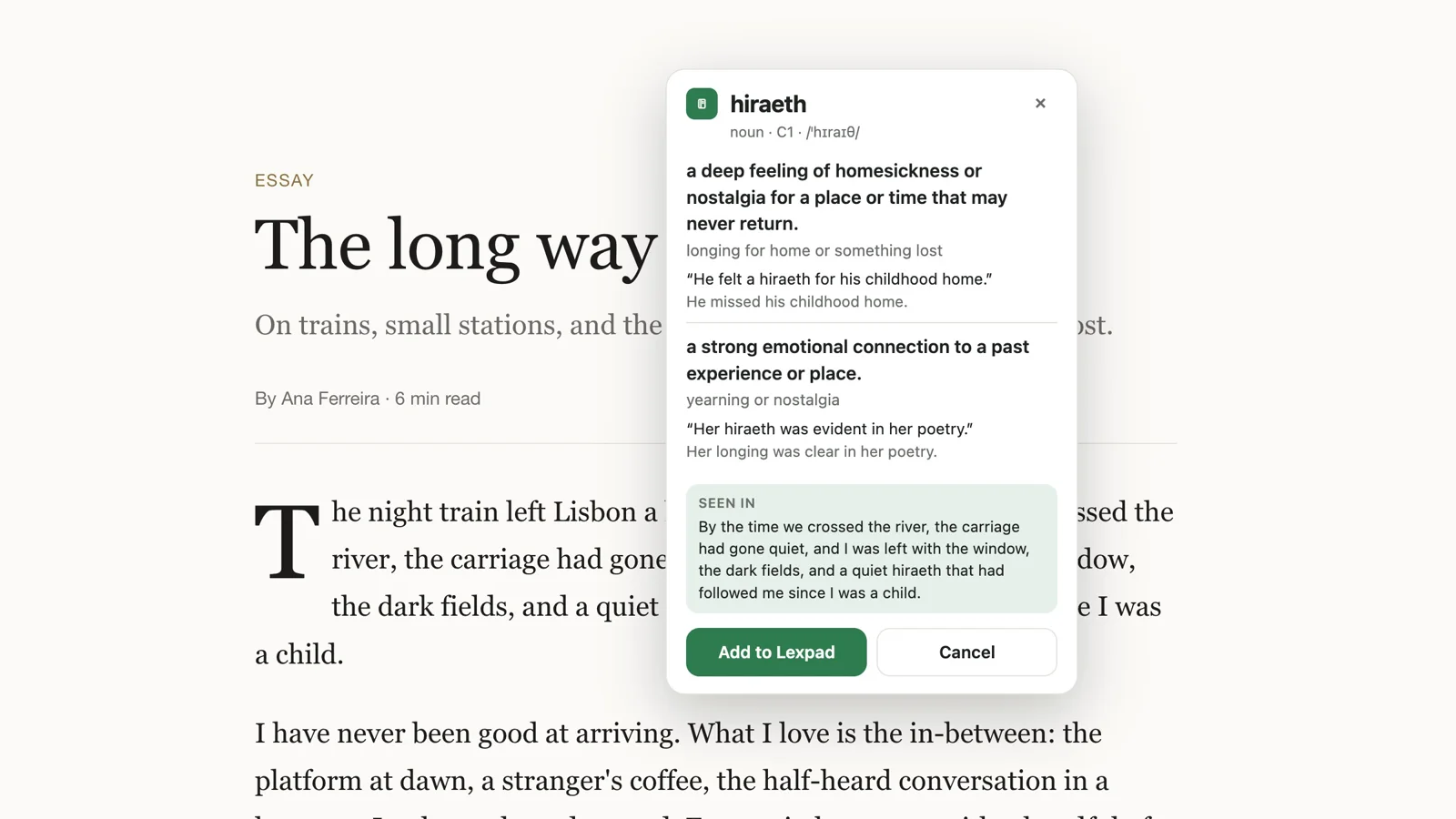
Lexpad’s browser extension explaining hiraeth in an article: two meanings with examples, the sentence it was seen in, and Add to Lexpad

How to choose

  1. Do you want a course or a tool? LingQ gives you lessons and audio. The others help with what you already read or watch.
  2. Where do you read? Mostly series and YouTube: Language Reactor; for YouTube words that go straight into a review schedule, Lexpad’s extension. Web pages: Readlang, Yomitan or Lexpad’s extension. E-books and PDFs on a computer: Lexpad’s desktop app. Your own texts, offline: Lute.
  3. Where should the reviews happen? Already using Anki: Yomitan feeds it. Want the words and their schedule in one place: Readlang, LingQ or Lexpad.
  4. Budget. Lute and Yomitan are free; Readlang, LingQ, Language Reactor and Lexpad have free plans with paid extras, and their limits differ a lot.

Good to know

Questions

What is a free alternative to LingQ?

Lute is free and open source, and works in a similar way, on your own computer. Readlang has a free plan for web pages. Lexpad’s free plan saves unlimited words from any page with the browser extension, but it is not a reader.

Is there a Readlang alternative for Firefox?

Yes. Lexpad’s and Yomitan’s extensions run in Firefox, and LingQ’s importer extension does too.

Does Lexpad work like LingQ?

No. LingQ is a reading and listening course. Lexpad is a vocabulary notebook: you read anywhere and save words into it, and it brings them back on a schedule.

Can I bring my saved words into Lexpad?

If the tool can export a file with the word and its meaning in two columns, yes. See moving words into Lexpad for the steps.

Why is Lexpad on this list if you make it?

Because saving words while you read is what it is for. It is marked as ours, the list is alphabetical, and the page says what it does not do.

Lexpad

Your next word is worth keeping.

Lexpad is free to start, on the web and on Android. Bring the words you meet.