 Lexpad
Vocabulary appsWhich vocabulary app fits
how you learn?
The right vocabulary app depends on where your words come from. If you want words chosen for you, use an app that gives you words; for any subject or ready-made sets, a flashcard app such as Anki or Quizlet; to learn from what you read and watch, a reading app such as LingQ or Readlang; and to keep the words you meet in your own life, a notebook app such as Wokabulary or Lexpad, which is ours.
By Reza Pirighadim, who makes Lexpad. Checked against the app on 14 October 2026.
- Checked
- 14 October 2026
- Kinds
- Four, by where the words come from
- Order
- A to Z within each kind, not a ranking
- Ours
- Lexpad, marked as ours
Four kinds, not one list
“Vocabulary app” covers four quite different tools. They differ less in quality than in one question: who decides which words you learn. So this page sorts them into kinds rather than ranking them. Inside each kind the apps are listed A to Z, and every fact links to the page we read it on.
All four can use spaced repetition, the method of bringing a word back just before you would forget it. Some say exactly how; some do not. Spaced repetition for vocabulary explains the schedules.
| Kind | Where the words come from | Suits | Examples |
|---|---|---|---|
| 1. Apps that give you words | The app chooses them: a word of the day, levels, exam lists | Someone who wants words chosen for them, or an exam list | Vocabulary.com; Vocabulary – Learn words daily |
| 2. Flashcard apps | You write cards, or use sets other people made | Any subject; a course or a class | Anki; Quizlet |
| 3. Reading and watching apps | The texts and videos you read or watch inside the app | Learning from real content in the language | Language Reactor; LingQ; Readlang |
| 4. Notebooks for your own words | Your own life: books, work, films, conversations | Keeping the words you meet, wherever you meet them | Lexpad (ours); Wokabulary |
1. Apps that give you words
These apps choose the words: a word of the day, levels, topics, exam lists, a trainer that adapts to what you already know. You type nothing. That is their strength, and the reason to pick one.
Better than a notebook when you do not yet meet many words of your own, or you have a fixed list to learn, such as an exam syllabus. Lexpad, our own app, has no word lists at all, so for this job choose one of these.
| App | Platforms | Price | Review schedule | Where the words come from |
|---|---|---|---|---|
| Vocabulary.com Checked 14 October 2026: VocabTrainer help, plans | Website | Free: 10 questions a day on its trainer, and its other activities. Paid: Learner plans of 1, 6 or 12 months. The plans page showed a 50% offer on the day, so we do not quote a price. | Adaptive: starts easy, adapts to what you know and keeps practising the hard words until you master them. No intervals published. | Its own trainer and word lists |
| Vocabulary – Learn words daily (Monkey Taps) Checked 14 October 2026: US App Store | iPhone and iPad (iOS 18 or later), Mac with Apple M1 or later, Apple Watch, Apple Vision | Free: the download. Paid: Premium in-app purchases, listed from $9.99 to $149.99 (lifetime). | Not described on the listing | More than 10,000 English words by level and topic; a new word on the Lock Screen |
Keep in mind: the words are someone else’s choice, so some will be words you never meet. Check that the app lets you test yourself on them later, not only read them.
2. Flashcard apps for any subject
General flashcard apps hold any question and answer, in any subject. You write the cards yourself or use sets other people made, and the app brings them back for review. Anki gives you a great deal of control over cards and settings; Quizlet can build a set for you from your notes.
Better than a vocabulary notebook when you study more than languages, follow a course with shared decks or sets, or want to design your own card templates. Our longer comparisons: Anki vs Quizlet, Anki alternatives and Quizlet alternatives.
| App | Platforms | Price | Review schedule | Where the words come from |
|---|---|---|---|---|
| Anki Checked 14 October 2026: apps.ankiweb.net, manual, App Store | Windows, Mac and Linux; AnkiDroid on Android; AnkiMobile on iPhone (iOS 15.2 or later); AnkiWeb | Free: The computer version, AnkiDroid and AnkiWeb sync. Paid: AnkiMobile $24.99. | FSRS, turned on in the deck options, or the older SM-2 | Cards you write, or shared decks |
| Quizlet Checked 14 October 2026: US App Store, Google Play | Web; iPhone and iPad (iOS 17 or later); Android | Free: the app, with in-app purchases; the Android listing also shows ads. Paid: Quizlet Plus $9.99 and $44.99 in the US App Store. | “Spaced Repetition”: it “resurfaces exactly what you need to review”. The method is not named. | Sets you make, or sets it builds from your notes or a lecture |
Keep in mind: a card is only as good as what you put on it. For a word, that usually means typing a meaning, an example and the pronunciation yourself.
3. Reading and watching apps
These apps put the language in front of you, as articles, books or videos, and most of them save a word when you look it up. Learning happens while you read or watch; review is a smaller part.
Better than a notebook when most of your learning is reading or watching in the language and you want help understanding it right there, with translations in the text. More options, with their limits: Readlang and LingQ alternatives.
| App | Platforms | Price | Review schedule | Where the words come from |
|---|---|---|---|---|
| Language Reactor Checked 14 October 2026: Chrome Web Store | Chrome on Windows and Mac computers | Free: the extension, which offers in-app purchases. Paid: prices not shown on the listing. | Not described on the listing | Dual subtitles and a pop-up dictionary on Netflix and YouTube |
| LingQ Checked 14 October 2026: lingq.com, LingQ blog, 4 Aug 2026 | Web, iPhone and Android; an importer extension for Chrome, Safari, Firefox and Edge | Free: 20 saved words or phrases (LingQs) in total, and 5 imported lessons. Paid: Premium $14.99 a month, or $10 a month on the yearly plan. | Saved words come back “over time”; no schedule named | Words you mark in its lessons and in what you import |
| Readlang Checked 14 October 2026: readlang.com | Web (computer, tablet and phone), iPhone and Android apps, a Chrome extension | Free: Unlimited single-word translations; 10 phrase translations a day. Paid: Premium $6 a month or $48 a year; Premium Plus $15 a month or $120 a year. | Flashcards “whenever you want”; no schedule named | Every word you translate while reading |
Keep in mind: the words you meet outside the app, in a meeting, a paper book or a chat, do not get in by themselves. Language Reactor’s store listing does not describe saving words, and none of the three names a review schedule on the pages we read: check both before you rely on one for keeping words.
4. Notebooks for your own words
A vocabulary notebook app holds the words you meet in your own life: at work, in books, in films, in conversations. You add each word, and the app keeps it and brings it back on a schedule. The words matter to you, because you met them; the cost is that you have to add them.
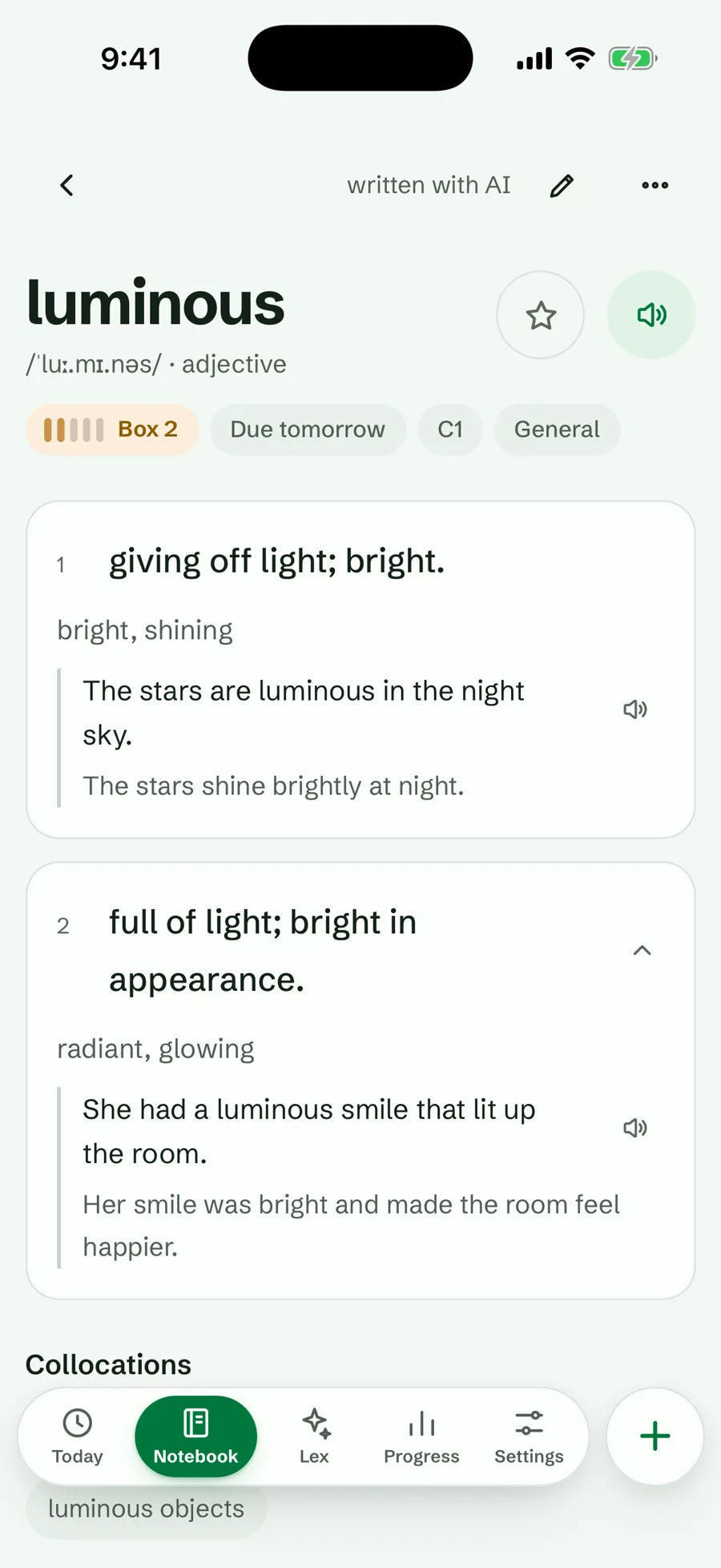
Better than the other kinds when you already meet more words than you can keep, in many places. Wokabulary keeps a tidy list on Apple devices that you type yourself. Lexpad saves a word where you find it (a web page, any app on a computer, a Kindle, a chat with ChatGPT or Claude), and AI writes the card: meanings, examples with translations, pronunciation and level, which you can change. How to keep a vocabulary notebook covers the method on paper or in an app.
| App | Platforms | Price | Review schedule | Where the words come from |
|---|---|---|---|---|
| Lexpad (ours) Checked 14 October 2026: our feature pages, pricing | Web; Android (Google Play or direct download); Mac and Windows; extensions for Chrome, Edge and Firefox. The iPhone and iPad app is in Apple’s App Review; until then, use the web app in Safari. | Free: Unlimited words, every card type, both schedules, and AI cards every day within a daily allowance. Paid: Pro 4.99 USD a month or 29.99 USD a year: Lex, Words worth keeping, many more AI cards a day, voice input, more notebooks and more. | Five Leitner boxes by default; per notebook, Smart (FSRS-6, Beta) | You: typed, saved from web pages or any app on a computer, a pasted text, Kindle, ChatGPT or Claude; AI writes the card |
| Wokabulary Checked 14 October 2026: wokabulary.com | iPhone, iPad, Mac and Apple Watch, synced | Free: the download. Paid: no prices on its site. | Learning levels: new and difficult words come back more often | You type them, or import word lists |
Keep in mind: a notebook gives you nothing to start with. If you meet few new words, kind 1 or kind 3 will feel fuller. Lexpad has no native iPhone app yet; it runs in Safari.
Pick by situation
- An exam list (SAT, GRE, IELTS) or words chosen for you: kind 1, or a flashcard app with a deck or set made for that exam.
- A class, a course or subjects beyond languages: kind 2, Anki or Quizlet.
- You read or watch a lot in the language and want help on the page: kind 3, Language Reactor, LingQ or Readlang.
- Words you meet at work, in books, on screens and in conversation: kind 4. Wokabulary if you use only Apple devices and like typing each word; Lexpad if you want to save words where you meet them and have the card written for you.
- You learn with ChatGPT or Claude: Quizlet’s app in ChatGPT makes a set from a chat; Lexpad’s connector saves words into your notebook and records your practice. Learning vocabulary with ChatGPT or Claude.
- Several of these at once: common and sensible. Read in a reading app, then keep the words that matter in one notebook with one schedule.
One product at a time: Clozemaster vs Lexpad (ready sentences by frequency), LingQ vs Readlang (two reading apps), Vocabulary.com alternatives (English words in English, or in your language) and your Anki deck on your phone.
What to check before you install
- Where the words come from. The kind matters more than the brand. Pick the kind that matches where you meet words.
- Whether you can get your words out. Look for an export you can open elsewhere. Lexpad exports a Lexpad JSON file with your progress, or copies a plain-text word list, and imports an Anki deck or a text file from Anki or Quizlet.
- Whether it works offline, if you practise on a train or a plane, and which parts need a connection.
- Whether it shows the schedule. You should be able to see when a word comes back and what a miss does. An app that never says is hard to trust.
- What is free, and the real price. Read the plan page, not the store badge. In-app prices differ by country and change; every price on this page carries the date we read it.
- Your devices and your languages. Check every device you use, and that the app handles your language pair, including right-to-left text if you need it.
- How long one word takes to add. If it takes minutes, you will stop adding words within a week.
Sources
Read on 14 October 2026, on each product’s own site, help centre or store listing. Prices are in US dollars as shown to us and may differ in your country.
- Anki: apps.ankiweb.net (version 26.09.3); Anki manual, deck options; AnkiMobile on the US App Store.
- Quizlet: US App Store; Google Play.
- Language Reactor: Chrome Web Store (5.1.8, updated 1 July 2026).
- LingQ: lingq.com; LingQ free vs Premium (4 August 2026).
- Readlang: readlang.com.
- Vocabulary.com: Introduction to the VocabTrainer; learner plans.
- Vocabulary – Learn words daily (Monkey Taps): US App Store.
- Wokabulary: wokabulary.com.
- Lexpad (ours): feature pages, pricing, changelog.
Good to know
Questions
Is there a free vocabulary app?
Yes, in every kind. Anki on a computer and AnkiDroid are free; Wokabulary is a free download; Vocabulary.com allows 10 trainer questions a day; LingQ’s free plan keeps 20 saved words in total; Lexpad’s free plan keeps unlimited words with both schedules. Check what each free plan leaves out before you commit.
What is a good vocabulary app for adults?
It depends on where the words come from. Adults learning for work or from their own reading are usually well served by a notebook app or a reading app; adults studying for an exam, with an app that gives words or a flashcard app with an exam deck.
Which app is good for learning English vocabulary?
All four kinds work for English. Vocabulary.com and Vocabulary – Learn words daily are built around English words. If English is not your first language, a notebook that gives meanings in your own language helps: Lexpad works in any pair of its 81 languages.
Should I use one app or several?
Many learners use two: one where they meet words (a reading app, a course, a chat) and one where they keep them. Two places to review is where it goes wrong: keep one schedule.
Why is Lexpad on this page if you make it?
Because it is one honest option for one kind of learner, the one who keeps the words met in real life. It is marked as ours, the apps are sorted by kind, and each kind says when it is the better choice. Who makes Lexpad.
Lexpad
Your next word is worth keeping.
Lexpad is free to start, on the web and on Android. Bring the words you meet.