 Lexpad
Digital vocabulary notebookDigital vocabulary notebook:
four ways to keep one
A digital vocabulary notebook is a vocabulary notebook kept on a phone or computer. There are four ways to keep one: a notes app, a spreadsheet, a flashcard app such as Anki or Quizlet, or a vocabulary notebook app such as Lexpad. Notes apps and spreadsheets only store your words; flashcard and notebook apps also test you and show which words are due each day, and an AI vocabulary notebook also writes the meaning and examples for each word you add.
By Reza Pirighadim, who makes Lexpad. Checked against the app on 20 October 2026.
- Four ways
- Notes, sheet, flashcards, notebook app
- Key test
- Does it tell you what is due?
- AI
- Writes the card, you choose the word
- Checked
- 20 October 2026
What a digital notebook should do
Whatever you use, a vocabulary notebook does its job when it does these six things. Paper does the first three well; the last three are where a device can help.
- Take a word in seconds, the moment you meet it.
- Keep the sentence you met it in, and where.
- Hold one clear meaning, in your language or a simple definition.
- Test you, rather than let you reread.
- Know what is due today, with gaps that grow for the words you know and a fresh start for the ones you miss.
- Let you leave: export your words in a file you can take elsewhere.
The method behind these is in how to make a vocabulary notebook.
Four ways, compared
Not a ranking: each fits a different learner. Prices as each maker listed them when we checked; follow the links on our comparison pages for the sources.
| Notes app | Spreadsheet | Flashcard app | Vocabulary notebook app | |
|---|---|---|---|---|
| Examples | Your phone’s notes, any notes app | Google Sheets, Excel, LibreOffice | Anki, Quizlet | Lexpad (ours), Wokabulary |
| Adding a word | Type it | Type it in a row | Write the front and back of a card | Type it, or save it from what you read |
| Meaning and examples | You write them | You write them | You write them, or use shared decks and sets | You write them; in Lexpad, AI can write them |
| Tells you what to review today | No | Only with formulas you build | Yes | Yes |
| Tests you | No | No | Yes | Yes |
| Price | Free | Free | Anki free except its iPhone app; Quizlet free with paid Plus | Lexpad free plan; Wokabulary a free download |
A notes app or a spreadsheet
The quickest start. Open a note, type the word, its meaning and the sentence. A spreadsheet adds columns, sorting and a date for each word, and you can download our free template to copy its columns.
The weak point is the review. A list does not test you, and it does not know which words are due, so the notebook slowly turns into an archive you scroll past. If you stay with a sheet, add a Next review column and sort by it each day, and cover the Meaning column when you test yourself.
When you outgrow it, nothing is lost: save the sheet as CSV with the word in column A and the meaning in column B, and Lexpad or Anki will import it (how).
A flashcard app
Anki and Quizlet test you and schedule reviews. Anki is free on computers and Android, has a strong scheduler (FSRS) and shared decks, and you write each card yourself or adapt a deck. Quizlet is built around study sets, often made by teachers or other learners for a course.
For a notebook of the words you meet yourself, both ask you to do the writing: a card with two meanings and an example takes a few minutes. Our fair comparisons: Anki vs Quizlet, Lexpad vs Anki, Anki alternatives and free Quizlet alternatives.
A vocabulary notebook app with AI
This is the notebook itself, made digital. You still choose every word. The app keeps the word with its sentence, writes a first version of the card, and brings the word back when it is due. That is what “AI vocabulary notebook” means: the AI does the writing, not the choosing.
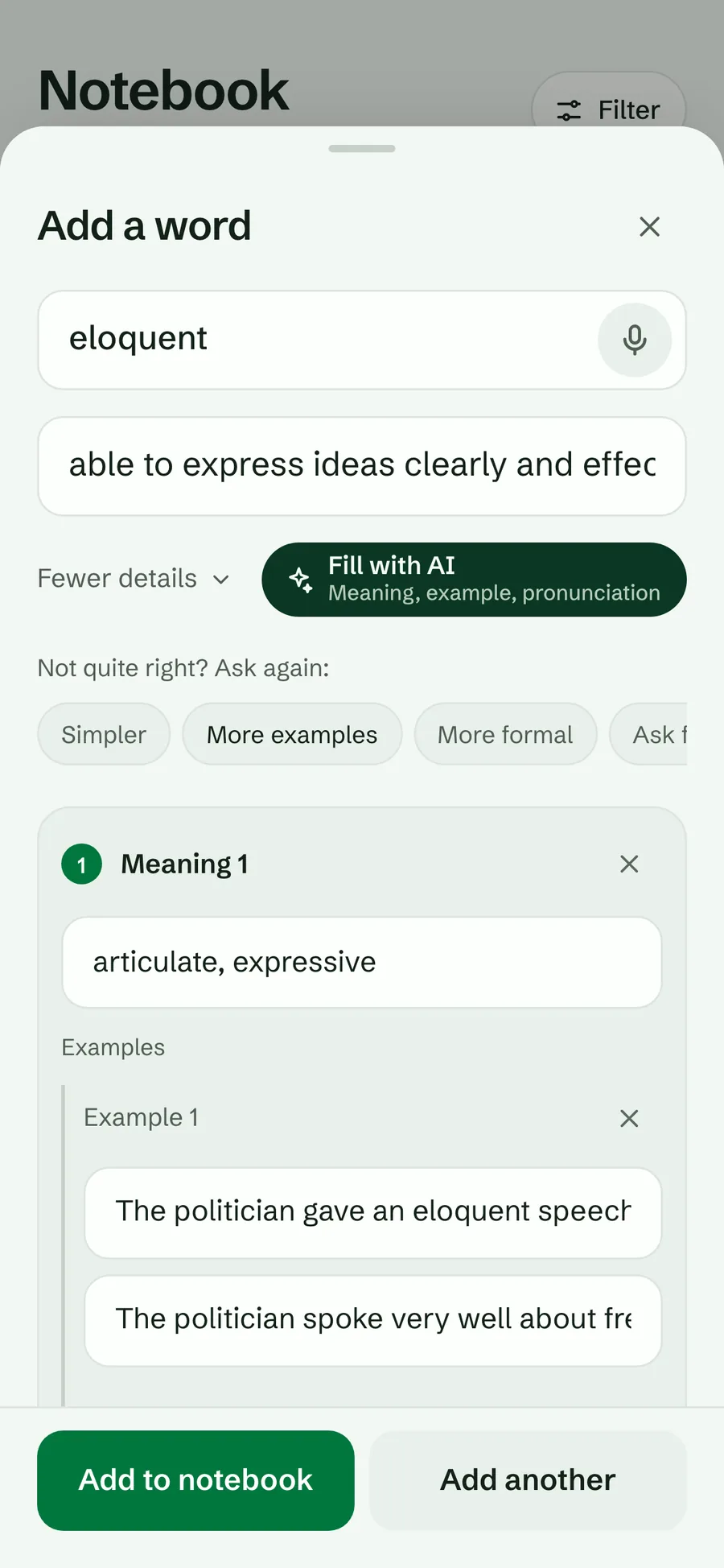
In Lexpad, our own app, you type a word with Add a word and Fill with AI writes its meanings, examples with translations, pronunciation and a level. You can change anything, and report anything the AI got wrong. Five Leitner boxes (or the Smart schedule, built on FSRS, in Beta) decide when each word comes back, and Today shows the words that are due.
Words can come in from where you read them: a browser extension for Chrome, Edge and Firefox keeps the word with its page sentence; on a Mac or Windows PC, select a word in any app and press ⌘⇧L or Ctrl+Shift+L (desktop app); Kindle look-ups import in one file; and ChatGPT or Claude can save a word to your notebook from a chat.
What to watch for with AI
- AI can be wrong. Read the meaning before you keep it, especially for slang, idioms and rare senses. Change it when your sentence means something else.
- Do not let it choose for you. A word you met in your own life is easier to keep than one from a generated list. Lexpad has no word lists or word of the day for this reason.
- It needs a connection. In Lexpad, AI cards need the internet; your notebooks, practice and progress work offline and sync later.
- Free has a limit. Lexpad’s free plan has unlimited words, every card type and both schedules, with a daily allowance of AI cards; Pro gives more AI cards a day. Plans.
Which one should you use?
- A few words a week, and you like lists: a notes app or a spreadsheet, with a weekly test.
- A course or an exam with set words: a flashcard app with shared sets or decks.
- Many words from your own reading, series and work: a vocabulary notebook app, where saving a word and reviewing it take the least time.
- Not sure: start on paper or with the template for two weeks. If the reviews feel like bookkeeping, move the words into an app.
Good to know
Questions
What is a digital vocabulary notebook?
A vocabulary notebook kept on a phone or computer instead of paper: a notes app, a spreadsheet, a flashcard app or a vocabulary notebook app. The useful ones also test you and show which words are due each day.
What is an AI vocabulary notebook?
A vocabulary notebook app where you choose the words and AI writes each card: meanings, examples with translations and pronunciation. You can change what it writes. Lexpad is one.
Is there a free digital vocabulary notebook?
Yes. A notes app or a spreadsheet costs nothing. Anki is free on computers and Android. Lexpad has a free plan with unlimited words, every card type and both schedules, and a daily allowance of AI cards.
Can I use Google Sheets as a vocabulary notebook?
Yes. Use columns for the word, meaning, sentence, date and next review, and sort by next review each day. Saved as CSV, the sheet imports into Lexpad or Anki later.
Does a digital vocabulary notebook work offline?
Notes apps and spreadsheets usually do. In Lexpad your notebooks, practice and progress work offline and sync when you are back online; AI cards need a connection.
Can I use a vocabulary notebook app on a computer?
Lexpad runs in any browser, and has a desktop app for Mac and Windows that saves a word you select in any app with one shortcut. It also has an Android app on Google Play.
Lexpad
Your next word is worth keeping.
Lexpad is free to start, on the web and on Android. Bring the words you meet.