It sees
Your languages, your most recently added words in this notebook (their meanings, an example and the step each is on), the recent conversation, and, when you ask about Lexpad, Lexpad’s own public pages.
 Lexpad
AI vocabulary tutor
Lex is a chat in its own tab. Instead of teaching from a textbook, it works with the words you have saved: it explains them, tells similar ones apart, tests you and helps you use them.
Updated . Checked against the app on 3 October 2026.
Open the Lex tab and type in Ask about your words, or tap one of the four openers. A few ideas:
“Test me on my newest words”
A quiz in conversation, one word at a time, using the words you saved most recently.
“Explain my newest word simply”
The word you saved last, explained in plain words with examples.
“Which of my words are easy to mix up?”
It finds confusable pairs among your words and tells them apart with examples.
“Use my hardest words in a short story”
Your words in context, in a story you can read and ask about.
“Is “I’m fed up of it” correct?”
It checks a sentence you wrote and explains the usual form.
از کلمههای جدیدم ازم امتحان بگیر
Written in Persian, so Lex answers in Persian, right to left.
“What is the difference between “credible” and “credulous”?”
A comparison with examples, then a quick check that you have it.
“What else can I say instead of “face the music”?”
A few similar expressions, each with how it differs and a short example. Ask for opposites or word partners the same way, about any word. Since 12 November 2026.
“Give “bank” a second meaning: the side of a river”
A card under the answer adds it after the meanings “bank” already has. Since 12 November 2026, on the web app.
“How many AI cards do I get on Free?”
A question about Lexpad itself. Lex answers from Lexpad’s own pages, with the numbers in force, and says when the pages do not say. Since 1 November 2026.
Lex sees your notebook’s languages and your most recently added words in the chat’s notebook, each with all its meanings, one example, the step it is on (“step 2 of 5”) and whether you starred or paused it, plus the recent conversation. Lex works from the words you add; see the ways to add words.
Your languages, your most recently added words in this notebook (their meanings, an example and the step each is on), the recent conversation, and, when you ask about Lexpad, Lexpad’s own public pages.
The whole of a large notebook, your private notes, your other notebooks, or the web.
Lex answers questions about any word or phrase, in your notebook or not. Ask for synonyms, similar expressions or opposites and you get a few, each with how it differs from the others and a short example. Word partners and word families work the same way. Grammar, translation and pronunciation questions get a real answer too.
Lex saves nothing on its own. If you like a word it mentioned, say “save it” and a card appears under the answer; the word goes into your notebook when you tap Save word. Since 12 November 2026, wherever you use Lex.
On a word’s page, Ask Lex about this word asks Lex to explain it simply, give two new examples and say which of your words it is easy to mix up with. After practice with misses, Go over my mistakes with Lex has Lex explain up to eight of them and quiz you again. Each opens a new chat and is asked once. On the web app since 27 October 2026 and in Android 1.0.79.
Since 20 October 2026, Lex can change your notebook for you, but only by asking first. Say what you want, such as “star wistful”, “pause cat, I know it” or “save frank”, and the change appears as a card under the answer, such as Star “wistful”, with Star and Not now. Nothing changes until you tap.
Lex can also give a word one more meaning. Ask “add ‘the side of a river’ to bank” and the card, Add a meaning to “bank”, lists the meanings the word has, numbered, with the new one under them. Add meaning puts it after the last one.
When Lex rewrites a meaning, the card shows the old meaning struck through, with the new one under it. Ask for several changes in one message and they come together, with Apply all at the bottom; a delete still asks on its own. Not now leaves the change as one dim line, so you can see later what you skipped. When the cards arrive, the chat scrolls down to them. If you had scrolled up to read, a small “1 change to review” button takes you there instead.
At the end of a reply, Lex may also suggest one or two changes of its own: “Want me to star candid? You often miss it.” They come apart from your own requests, under Lex suggests, and Apply all never includes them.


Add a word, rewrite one of a word’s meanings, add another meaning, star or unstar, pause or bring back, and delete. Lex makes at most one or two offers of its own in a reply.
Lex offers to save only words you brought into the chat yourself: typed, asked about or pasted. A word Lex used in a reply is added only if you then ask for it (“save that word”), and still as a card you confirm. It deletes only a word you named.
A delete asks once more. A tapped card is saved like any edit you make, so it syncs to your other devices; an offer you turn down is not offered again in that chat. In a shared notebook you can only view, Lex proposes nothing.
When you save a word from one of these cards, Lexpad writes its whole card, as Write the card with AI does: every common meaning with a definition and examples, part of speech, level, pronunciation, word partners (collocations), expressions, related words and a usage note. It uses one of your AI cards. If the card cannot be written just then (offline, or the day’s AI cards are used up), the word is saved without a meaning and waits for Write the card with AI, and the card under the answer says so. A word you already have, with a meaning, just moves to the top.
Proposed changes, and the whole card for a word Lex adds, are in the web app since 20 October 2026, in the Android app from 1.0.69 and in Lexpad for Mac and Windows from 0.3.11. The new cards, Apply all and Add a meaning are in the web app since 12 November 2026. The Android app and Lexpad for Mac and Windows get them with their next update; until then they show Lex’s suggestions as small buttons that open the same card.
Lex answers in your meaning language unless you write in another. Ask it to answer in a different language, such as “in English, please”, and it stays in that language for the rest of the chat. A meaning it writes for your notebook is always in the notebook’s meaning language, whatever language you chat in. Each answer is laid out in the direction of its script, so Persian, Arabic and Hebrew read right to left, and the input box turns with the first letter you type. You can also speak your question.
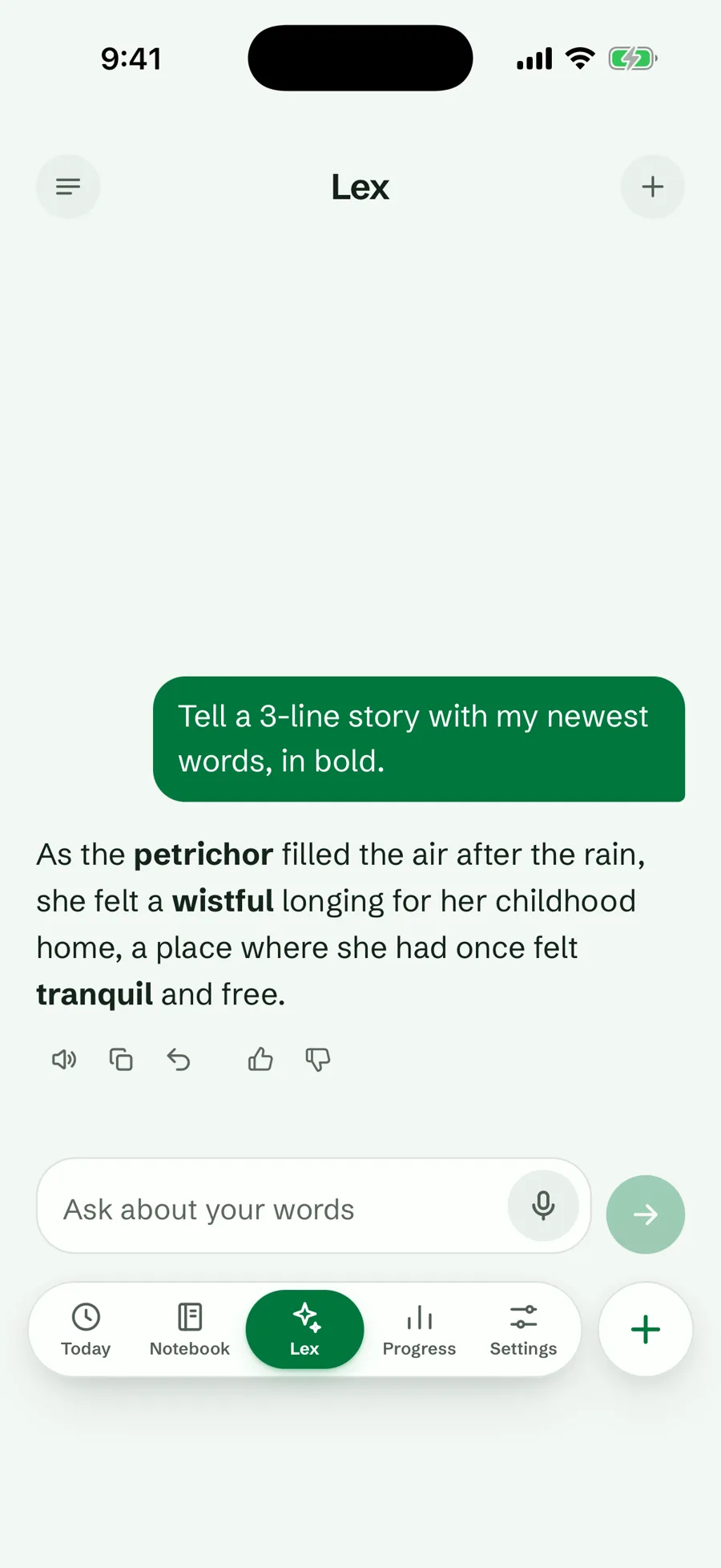
Lex comes with Pro. Every new account can use it during the 7-day Pro trial, with no card. On Free, the Lex tab shows questions you could ask about your own words and, where Pro is sold, a button for the trial or Pro.
On Pro and during the trial: 100 messages in any 24 hours, 2,000 a month. All the numbers. If Lex cannot answer, it says so; offline, it says Lex needs the internet.
Lex lives inside Lexpad. To work with your notebook from ChatGPT or Claude instead, connect Lexpad to your assistant. Connecting is free.
Good to know
Your most recently added words in the chat’s notebook, with their meanings, an example and the step each is on.
Mostly from your notebook: Lex starts from the words you saved. You can also ask about any other word, and Lex answers.
Yes, when you ask. You get a few, each with how it differs and a short example, for any word you ask about. Lex saves one only when you ask it to, as a card you tap.
Only when you say yes. Since 20 October 2026 (web app), Lex can propose adding, starring, pausing, editing or deleting a word as a card under its answer, and since 12 November 2026 (web app) adding a meaning to a word. Nothing changes until you tap the card’s button, and a delete asks once more. It offers to save only words you brought into the chat.
Lex comes with Pro: 100 messages in any 24 hours, 2,000 a month. Every new account gets the 7-day Pro trial, with no card, so you can try it with your own words first.
No. Lex is Lexpad’s own tutor, in the app with Pro. Connecting ChatGPT or Claude lets your own assistant read and change your notebook, free to connect, and never uses Lexpad’s AI.
Lexpad
Lexpad is free to start, on the web and on Android. Bring the words you meet.