Start a conversation
“Let’s talk in Spanish about what I did today. Keep to my level (B1). Ask me one question at a time, and after each of my messages, correct my mistakes in one line before you reply.”
 Lexpad
Method · ChatGPT and Claude
A chat assistant is a patient tutor. It answers at three in the morning and never sighs when you ask the same question twice. It also forgets you between chats, agrees with you too easily, and will not notice when you stop. This page is how to get the first half without the second: a set-up you do once, a 20-minute routine, the prompts that get you real corrections, and what to do with the words it teaches you so they are still there next month.
By Reza Pirighadim, who makes Lexpad. Checked against the app on 1 November 2026. How this guide is made.
Both apps let you keep a standing instruction, so you do not type your rules every day: ChatGPT’s custom instructions or a project, Claude’s projects. Put something like this there, in your own words:
“I am learning German. My level is about B1. Explain things in English. When we talk in German, keep to my level and ask me one question at a time. Correct every mistake I make, briefly, before you reply, and tell me when something is correct but not what a native speaker would say. Do not translate unless I ask.”
Not sure of your level? What the CEFR levels mean for words helps you pick one. Change the rules when they stop fitting; a learner at B2 wants fewer corrections and harder questions than one at A2.
On a day with no time, do only the first and last steps. They keep what you already have.
Write the way you would talk to a tutor, and say what you want back. These eight cover most of a week. Change the language, the level and the topic to yours.
“Let’s talk in Spanish about what I did today. Keep to my level (B1). Ask me one question at a time, and after each of my messages, correct my mistakes in one line before you reply.”
“Here is a paragraph I wrote. Don’t rewrite it. List my mistakes, the worst three first, each with the rule in one sentence and the corrected phrase.”
“I wrote: ‘I have 30 years.’ Is this what a native speaker would say? If not, give me the natural version and tell me why mine sounds odd.”
“Explain the difference between the German cases dative and accusative with ‘in’, using four sentences about my kitchen, in English.”
“Write a 150-word text about football in Italian at level A2, with five words I may not know in bold. Then ask me three questions about it.”
“Here is a paragraph from an article I read. Explain the words in bold in English, and tell me which ones are common and which are rare.”
“What is the difference between reluctant and hesitant? One example of each, about work, then a sentence where only one of them fits.”
“How do I say ‘thoroughly’? Give me the IPA and a word in my language with the same sounds, if there is one.”
Two habits make every prompt better. Name the words you want explained or saved, rather than “the new words”, so nothing is guessed. And ask for examples from your own context: the sentence is what brings the word back later.
Both apps can talk: you speak, it answers aloud. It is the easiest way to practise saying things when there is nobody to say them to. Use it for the conversation step, with the same standing rules, and ask for the corrections in writing afterwards so you can keep them.
Be honest with yourself about what it checks. It hears words. When it answers something you did not say, you have learned that a word of yours is not coming out clearly, which is useful. It is not a pronunciation coach, and a yes from it is not a native speaker’s yes.
This is the step most people skip, and it is why a month of good chats can leave almost nothing behind. The chat forgets; something else has to remember. Three ways:
Made by the author of this page
Free account, no card. Apps: Mac · Windows · Android · iPhone
Free account, no card. macOS 11 or later · All downloads
Free account, no card. Or the direct installer
Free account, no card. Or the APK file
Free account, no card. Lexpad works in Safari on iPhone and iPad.
Free account, no card. Lexpad works in Safari on iPhone and iPad.
Free account, no card. Apps: Mac · Windows · Android · iPhone
Free account, no card. Apps: Mac · Windows · Android · iPhone
Free account, no card. Apps: Mac · Windows · Android · iPhone
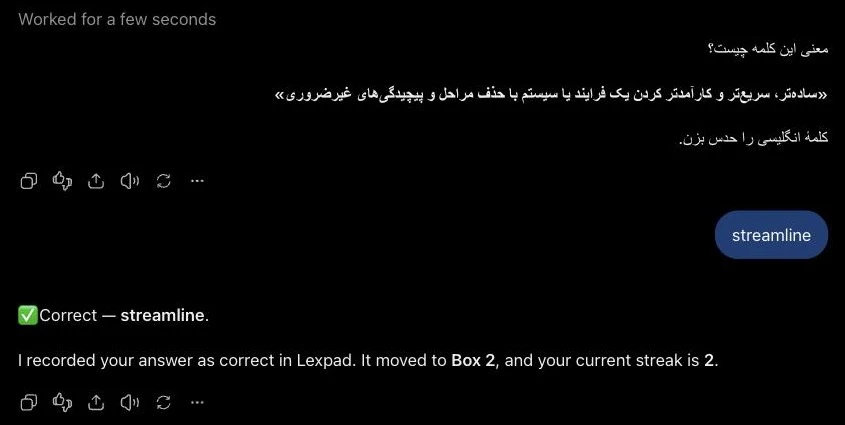
Lexpad has a tutor of its own, Lex, with Pro. The difference from a general chat is where it starts: from the words you saved most recently, with their meanings and boxes in front of it. “Test me on my newest words” or “use my hardest words in a short story” needs no pasting. More about Lex.
Good to know
Reading, writing and grammar, a long way. Listening needs real speakers, and speaking needs a person at some point. The chat is the tutor between those: it explains, corrects and keeps you talking every day.
Both do everything on this page, and Lexpad connects to both. Use the one you already have open. What matters is the standing instruction and the daily twenty minutes, not the model.
Both have a free plan; what it allows changes, so check the app. Connecting Lexpad is free, and its Free plan works in the chat: on Free, ChatGPT and Claude write 10 cards a day. Adding a plugin in ChatGPT or a connector in Claude depends on your plan there.
Not in a way you can rely on. A new chat starts from zero, and no chat brings a word back on the day you are about to forget it. Keep the words in a notebook with a schedule, on paper, in Anki or in Lexpad.
It is strongest in widely used languages. In a smaller language, check an unfamiliar word in a dictionary before you keep it. Lexpad’s AI cards have the same limit.
Voice mode hears words, not accent. If it misunderstands a word, that word is not coming out clearly. For pronunciation itself, copy a native speaker’s line aloud (shadowing) and, when you can, ask a person.
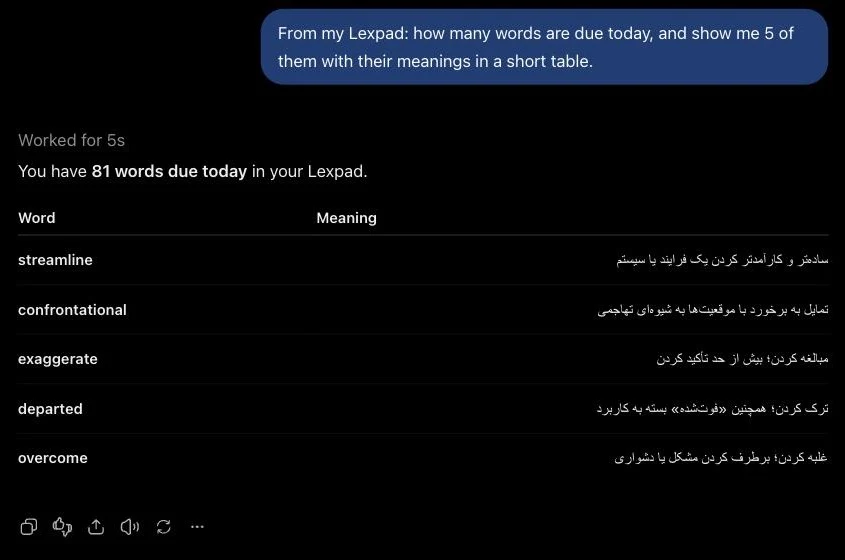
Add Lexpad from ChatGPT’s Plugins Directory, type @Lexpad in a chat and connect once. Then say “save this word to my Lexpad”; the assistant writes the card and it comes back on Lexpad’s schedule. In Claude, connect from Claude’s connector directory.
Lexpad
Save the words you meet with their sentence; AI writes the card and spaced repetition brings each one back. Free to start, on the web, Android, Mac and Windows.
Every new account gets Pro free for 7 days, no card needed.
Free account, no card. Apps: Mac · Windows · Android · iPhone
Free account, no card. macOS 11 or later · All downloads
Free account, no card. Or the direct installer
Free account, no card. Or the APK file
Free account, no card. Lexpad works in Safari on iPhone and iPad.
Free account, no card. Lexpad works in Safari on iPhone and iPad.
Free account, no card. Apps: Mac · Windows · Android · iPhone
Free account, no card. Apps: Mac · Windows · Android · iPhone
Free account, no card. Apps: Mac · Windows · Android · iPhone

 Add to Chrome
 Add to Edge
 Add to Firefox