 Lexpad
Method · English with Netflix
How to learn English
with Netflix
Netflix has more English than you could watch in a lifetime, spoken at real speed by real actors, with subtitles one click away. An evening of it still leaves most people with a story and no new words. The difference is a few habits: which subtitles you turn on, what you watch, what you write down from each episode and when you look at it again. This page is those habits, in order.
By Reza Pirighadim, who makes Lexpad. Checked against the app on 1 November 2026. How this guide is made.

Set Netflix up for learning
Three settings and one choice of screen. The settings are from Netflix’s own help pages, read 1 November 2026.
- Turn on English subtitles. While something plays, open the speech-bubble icon and pick English under Subtitles (Netflix Help: subtitles, captions and audio language). “English [CC]” also writes down sounds and who is speaking; plain “English” is cleaner to read. Either works.
- Keep the audio in English too. A show made in another language and dubbed into English has lips that do not match, and the subtitles are often a different translation from the dubbing. For learning, pick shows that were made in English.
- Subtitles in English, not in your language. Your own language tells you the story and hides the words. A 2022 review of 34 studies found that subtitles in the same language as the audio did the most for vocabulary (Reynolds, Cui, Kao and Thomas, Systems 10(5), 2022). If you cannot follow with English subtitles yet, watch the episode once in your language for the story, then again in English.
- Watch on a computer when you want to keep words. On a TV you can only watch. In a browser you can pause with the space bar, go back ten seconds with the left arrow (Netflix Help: keyboard shortcuts), read a line twice, and use an extension to look a word up without leaving the scene.
Pick what to watch
No list of “the best shows to learn English” here. The right show is one you would watch anyway and mostly follow. A two-minute test: if you get what is going on and meet a few new words a minute, it fits. Lost after one minute? Pick something easier. Nothing new at all? Harder.
- A series beats films. The same people talk the same way for ten episodes, so a word you kept in episode two comes back in episode five for free. Episodes of 20 to 45 minutes also fit a weekday.
- Made in English, for the reason above.
- A world you know is easier than its speed suggests: a cooking competition if you cook, a hospital drama if you work in one. The picture and what you already know fill the gaps.
- Sitcoms give you everyday phrases, fast and with jokes you may miss; documentaries and nature series have one clear narrator and slower speech. Start where you follow more, add the other kind later.
- Stay with one series for a few weeks. The voices get easier every episode, which is the feeling of listening getting better.
A routine for one episode
About 30 minutes for a 20-minute episode. A 45-minute drama can take two evenings; the routine is the same.
- Watch it once, for the story. English subtitles on, no pausing. You want the plot and the sound of the voices.
- Go back to two or three scenes you nearly understood. Left arrow, read the line, play it again. Those lines hold the English you are ready for; lines you understood nothing of are for next year.
- Keep three to five words or phrases. Each with its whole line and the minute. Phrases you could say yourself this week come first; names and words you guessed at once stay out.
- Say two lines aloud, at the actor’s speed, copying the stress. Three times each. It feels silly and it works.
- Tomorrow, before the next episode, look at yesterday’s lines with the phrase covered, say it, then check.
Five words an episode is about 50 a season. That sounds slow. It is 50 words you heard in a scene you remember, which is a different thing from 50 words on a list, and a year of evenings is close to a thousand.
What to keep
What you write down matters more than where. For each one: the phrase, the whole line it was said in, the episode and the minute, and a short meaning for that line. The sentence is what brings the word back later; a word on its own fades.
Much of what people actually say in English is a phrasal verb or a short idiom: not buying it, figure it out, I’m on it. Keep them whole (how to learn phrasal verbs), and keep the sentence you heard them in (sentence mining).
| Field | What to write | Example |
|---|---|---|
| Word or phrase | As you would use it. A phrase when the words belong together. | not buying it |
| The line | The subtitle, as it was shown. | “I’m not buying it. Where were you really?” |
| Where and when | The title, the episode and the minute, so you can hear it again. | A courtroom drama, S1 E3, 12:40 |
| Meaning | In your own language, or in plain English, for this line only. | I don’t believe it |
Ways to keep the words
- Paper or a notes app. Fine, if you also plan the reviews. The free notebook template has the review boxes drawn in; the spaced repetition calculator shows what five words a day adds up to.
- A flashcard app such as Anki. Put the whole line on the card, not only the phrase, and the episode and minute in a field of its own.
- A subtitle file of your own video. If you have an .srt or .vtt file, the free Text to flashcards tool shows every line, lets you tap the words you do not know, and writes a file for Anki or Lexpad. No account, nothing uploaded.
- Lexpad’s browser extension, below, which saves the word from the Netflix subtitle itself.
Keeping them with Lexpad
Made by the author of this page
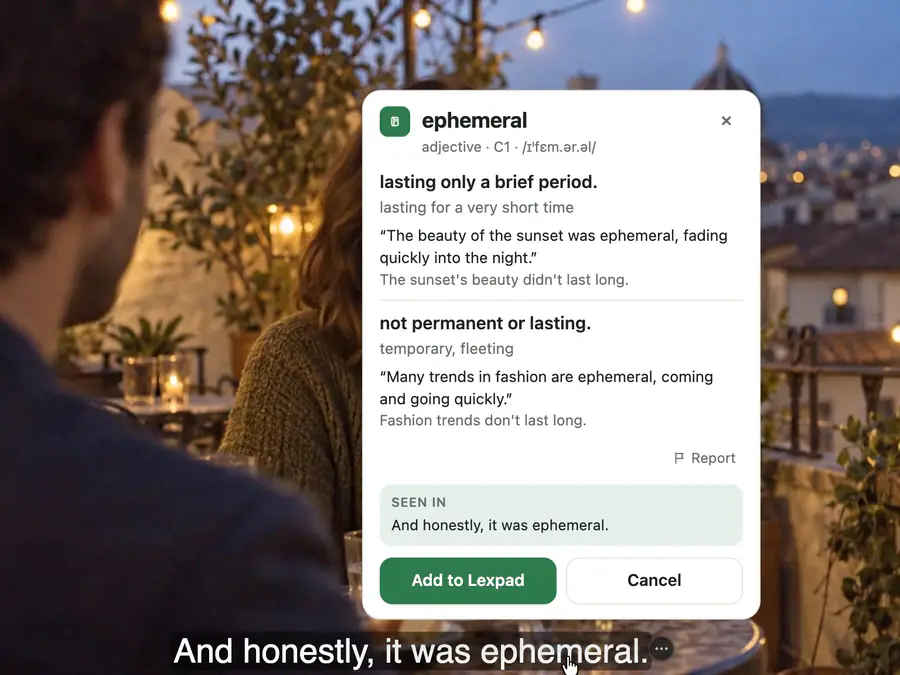
Click the word in the Netflix subtitle
- With the free Lexpad extension in Chrome, Edge or Firefox, rest your pointer on a subtitle and the scene waits. Click the word you did not know, or drag across up to seven words for a phrase, and a card with its meaning, written by AI, opens just above the line. It works in full screen too.
- Press Add: the whole line becomes the word’s first example, and a private note keeps what you were watching, “Netflix” and the moment, such as 12:40, so you can find the scene again.
- The next day Lexpad asks you the word. Know it and it waits 1, 3, 7, then 21 days before it comes back; miss it and it comes back today. The same extension works on YouTube, TED and other video sites, and on any web page.
- Lexpad reads the subtitles Netflix shows as text, in the language you picked. Free: unlimited words in one notebook in the app (5 a day each from the extension, desktop app, Player), and 5 AI cards a day (200 a month). How it works on Netflix.
Free account, no card. Apps: Mac · Windows · Android · iPhone
Free account, no card. macOS 11 or later · All downloads

Free account, no card. Or the direct installer

Free account, no card. Or the APK file
Free account, no card. Lexpad works in Safari on iPhone and iPad.
Free account, no card. Lexpad works in Safari on iPhone and iPad.
 Add to Chrome
Free account, no card. Apps: Mac · Windows · Android · iPhone
 Add to Edge
Free account, no card. Apps: Mac · Windows · Android · iPhone
 Add to Firefox
Free account, no card. Apps: Mac · Windows · Android · iPhone
Review them so they stay
A phrase you met once in a scene is usually gone within a week, however good the scene was. What keeps it is bringing it back from memory, on purpose, at growing gaps: the same day, then after a day, three days, a week and three weeks. Each time, look at the line with the phrase missing, say it, then check (why testing yourself works).
In Lexpad those gaps are the five boxes. A phrase you miss goes back to box 1. A few minutes a day on your phone or computer covers it, and a season’s words keep coming back long after the season has ended (how many new words a day).
- Box 1Today
- Box 21 day
- Box 33 days
- Box 47 days
- Box 5 · mastered21 days, then longer
Not only English
Everything on this page works for Spanish, German, Korean or any language Netflix has shows in: subtitles in that language, shows made in it, a series you mostly follow, a few words an episode. Lexpad keeps a notebook for any of 81 languages in any pair, so the card for a Spanish word can be in English, in Spanish, or in your own language. For what to put on a card in a given language, see the guides to Spanish, German, Korean, French, Italian and Japanese words.
Good to know
Questions
Can I learn English just by watching Netflix?
Listening, yes: it is hours of real English at real speed. Words stay only if you keep a few and bring them back, and speaking only improves when you speak. Netflix plus a notebook plus someone to talk to is a complete method; Netflix alone is a pleasant evening.
English subtitles or subtitles in my language?
English, once you follow most of an episode. You read the words you hear, so you can catch them. If an episode is well above your level, watch it once in your language for the story and once in English for the words.
English or English [CC]?
Both show the words. [CC] adds sounds and who is speaking, which helps when several people talk; plain English is less to read. Pick the one you find easier and stay with it.
Is there a free extension for learning English on Netflix that works in Firefox?
Yes. Lexpad’s browser extension is free in Chrome, Edge and Firefox. On Netflix, rest your pointer on a subtitle, click a word, and it is saved with the line and the moment; the word then comes back for review on a schedule.
How many episodes a day?
One episode worked through beats three watched. Thirty minutes with one episode, plus a few minutes of review, is a good daily base. Watch more for fun on top, with the subtitles still in English.
I watch on a TV. What then?
Keep a note of the word and the minute, and add it after the episode. Lexpad’s extension is for Chrome, Edge and Firefox on a computer; on a phone, add the word in the Android app or the web app, and type the line from memory while you still have it.
Does this work for other languages?
Yes. Subtitles in the language you are learning, shows made in that language, and the same routine. Lexpad has notebooks for 81 languages in any pair.
Lexpad
Keep the words you meet.
Save the words you meet with their sentence; AI writes the card and spaced repetition brings each one back. Free to start, on the web, Android, Mac and Windows.
Every new account gets Pro free for 7 days, no card needed.
Free account, no card. Apps: Mac · Windows · Android · iPhone
Free account, no card. macOS 11 or later · All downloads
Free account, no card. Or the direct installer
Free account, no card. Or the APK file
Free account, no card. Lexpad works in Safari on iPhone and iPad.
Free account, no card. Lexpad works in Safari on iPhone and iPad.
Free account, no card. Apps: Mac · Windows · Android · iPhone
Free account, no card. Apps: Mac · Windows · Android · iPhone
Free account, no card. Apps: Mac · Windows · Android · iPhone