 Lexpad
Method · Videos and subtitles
Learn vocabulary
from videos
Videos let you hear a word, see it written and watch when people use it. Most of them fade again unless you keep a few and meet them again on purpose. This is a routine that works on paper, in a flashcard app or with Lexpad.
By Reza Pirighadim, who makes Lexpad. Checked against the app on 25 October 2026.
Why videos work, and why they are not enough
Subtitles help. A 2022 review of 34 studies found that watching captioned or subtitled video helped learners pick up vocabulary, and that captions in the same language as the audio had the largest effect (Reynolds, Cui, Kao and Thomas, Systems 10(5), 2022). You hear the sound, read the spelling and see the scene at the same time.
Watching once is still a weak way to remember. What makes a word stay is bringing it back from memory, on purpose, at growing gaps: retrieval practice (Karpicke and Roediger, Science, 2008) and spacing (Cepeda and colleagues, Psychological Bulletin, 2006). So the method has two halves: meet words in videos, then test yourself on a few of them over the next weeks.
Choose the video and the subtitles
- Subtitles in the language you are learning, not in your own. You want to read the words you hear. Subtitles in your own language tell you the story but hide the words.
- Videos you mostly understand. If you follow the story and meet a few new words a minute, you can work out meanings from the scene. If every line is new, drop down a level: slower speakers, videos for learners, or a topic you already know well.
- One creator or series for a while. The same people use the same words again, so a word you saved in one episode comes back in the next, which is free review.
- Check whether the subtitles were written by a person. On YouTube, automatic subtitles are marked “auto-generated” in the subtitles menu. YouTube says they “might misrepresent the spoken content due to mispronunciations, accents, dialects, or background noise” (YouTube Help). They are still useful; check an odd-looking word in a dictionary before you save it.
Subtitles printed into the picture, as many shows and short videos have, are part of the video itself: pause and type the word you want. Subtitles you can turn on and off in the player are text on the page, which a browser extension can read.
A routine for one video
- Watch for the story first, a few minutes or the whole video, without stopping.
- Watch again with subtitles on, and pause on lines you almost understood. Those lines hold the words worth keeping.
- Keep five to ten words or phrases, each with its line. Leave out names and words you could guess at once.
- Write down where you heard each one: the title and the minute, so you can play the line again.
- Test yourself the next day, then after a few days, a week and three weeks. Look at the line, say the word or its meaning, then check.
- Watch the video again in a week or two. Words you saved now jump out, which shows you what has stuck.
| Field | What to write | Example |
|---|---|---|
| Word or phrase | The words as you want to use them: a phrase when the words belong together. | get the hang of |
| The line | The subtitle line, copied as it was shown. | “It took me a week to get the hang of it.” |
| Where and when | The video’s title and the minute, so you can hear the line again. | A cooking video, 4:12 |
| Meaning | In your own language or in simple words, for the sense in the line. | to learn how to do something |
Keys that help on YouTube
From YouTube’s own list of shortcuts (YouTube Help): C turns subtitles on or off, K pauses, J and L jump back or forward 10 seconds, the left and right arrows 5 seconds, and < and > slow the video down or speed it up. Slowing a fast speaker a little is often enough to catch a phrase.
A captioned video also has a transcript: in the description, choose Show transcript, and click a line to jump to that moment (YouTube Help). It is a quick way to find a line you half remember.
Which words to keep
- Words you hear more than once. If a word comes back in the same video, it will come back in your life too.
- Phrases, not only single words. “Get the hang of”, “figure it out” or “to be honest” are easier to reuse than one word on its own, and the line shows how they fit a sentence.
- Words you would like to say yourself. A rare word in a documentary may be interesting, but a word you would use this week is worth more.
- Fewer than you think. Ten words from one video, reviewed, beat fifty written down and never seen again. The review load of each new word is the real cost.
Ways to keep the words
- On paper: a notebook with the word, the line and the minute. A free template has review boxes for the next days.
- From a subtitle file: if you have the
.srtor.vttfile of your own video, the free Text to flashcards tool lets you tap the words you don’t know, and its Anki file keeps each subtitle line as the word’s sentence. - While you watch: a browser extension that lets you click the word in the subtitle and keeps the line for you. Lexpad does this, below; Language Reactor alternatives compares the tools that do similar things.
How Lexpad does it
Made by the author of this page
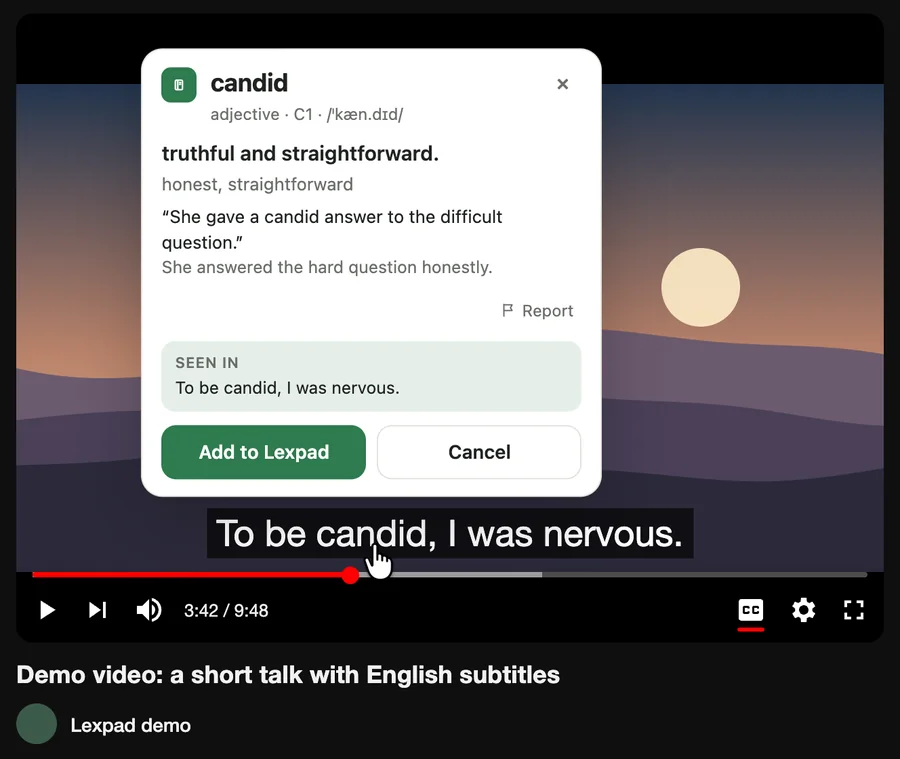
Click the word in the subtitle
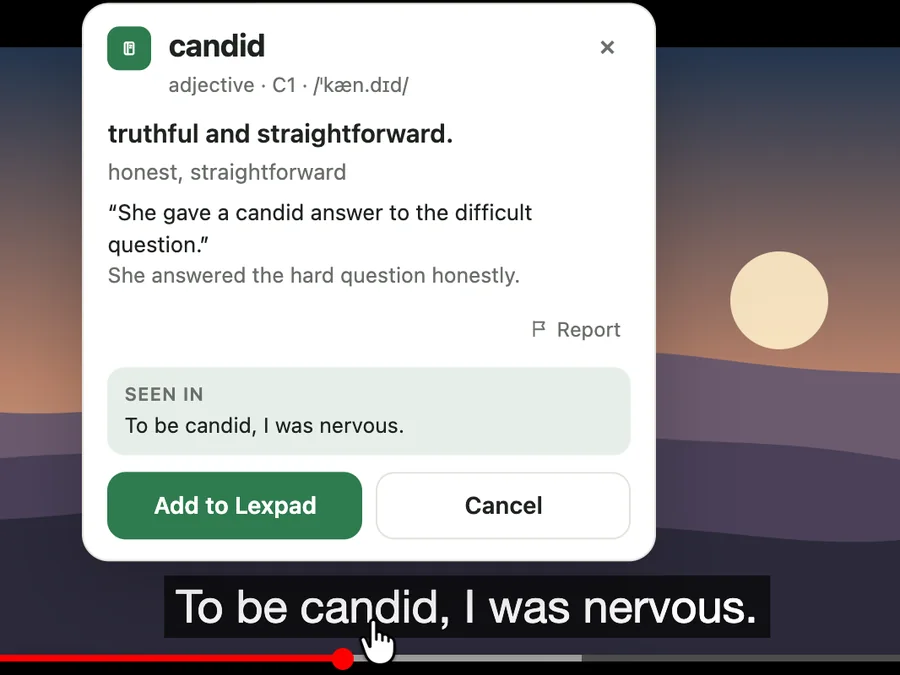
- Rest your pointer on a subtitle and the video waits. Click a word, or drag across up to four, and a card opens above the line with the meaning, written by AI in your notebook’s languages.
- Add it, and the line becomes the word’s first example. The note says where you heard it: on YouTube, the title and a link that starts two seconds before the moment; on TED, lesson pages and common web players, the page, the site and the time.
- The word then comes back for practice on growing gaps (today, then after 1, 3, 7 and 21 days), on the web, in the Android app and in Lexpad for Mac and Windows. In practice, the Example cloze card blanks the word in the first example on its card that contains it, and your own line is the first example. Sentence builder gives you your own line back as tiles to put in order, and Dictation can play it.
- The extension is free; each card uses the AI allowance (25 AI cards a day (400 a month) on Free). YouTube subtitles need extension 0.4.0 or later; TED, other web players and Google Meet captions need 0.5.0. Versions in the stores: Firefox 0.5.0, Chrome 0.4.0, Edge 0.3.1. Each store reviews a version on its own; the extension updates itself.
Free account, no card. Apps: Mac · Windows · Android · iPhone
Free account, no card. macOS 11 or later · All downloads

Free account, no card. Or the direct installer
Free account, no card. Or the APK file
Free account, no card. Lexpad works in Safari on iPhone and iPad.
Free account, no card. Lexpad works in Safari on iPhone and iPad.
 Add to Chrome
Free account, no card. Apps: Mac · Windows · Android · iPhone
 Add to Edge
Free account, no card. Apps: Mac · Windows · Android · iPhone
 Add to Firefox
Free account, no card. Apps: Mac · Windows · Android · iPhone
Good to know
Questions
Should I use subtitles in my own language or the one I am learning?
In the one you are learning, once you can follow most of a video. You read the same words you hear, so you can catch and keep them. Subtitles in your own language help with the story, not the words.
How many words should I keep from one video?
Five to ten is plenty. Every word you keep brings reviews over the next weeks, so keep the ones you would like to use.
Are auto-generated subtitles good enough?
Mostly, for clear speech. YouTube itself says they can get words wrong with accents, dialects or background noise, so check a strange word before you save it.
Can I learn vocabulary just by watching?
You pick some up, and captions help. Words stay much better when you also test yourself on them at growing gaps.
Does this work with TED talks?
Yes. TED talks have subtitles in many languages. The routine is the same; with the Lexpad extension you click words in TED’s subtitles the same way as on YouTube.
Can I do this on my phone?
The routine, yes: pause and write the word and line down. The Lexpad extension is for Chrome, Edge and Firefox on a computer; the words you save there are in the Android app and the web app on your phone.
Lexpad
Keep the words you meet.
Save the words you meet with their sentence; AI writes the card and spaced repetition brings each one back. Free to start, on the web, Android, Mac and Windows.
Every new account gets Pro free for 7 days, no card needed.
Free account, no card. Apps: Mac · Windows · Android · iPhone
Free account, no card. macOS 11 or later · All downloads
Free account, no card. Or the direct installer
Free account, no card. Or the APK file
Free account, no card. Lexpad works in Safari on iPhone and iPad.
Free account, no card. Lexpad works in Safari on iPhone and iPad.
Free account, no card. Apps: Mac · Windows · Android · iPhone
Free account, no card. Apps: Mac · Windows · Android · iPhone
Free account, no card. Apps: Mac · Windows · Android · iPhone