 Lexpad
Anki on your phoneYour Anki deck
on your phone
Sync it. In Anki on your computer, press Sync and sign in with a free AnkiWeb account; then install AnkiDroid (free, Android) or AnkiMobile ($24.99, iPhone and iPad), sign in with the same account and sync again. You can also open AnkiWeb in your phone’s browser and study there for free. For a vocabulary deck there is one more way: import the .apkg into Lexpad, our own app, which runs in any phone’s browser, and AI fills in what the deck lacks.
By Reza Pirighadim, who makes Lexpad. Checked against the app on 20 October 2026.
- Android
- AnkiDroid, free
- iPhone
- AnkiMobile $24.99, or AnkiWeb free
- Sync
- Through a free AnkiWeb account
- Checked
- 20 October 2026
The usual way: sync through AnkiWeb
- On the computer: open Anki and click Sync. Sign in with your AnkiWeb account, or create one (free).
- First sync: Anki asks whether to upload or download. Your cards are on the computer and AnkiWeb is empty, so choose to upload.
- On the phone: install AnkiDroid (Android, free) or AnkiMobile (iPhone and iPad, $24.99 on the US App Store), sign in with the same AnkiWeb account and sync. Choose to download.
- From then on Anki syncs your reviews both ways each time you open or close it.
Steps from the Anki manual (Syncing with AnkiWeb); prices from apps.ankiweb.net and the US App Store, read 20 October 2026. The manual warns: if several people share one computer with a profile each, each needs their own AnkiWeb account, or data is lost.
Every way, side by side
Pick by phone, budget and whether your review history matters.
| Way | Phone | Cost | Your review history |
|---|---|---|---|
| Sync through AnkiWeb to AnkiDroid | Android | Free | Kept, and synced both ways |
| Sync through AnkiWeb to AnkiMobile | iPhone and iPad | $24.99 once (US App Store) | Kept, and synced both ways |
| AnkiWeb in the phone’s browser | Any | Free | Kept; you study in the browser |
| Import the deck into Lexpad (vocabulary decks) | Any phone’s browser, or the Android app | Free plan | Not kept: words start in box 1 |
On an iPhone without paying
AnkiMobile is the official iPhone app and costs $24.99; its sales fund Anki’s development. Without it, open AnkiWeb in Safari and study there: it is free, uses the same account and keeps your history. It needs a connection.
For a vocabulary deck, Lexpad’s web app works in Safari too. The iPhone and iPad app is in Apple’s App Review; until then, use the web app in Safari.
For vocabulary decks: import it into Lexpad
If your deck is words and meanings, you can move it into Lexpad, which we make. Lexpad reads the Anki deck itself (.apkg or .colpkg, including the ones current Anki makes with default settings) and picks the word, meaning, example and pronunciation by the names of the note’s fields.
- In Anki on a computer, choose File, Export, pick the deck and save it as an Anki deck package (
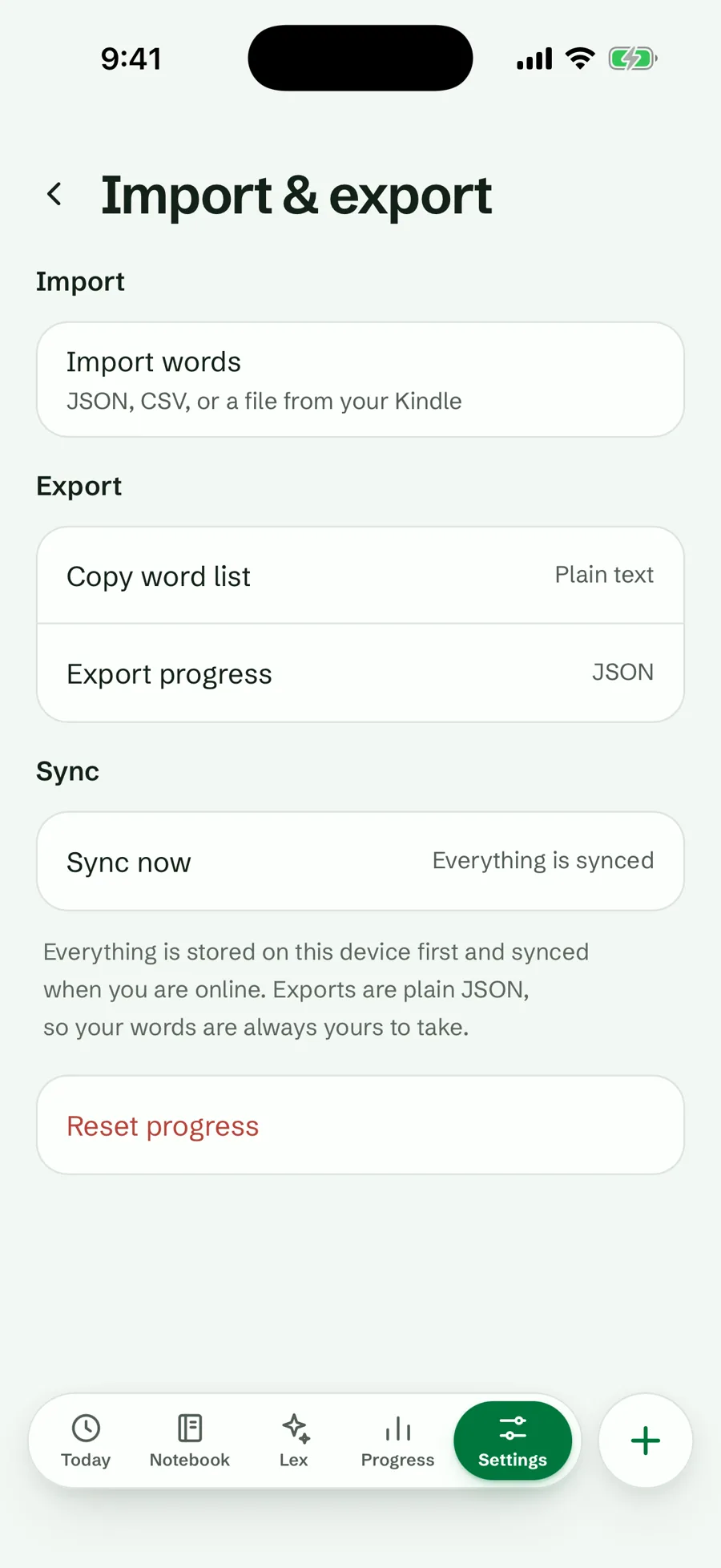
.apkg). - Open Lexpad in your phone’s browser (app.lexpad.app), or on the computer, and go to Settings, Import & export, Import words. Choose the file.
- Words with no meaning or example? Fill with AI writes them for every empty word in one tap.
What does not come across: review history, pictures and sounds; every word starts in box 1, and a cloze note comes in as the word in its gap. The deck is read on Lexpad’s server, so the import needs a connection. On the web since 17 October 2026, in any phone’s browser; in the Android app, the file can be chosen from 1.0.71. Full steps: move your Anki or Quizlet words.
Sources, checked 20 October 2026
Each fact about another product was read on 20 October 2026 on that product’s own site, help page, blog or US App Store listing. Prices and features change; check the source before you buy.
Good to know
Questions
How do I get my Anki deck on my phone?
Sync it through a free AnkiWeb account: press Sync in Anki on your computer and upload, then sign in with the same account in AnkiDroid or AnkiMobile and download.
Is Anki free on iPhone?
The official iPhone app, AnkiMobile, costs $24.99 on the US App Store. AnkiWeb, in Safari, is free and uses the same account.
Is AnkiDroid free?
Yes. AnkiDroid is free and made by volunteers; donations fund its development.
Will my progress come with my deck?
Through AnkiWeb sync, yes: reviews sync both ways. Moving a deck to another app, such as Lexpad, keeps the cards but not the review history.
Can I open an .apkg file on my phone?
On Android, yes: the AnkiDroid manual describes Import file for an .apkg. Lexpad’s web app imports one in any phone’s browser. If the deck is already in Anki on your computer, syncing is simpler.
Lexpad
Your next word is worth keeping.
Lexpad is free to start, on the web and on Android. Bring the words you meet.