 Lexpad
Method · English at work
Learn English
at work
The English you need at work is the English your colleagues use: their meeting phrases, the polite forms in their e-mails and the words of your field. You meet it every day. The trick is to catch a few of those words, keep them with the sentence, and use them back within the week.
By Reza Pirighadim, who makes Lexpad. Checked against the app on 25 October 2026.
Work English is its own vocabulary
Courses teach general English. At work you need phrases that come up every week and are hard to guess from their words, plus the terms of your own job.
| Kind | Example | Why it is worth a card |
|---|---|---|
| Meeting phrases | “Let’s circle back to this.” · “Can we take this offline?” | Said every week, and hard to guess from the words |
| Softeners in e-mails | “Just to confirm…” · “Would it be possible to…” | Polite forms you will write yourself |
| Phrasal verbs | “roll out”, “sign off on”, “follow up” | One meaning at work, another elsewhere |
| Your field’s words | The terms in your team’s documents | No general course teaches them |
Meetings: turn the captions on
In a call, a phrase can be gone before you have understood it. Live captions let you read what you just heard. In Google Meet, by Google’s own help pages:
- At the bottom of the call, point at Captions and translation and choose Turn on captions, or press C. They are shown only to you (Google Meet Help).
- Set the spoken language from the menu at the left of the captions, so the captions match what people are saying.
- Google lists dozens of caption languages, some marked beta, so check yours is there.
- Translated captions exist only in some paid Google Workspace editions (Google Meet Help). For learning, keep the captions in English anyway: you want to read the words you hear.
Other video-call apps have live captions too; look for CC or Captions in the call’s controls.
Collect without losing the thread
- In the meeting, catch only the phrase. Note it, or save it with one click, and go back to listening. Two or three per meeting is plenty.
- Right after, add the sentence. Write down the line it came in while you still remember it.
- From e-mails and documents, keep phrases you would write yourself, with their sentence.
- Leave out names and anything confidential. A phrase does not need the client, the project or who said it.
Use them back within the week
- Review a few minutes before the next meeting. Look at the phrase, say its meaning, then check: the answering is what makes it stay.
- Write it once. Put one new phrase in an e-mail or a chat message the same week. Using it yourself turns a word you recognise into one you can say.
- Say it aloud. Read the line out loud before a call, or repeat it right after hearing it (shadowing).
- Watch for false friends of meaning. “Table” a topic means to propose it for discussion in British English and to put it off in American English (Wiktionary, “table”, verb). When a phrase surprises you, keep the sentence that shows which one your team means.
A week that works
Five minutes a day is enough to keep going: during the day, catch the phrases; on the way to work or before the first call, review the ones that are due; once a day, use one in writing. The spaced repetition calculator shows how many reviews a few new words a day bring.
Your employer’s rules come first: some workplaces limit browser extensions or apps on work computers. Check before you install anything.
How Lexpad helps at work
Made by the author of this page
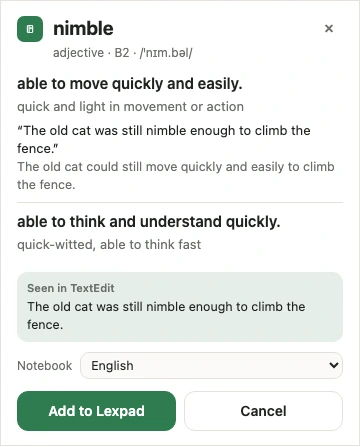
Catch the phrase, keep the sentence
- In Google Meet, with captions on, rest your pointer on them: a still copy of the last lines appears, so you can click the word you just heard. “Earlier” shows the last ten lines. Only that word and its line are saved, with “Google Meet” and the date; never names, the meeting link or its title. Google Meet captions.
- On web pages and web mail, select a word and press the small + button. In any app on a Mac or Windows PC, select it and press ⌘⇧L or Ctrl+Shift+L with Lexpad for Mac and Windows; the note says “Seen in” that app.
- Each word comes back on growing gaps, on the commute in the Android app or on Today in the web app.
- With Pro, Use it in a sentence reads a sentence you write with the word and says whether it is natural, and Lex can quiz you on the words you saved recently. Every new account gets Pro free for 7 days, no card needed.
- The extension is free; each card uses the AI allowance (25 AI cards a day (400 a month) on Free). YouTube subtitles need extension 0.4.0 or later; TED, other web players and Google Meet captions need 0.5.0. Versions in the stores: Firefox 0.5.0, Chrome 0.4.0, Edge 0.3.1. Each store reviews a version on its own; the extension updates itself.
Free account, no card. Apps: Mac · Windows · Android · iPhone
Free account, no card. macOS 11 or later · All downloads

Free account, no card. Or the direct installer
Free account, no card. Or the APK file
Free account, no card. Lexpad works in Safari on iPhone and iPad.
Free account, no card. Lexpad works in Safari on iPhone and iPad.
 Add to Chrome
Free account, no card. Apps: Mac · Windows · Android · iPhone
 Add to Edge
Free account, no card. Apps: Mac · Windows · Android · iPhone
 Add to Firefox
Free account, no card. Apps: Mac · Windows · Android · iPhone

Good to know
Questions
How can I improve my English vocabulary at work?
Keep the phrases your colleagues use, a few a day, each with its sentence. Review them at growing gaps and use one in an e-mail or a meeting the same week.
Should I use translated captions in meetings?
For understanding a hard meeting, they can help where your plan has them. For learning, captions in English work better, because you read the words you hear.
Does Lexpad record my meetings?
No. It reads Google Meet’s captions on your screen while they are on, keeps the last ten lines in the page’s memory, and saves only a word you click, with its line, “Google Meet” and the date.
Which words should I learn first?
The ones you hear or read every week at work: meeting phrases, the polite forms in e-mails, and your field’s terms. They pay back fastest.
Can I use this for languages other than English?
Yes. The method is the same for any language you work in, and Lexpad’s cards come in 81 languages, in any pair.
Lexpad
Keep the words you meet.
Save the words you meet with their sentence; AI writes the card and spaced repetition brings each one back. Free to start, on the web, Android, Mac and Windows.
Every new account gets Pro free for 7 days, no card needed.
Free account, no card. Apps: Mac · Windows · Android · iPhone
Free account, no card. macOS 11 or later · All downloads
Free account, no card. Or the direct installer
Free account, no card. Or the APK file
Free account, no card. Lexpad works in Safari on iPhone and iPad.
Free account, no card. Lexpad works in Safari on iPhone and iPad.
Free account, no card. Apps: Mac · Windows · Android · iPhone
Free account, no card. Apps: Mac · Windows · Android · iPhone
Free account, no card. Apps: Mac · Windows · Android · iPhone