 Lexpad
Leitner vs FSRSLeitner boxes or FSRS:
which schedule for words?
Leitner boxes give every word the same fixed waits, set by the box it is in; FSRS works out a wait for each word from your own answers and brings it back when your chance of remembering it falls to a target you choose. Boxes are simpler to see and trust, FSRS fits each word more closely, and both work. In Lexpad you can choose either one per notebook and switch without losing progress.
By Reza Pirighadim, who makes Lexpad. Checked against the app on 13 October 2026.
- Boxes
- Fixed waits: today, 1, 3, 7, 21 days
- FSRS
- A wait per word, to a target
- In Lexpad
- Either one, per notebook
- Switching
- Keeps every box and date
The two, in one paragraph each
Leitner boxes. Sebastian Leitner described the method in his 1972 book So lernt man lernen, with paper cards and a box of compartments. A card you answer right moves to the next box, which is reviewed less often; a card you miss goes back to the first box. Every card in a box waits the same time. The Leitner system explained has the details.
FSRS (Free Spaced Repetition Scheduler) is an open-source algorithm. For each card it keeps a small model of your memory: how hard the card is for you, how stable your memory of it is, and the chance you can recall it today. It schedules the next review for the day that chance falls to your target. It grew out of research by Jarrett Ye and colleagues on memory data from the language app MaiMemo (Ye, Su and Cao, KDD 2022), and Anki supports it from version 23.10, as an alternative to its older SM-2 scheduler (Anki manual).
New to the idea itself? Spaced repetition for vocabulary starts from the beginning, with SM-2 and a table of which apps use which schedule.
Side by side
The same two buttons work for both: you knew the word, or you did not. What differs is how the next date is chosen.
| Leitner boxes | FSRS (Smart in Lexpad) | |
|---|---|---|
| What sets the wait | The box the word is in. Every word in a box waits the same. | A memory model of each word, updated after every answer. |
| What you see | A box number and the next date. | The next date and the chance you remember the word today. Lexpad still shows a box. |
| After a right answer | One box up, a longer fixed wait. | A longer wait, worked out for that word. |
| After a miss | Back to box 1, asked again today (or two boxes back, if you choose). | Asked again today, and the word’s memory record is marked down. |
| How much to remember | Fixed by the boxes. | You choose a target, such as 90%. |
| Easy to check by hand | Yes. You can run it with paper cards. | No. It needs a computer. |
| In Lexpad | The default. Free. | Optional per notebook, Beta. Free. |
The real numbers in Lexpad
- Boxes: a new word is asked today, then waits 1 day in box 2, 3 days in box 3, 7 days in box 4 and 21 days in box 5. A mastered word you still know then waits 45, 90, 180 and 365 days. A miss sends it to box 1, asked again today.
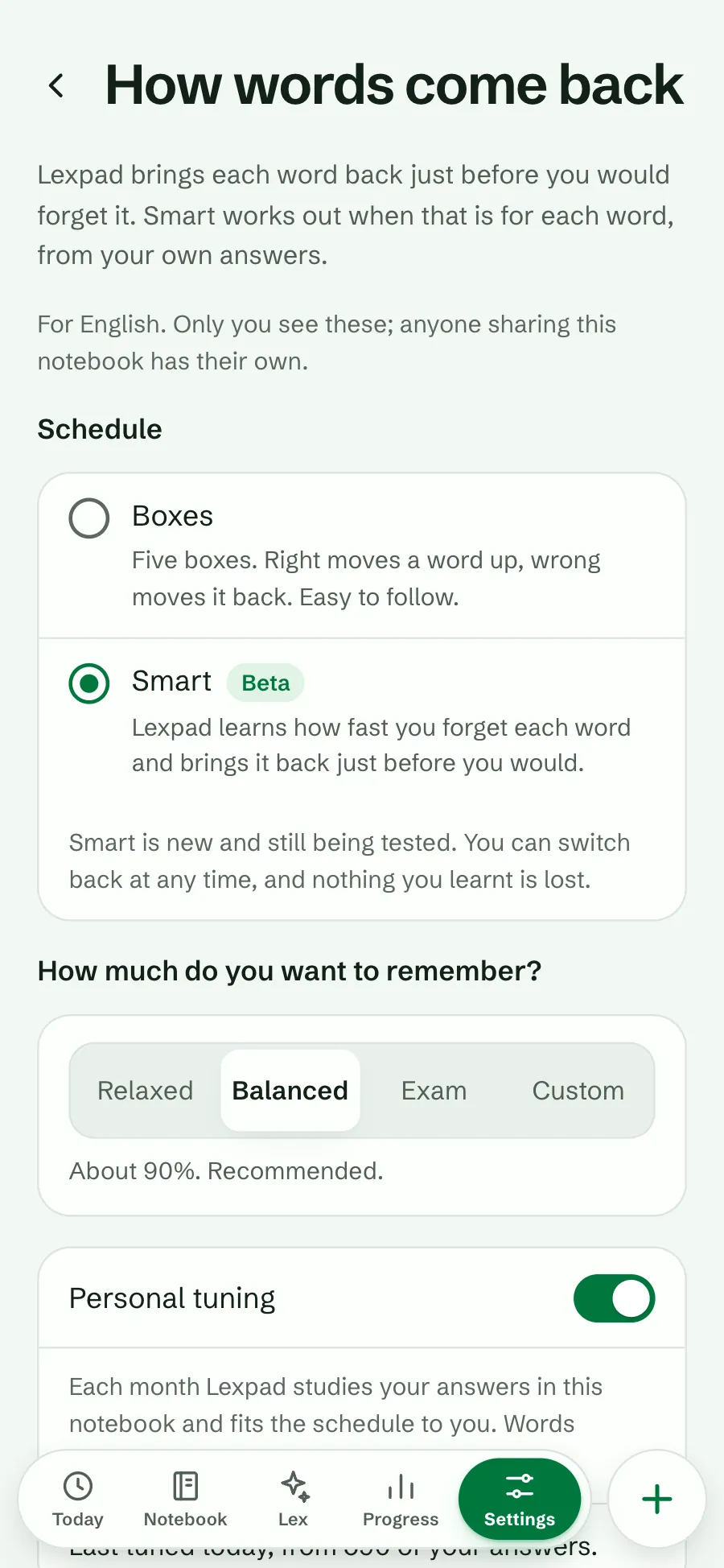
- Smart: FSRS-6 with its standard parameters, in whole days. Knew it counts as FSRS’s Good, Didn’t know as Again. Targets: Relaxed about 85%, Balanced about 90% (recommended), Exam about 95%, or Custom from 80% to 97%. The longest wait is a year.
- Boxes inside Smart: a Smart word still shows a box from 1 to 5, set by how stable it is (box 5 means stable for three weeks or more), so decks, filters and “mastered” keep working.
- Personal tuning (Smart only, on by default): about once a month Lexpad fits the model to the answers in the notebook, and keeps a new fit only if it predicts your most recent answers better.
Both are free. Boxes are the default for every notebook; Smart is opt-in and marked Beta. How Smart works.
When boxes are the better choice
- You want to see the rule. Box 3 means three days. You can predict every date, and run the same rule on paper.
- The notebook is new or small. FSRS starts from standard settings and learns from your answers; with few answers, boxes lose little.
- You want to plan your load. With fixed waits the reviews per new word can be worked out by hand. How many new words a day does the arithmetic.
- You like a clear consequence. A miss in box 5 sends the word back to the start. In Lexpad you can soften that to two boxes back.
When FSRS is the better choice
- A big notebook kept for months. Words you always know get longer gaps than a fixed ladder gives them, and your minutes go to the rest.
- A test coming up. Raise the target for a few weeks, then lower it again.
- Words of very different difficulty. A word that keeps slipping comes back sooner without falling all the way to the start.
What the evidence says, plainly: in the open SRS benchmark, run on the review histories of about 10,000 Anki users, FSRS predicts whether people will remember a card better than many other models. That benchmark measures prediction; it does not include Leitner boxes. Anki’s manual calls a 90% target “a good balance of retention and workload” and warns that above 90% the workload increases very quickly.
We have not measured on Lexpad whether Smart means fewer reviews than boxes for the same recall, so this page promises no number. That is part of why Smart is still Beta.
Switching without losing progress
In Lexpad the schedule belongs to a notebook, so you can keep boxes in one and try Smart in another.
- Open Settings, then Notebooks, and choose How words come back.
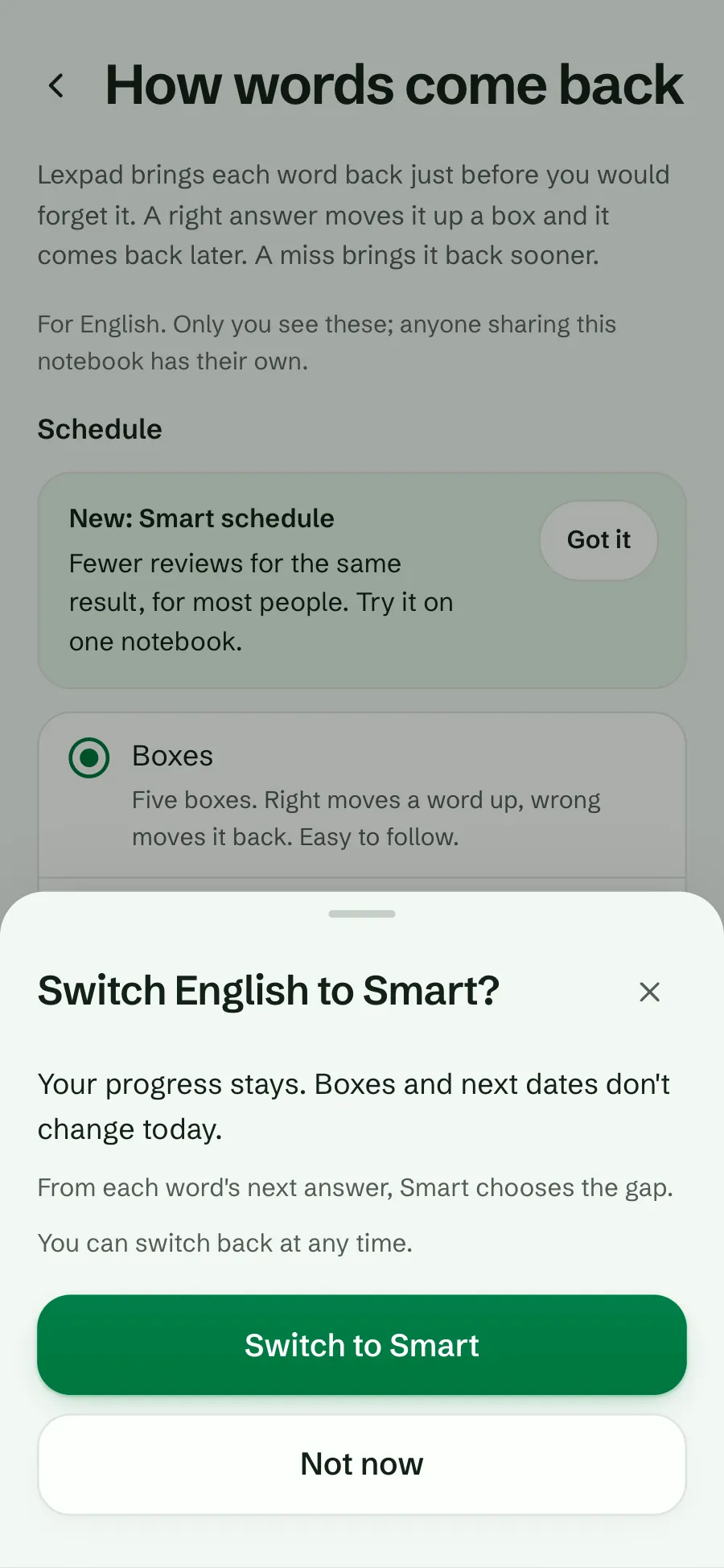
- Under Schedule, choose Smart, read the sheet, and choose Switch to Smart.
- Pick a target: Relaxed, Balanced or Exam.
- Nothing moves on the day you switch: every word keeps its box and its next date. Smart chooses the gap from each word’s next answer.
- Lexpad has kept a memory record from your past answers in the background, so a practised word does not start from zero.
- Switching back to boxes keeps every box and date too, and the message offers Undo.
- Switching needs a connection. Practice works offline on either schedule.
If you use Anki
In Anki, FSRS is turned on in the deck options, and only for the whole collection, not for one preset (Anki manual). Anki’s answer buttons are Again, Hard, Good and Easy; Lexpad has two, which it counts as Again and Good. Moving your words from Anki to Lexpad brings the words and meanings, not their review history: how to move them.
Good to know
Questions
Is FSRS the Anki algorithm?
FSRS is an open-source algorithm from the Open Spaced Repetition project. Anki supports it from version 23.10 as an alternative to its older SM-2 scheduler, and other apps use it too. Lexpad’s Smart schedule uses FSRS-6 in its own code.
Is FSRS better than the Leitner system?
It fits each word more closely and lets you choose a target, and it predicts recall well in the open benchmark of Anki users. That benchmark does not test Leitner boxes, and we have not measured the difference on Lexpad. Boxes remain a sound, simple choice.
Does FSRS need many reviews before it works?
No. It starts with standard settings that fit most people. Fitting it to your own memory needs a history of answers: in Lexpad, Personal tuning does this about once a month when the notebook has enough answers.
Which target should I choose?
About 90% suits most notebooks. Choose about 95% before a test, and about 85% for a large notebook you read for pleasure. Higher targets mean more reviews.
Can I go back to boxes?
Yes, at any time. Every word keeps its box and next date, and the message offers Undo.
Does it cost anything?
No. Both schedules and every target are on Lexpad’s free plan.
Lexpad
Your next word is worth keeping.
Lexpad is free to start, on the web and on Android. Bring the words you meet.